Smart Home Setup in India: Complete Step-by-Step Installation Guide
Transforming your Indian home into a smart home is no longer a luxury reserved for the ultra-wealthy. With affordable devices flooding the market, improved internet infrastructure, and growing awareness of home automation benefits, setting up a smart home in India has become more accessible than ever. Whether you live in a compact apartment in Mumbai or a spacious villa in Bengaluru, this comprehensive guide will walk you through every step of creating a connected, intelligent living space tailored to Indian conditions.
From choosing devices that work with India's power supply standards to navigating compatibility issues with local Wi-Fi routers, this guide addresses the unique challenges Indian homeowners face when building a smart home ecosystem. We will cover everything from initial planning to final automation routines, ensuring your setup is reliable, energy-efficient, and genuinely useful for your daily life.
Project Overview
Difficulty Level: Intermediate (Beginner-friendly for basic setup; advanced for full automation)
Estimated Time: 4–8 hours for a basic setup (1–2 rooms); 2–4 days for a comprehensive whole-home installation
Budget Range: ₹15,000–₹2,50,000+ depending on scope and device selection
Best For: Homeowners and renters looking to automate lighting, security, climate control, and entertainment
Tools & Products Needed for Your Smart Home Setup
Before diving into the installation process, gather the essential tools and products you will need. Having everything ready will make the setup smoother and help you avoid frustrating mid-project trips to the store or waiting for online deliveries.
Essential Tools
- Smartphone or Tablet: Required for configuring most smart devices via companion apps (Android or iOS)
- Wi-Fi Router: A dual-band router (2.4 GHz & 5 GHz) with good range — consider a mesh system for larger Indian homes
- Phillips & Flathead Screwdrivers: For mounting devices, replacing switch plates, and installing smart switches
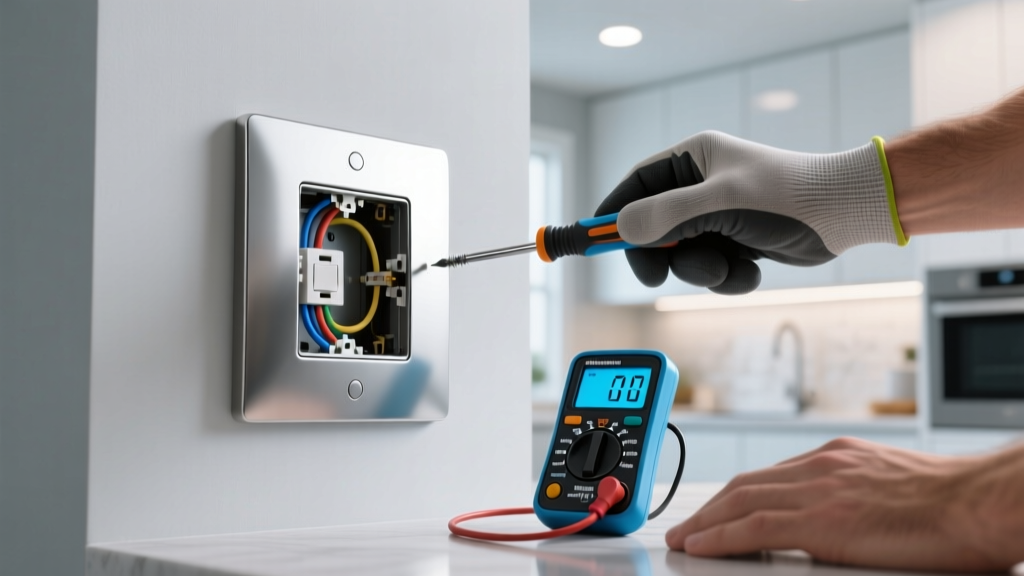
- Voltage Tester / Multimeter: Critical for safety when working with electrical wiring in Indian homes
- Electrical Tape & Wire Nuts: For securing wire connections during smart switch installation
- Drill & Wall Anchors: For mounting cameras, smart displays, and sensors on Indian wall types (brick, concrete, or drywall)
- Step Ladder: For accessing ceiling-mounted devices, smoke detectors, and high-placed cameras
- UPS or Surge Protector: Essential in India to protect smart devices from power fluctuations and outages
Core Smart Home Devices
- Smart Hub or Voice Assistant: Amazon Echo, Google Nest Hub, or Apple HomePod — serves as the brain of your smart home
- Smart Bulbs or Smart Switches: Wi-Fi-enabled bulbs (like Wipro, Philips Hue, or Syska) or smart switch modules (like Anchor Roma, Havells, or Sonoff)
- Smart Plugs: For controlling non-smart appliances like table fans, mosquito repellents, or water purifiers
- Smart Security Cameras: Indoor & outdoor cameras from brands like CP Plus, Hikvision, Qubo, or Mi
- Smart Door Lock: Options from Godrej, Yale, or Samsung that support Indian door standards
- Smart Thermostat or AC Controller: Devices like Sensibo or Ambi Climate for controlling split ACs common in Indian homes
- Sensors: Motion sensors, door/window sensors, and water leak sensors for automation and security
Optional but Recommended
- Smart Curtain Motors: For automated curtains — increasingly popular in Indian homes
- Smart Water Heater Controller: For scheduling your geyser to save electricity
- Smart Doorbell: Video doorbells from Ring, Godrej, or Qubo
- Network Switch: For homes with many wired devices or limited router ports
For a deeper look at compatible devices and recommendations, explore our best smart home devices guide to find products that work seamlessly in Indian conditions.
Step 1: Plan Your Smart Home Layout & Choose an Ecosystem
The most common mistake people make when setting up a smart home is buying devices impulsively without a plan. A thoughtful approach saves money, prevents compatibility headaches, and ensures every device serves a real purpose in your daily routine.
Assess Your Home & Identify Priorities
Start by walking through your home and identifying the areas where automation will have the biggest impact. In Indian homes, the following zones typically offer the most value:
- Living Room: Smart lighting, entertainment control (TV, soundbar), AC automation, and voice assistant placement
- Bedrooms: Automated lighting schedules, smart fans, curtain automation, and sleep-friendly routines
- Kitchen: Smart plugs for appliances (mixer, water purifier), gas leak sensors, and smoke detectors
- Main Entrance: Smart lock, video doorbell, and security camera
- Parking / Gate Area: Outdoor security cameras and gate automation
- Bathrooms: Water heater scheduling and water leak sensors
Create a simple floor plan sketch and mark where you want each device. Note the locations of existing electrical switches, power outlets, and your Wi-Fi router. This visual plan will be invaluable during installation.
Choose Your Smart Home Ecosystem
Selecting a primary ecosystem is one of the most important decisions you will make. It determines which devices will work together and how you will control your smart home. The three main ecosystems available in India are:
| Ecosystem | Voice Assistant | Best For | Availability in India |
|---|---|---|---|
| Amazon Alexa | Alexa | Widest device compatibility, best value | Excellent — wide product range on Amazon.in |
| Google Home | Google Assistant | Best search integration, multi-language support | Excellent — strong Hindi & regional language support |
| Apple HomeKit | Siri | Privacy-focused, premium experience | Limited — fewer compatible devices, higher cost |
Recommendation for most Indian homes: Google Home or Amazon Alexa offer the best combination of device compatibility, regional language support, and affordability. Google Assistant has a slight edge if you want Hindi, Tamil, Telugu, or other Indian language voice commands.
Understand Indian Electrical Standards
Indian homes use 230V / 50Hz electrical supply with Type D (three-pin round) or Type M sockets. When purchasing smart devices, especially smart switches and plugs, ensure they are rated for Indian voltage standards. Key considerations include:
- Smart Switches: Most Indian smart switches (like Anchor Roma Smart, Havells, or Crabtree) are designed for 230V and fit standard Indian switchboard plates. Verify the module size fits your existing switchboard.
- Smart Plugs: Choose plugs with Indian 3-pin configuration or universal sockets. Avoid US-standard plugs unless you plan to use adapters.
- Neutral Wire Requirement: Many smart switches require a neutral wire. Older Indian homes (built before 2000) may not have neutral wires at switch locations. Check your wiring before purchasing.
- Earthing: Ensure your home has proper earthing, especially for outdoor cameras and smart locks. Poor earthing is common in many Indian buildings and can damage sensitive electronics.
For more details on choosing the right smart switches, visit our smart switch installation guide.
Step 2: Set Up Your Network Foundation
A robust Wi-Fi network is the backbone of any smart home. In Indian homes, network challenges like thick concrete walls, interference from neighboring apartments, and bandwidth limitations from multiple family members streaming simultaneously can all impact smart device performance.
Upgrade Your Router if Needed
Most ISP-provided routers in India (from Airtel, JioFiber, ACT, or BSNL) are basic models that struggle to handle 20+ connected devices. If you plan to connect more than 10 smart devices, consider upgrading to one of the following:
- Mid-range Wi-Fi 6 Router (₹4,000–₹8,000): TP-Link Archer AX50, ASUS RT-AX55, or D-Link DIR-X2150 — suitable for apartments up to 1,200 sq ft
- Mesh Wi-Fi System (₹8,000–₹20,000): TP-Link Deco M4/M5, Google Nest Wi-Fi, or ASUS ZenWiFi — ideal for larger homes, villas, or multi-floor houses
- High-end Router (₹12,000+): ASUS RT-AX86U or TP-Link Archer AX73 — for power users with 40+ devices
Optimize Router Placement
Place your router in a central location, elevated off the floor, and away from thick concrete walls or metal objects. In typical Indian apartments with reinforced concrete walls, signal degradation is significant. A mesh system with nodes placed in different rooms can solve this problem effectively.
Create a Dedicated IoT Network
Most smart home devices operate on the 2.4 GHz band, which is also used by microwaves, cordless phones, and Bluetooth devices. To improve reliability:
- Access your router's admin panel (usually at 192.168.0.1 or 192.168.1.1)
- Create a separate SSID (network name) specifically for smart home devices — for example, "HomeIoT"
- Assign this SSID to the 2.4 GHz band only
- Keep your primary network on 5 GHz for phones, laptops, and streaming devices
- If your router supports it, enable guest network isolation for IoT devices to improve security
Set Up Static IP Addresses or DHCP Reservations
For critical devices like security cameras and smart locks, assign static IP addresses or DHCP reservations in your router settings. This ensures these devices always receive the same IP address, making them easier to manage and troubleshoot.
For detailed networking tips, check out our smart home network setup guide to optimize your connection for reliable automation.
Step 3: Install & Configure Core Smart Devices
With your network ready, it is time to install and configure your smart devices. We will tackle this room by room, starting with the most impactful installations.
3a. Set Up Your Voice Assistant Hub
Your voice assistant hub (Amazon Echo, Google Nest, or Apple HomePod) acts as the central controller for your smart home. Follow these steps:
- Unbox the device and plug it into a power outlet in a central location (living room or hallway)
- Download the companion app — Amazon Alexa app, Google Home app, or Apple Home app
- Follow the in-app setup wizard to connect the device to your Wi-Fi network
- Set your preferred language — Google Assistant supports Hindi, Tamil, Telugu, Marathi, and more
- Enable voice match to personalize responses for different family members
- Set your home address for location-based automations (like turning on lights at sunset)
Pro Tip: Place your voice assistant away from TVs, fans, and AC units to improve voice recognition accuracy. In Indian homes with ceiling fans running constantly, positioning the device at least 3 feet from the fan can significantly reduce misheard commands.
3b. Install Smart Lighting
You have two main approaches for smart lighting in Indian homes:
Option A: Smart Bulbs (Easiest)
- Screw the smart bulb into an existing light fixture (B22 bayonet or E27 screw base — check your fittings)
- Download the manufacturer's app (Wipro Next, Philips Hue, Syska Smart, etc.)
- Connect the bulb to your 2.4 GHz Wi-Fi network via the app
- Name the bulb by room and function (e.g., "Bedroom Ceiling" or "Kitchen Counter")
- Link the bulb to your voice assistant ecosystem (Alexa or Google Home)
Option B: Smart Switch Modules (More Permanent)
- Turn off the main power supply at your distribution board — never work on live wiring
- Use a voltage tester to confirm no current is flowing to the switch
- Remove the existing switch plate and note the wiring configuration
- Identify the live wire (usually red), neutral wire (usually black), and earth wire (green/yellow)
- Connect the smart switch module according to the manufacturer's wiring diagram
- Secure all connections with wire nuts and electrical tape
- Mount the module behind the switch plate or inside the switchboard
- Restore power and test the switch manually
- Configure the switch via its companion app and link to your voice assistant
Important for Indian homes: If your switchboard does not have a neutral wire, look for "no-neutral" smart switches from brands like Sonoff (ZBMINI-L) or Shelly (Shelly 1L). These work without a neutral wire but may have limitations with low-wattage LED bulbs.
3c. Install Smart Security Cameras
Security is a top priority for Indian homeowners. Here is how to set up indoor and outdoor cameras:
Indoor Cameras (Mi, Qubo, CP Plus, TP-Link Tapo):
- Choose a location with a wide field of view — typically a corner of the living room or above the main entrance
- Plug the camera into a nearby power outlet (most Indian indoor cameras come with 2–3 meter cables)
- Download the companion app and create an account
- Connect the camera to your Wi-Fi network via the app
- Adjust the camera angle using the app's live view
- Configure motion detection zones to avoid false alerts from ceiling fans or curtains
- Set up cloud storage or insert a microSD card for local recording
Outdoor Cameras:
- Choose an IP65 or IP66-rated camera for India's monsoon conditions
- Mount the camera at a height of 8–10 feet using the provided bracket and wall anchors
- For brick or concrete walls, use a masonry drill bit (6mm) and plastic wall anchors
- Route the power cable through a conduit or use a weatherproof junction box
- Connect to Wi-Fi and configure motion alerts in the app
- Set up night vision and adjust IR LED intensity for optimal nighttime footage
For comprehensive security planning, read our smart home security setup guide to build a complete surveillance system.
3d. Set Up Smart AC Control
Split ACs are the most common cooling solution in Indian homes. Smart AC controllers like Sensibo, Ambi Climate, or IR blasters (like Oakter or iTach) can make any split AC smart:
- Mount the smart AC controller on a wall or shelf with a clear line of sight to your AC unit
- Plug it into a power outlet
- Open the companion app and add your AC brand and model (most Indian brands like Voltas, Blue Star, Daikin, LG, and Samsung are supported)
- Test all functions — power, temperature, mode, fan speed, and swing
- Create schedules for automatic temperature adjustments (e.g., 24°C at night, off at 6 AM)
- Set up geofencing to turn off the AC when you leave home
- Link to your voice assistant for voice-controlled cooling
Energy Saving Tip: In India, ACs account for 40–60% of household electricity bills during summer. Smart scheduling and temperature automation can reduce AC energy consumption by 15–25%, saving ₹1,000–₹3,000 per month during peak summer.
3e. Install Smart Plugs for Everyday Appliances
Smart plugs are the easiest entry point into home automation. They let you control any appliance with a physical on/off switch. Popular use cases in Indian homes include:
- Water Purifier (RO): Schedule it to run during off-peak hours or turn it off when you are on vacation
- Mosquito Repellent: Automatically turn on at sunset and off at sunrise
- Geyser / Water Heater: Schedule it 30 minutes before your morning bath to save electricity
- Table Fan / Air Cooler: Control remotely or set timers for nighttime use
- Washing Machine: Get notified when a wash cycle is complete (via power monitoring plugs)
- Phone Chargers: Cut power automatically after charging is complete to protect battery health
Setup is straightforward: plug the smart plug into a wall socket, plug your appliance into the smart plug, and configure via the companion app. Choose smart plugs rated for the wattage of your appliance — most Indian smart plugs handle up to 16A / 3,680W.
Step 4: Create Automations & Routines
The true power of a smart home lies in automation — devices working together without manual intervention. Once your devices are installed and connected, it is time to create routines that match your daily life.
Essential Automations for Indian Homes
1. Morning Routine (6:00 AM – 7:00 AM)
- Gradually increase bedroom light brightness over 15 minutes (simulated sunrise)
- Turn on the geyser 30 minutes before wake-up time
- Start the water purifier if it was turned off overnight
- Play a morning news briefing on your smart speaker (All India Radio, NDTV, or your preferred podcast)
- Open smart curtains (if installed) to let in natural light
2. Leaving Home Routine
- Turn off all lights, fans, and ACs
- Arm security cameras and enable motion alerts
- Lock the smart door lock
- Turn off non-essential smart plugs (mosquito repellent, table fans)
- Send a notification confirming all devices are secured
3. Evening Routine (6:00 PM – 7:00 PM)
- Turn on outdoor and balcony lights at sunset (use sunset calculation based on your city)
- Activate mosquito repellent plugs
- Set living room lights to warm white at 70% brightness
- Turn on the AC if indoor temperature exceeds 28°C (requires a temperature sensor)
4. Night / Sleep Routine (10:00 PM – 11:00 PM)
- Dim bedroom lights to 20% warm white
- Set AC to 25°C with sleep mode enabled
- Turn off all non-essential devices (TV, soundbar, kitchen appliances)
- Lock the main door and enable camera night vision
- Set a gradual lights-off over 20 minutes
5. Monsoon / Weather-Based Automations
- Close smart curtains when rain is detected (requires a rain sensor or weather API integration)
- Turn on indoor lights if ambient light drops significantly during daytime storms
- Send an alert to your phone if a window sensor detects an open window during rain
How to Create Routines
In the Google Home app: Go to Automations → Add new automation → Choose a starter (time, device action, location, etc.) → Add actions (control devices, send notifications, play media) → Save and test.
In the Amazon Alexa app: Go to More → Routines → Create Routine → Set "When this happens" (voice command, schedule, device, etc.) → Set "Add action" → Save and test.
For advanced automations, consider using platforms like Home Assistant (free, open-source, runs on a Raspberry Pi) which offers far more customization than Alexa or Google Home. Home Assistant is particularly popular among Indian tech enthusiasts who want granular control over their smart home logic.
Learn more about creating powerful automations in our smart home automation routines guide.
Step 5: Secure Your Smart Home & Ensure Reliability
Smart home security goes beyond cameras and locks. Protecting your network and devices from cyber threats, and ensuring your system survives India's notorious power issues, is essential for long-term reliability.
Network Security Best Practices
- Change default passwords: Every router, camera, and smart device comes with a default password. Change them immediately to strong, unique passwords.
- Enable WPA3 encryption: If your router supports it, use WPA3 for your Wi-Fi network. Fall back to WPA2 if older devices are incompatible.
- Disable remote access: Unless you specifically need it, disable remote management on your router and cameras. Many Indian smart camera brands have had security vulnerabilities related to open remote access.
- Update firmware regularly: Set a monthly reminder to check for firmware updates on your router, hub, and all smart devices.
- Use a separate IoT network: As discussed in Step 2, isolating smart devices on their own network prevents a compromised device from accessing your personal computers and phones.
- Review app permissions: Many smart home apps request unnecessary permissions (contacts, location, microphone). Grant only what is required for the device to function.
Power Backup & Protection
India's power grid, while improving, still experiences frequent outages, voltage fluctuations, and surges — especially during summer and monsoon seasons. Protect your smart home investment with these measures:
- UPS for Router & Hub: A small UPS (600VA–1000VA) for your Wi-Fi router and smart hub ensures your smart home stays online during power cuts. Brands like APC, Luminous, and Microtek offer affordable options starting at ₹2,500.
- Surge Protectors: Use surge-protected power strips for expensive smart devices. Look for strips with a joule rating of at least 1,000J and an indicator light.
- Voltage Stabilizers: For smart ACs and other high-value appliances, use a voltage stabilizer to protect against fluctuations common in Indian power supply.
- Smart Plug with Power Monitoring: Some smart plugs (like TP-Link HS110 or Oakter smart plugs) include energy monitoring. Use these to track power consumption and detect anomalies that might indicate electrical issues.
Dealing with Internet Outages
Most cloud-dependent smart devices stop working when the internet goes down. To maintain basic functionality:
- Choose devices with local control capabilities — smart switches that work physically even without internet
- Use Zigbee or Z-Wave devices with a local hub (like Home Assistant with a Zigbee dongle) for automations that run without cloud connectivity
- Keep a mobile hotspot ready as a backup internet source — most Indian mobile plans (Jio, Airtel) offer sufficient data for basic smart home connectivity
Troubleshooting Common Smart Home Issues in India
Even with careful planning, you will likely encounter some issues during or after setup. Here are solutions to the most common problems Indian smart home users face:
Device Won't Connect to Wi-Fi
- Cause: Most smart devices only support 2.4 GHz Wi-Fi. If your router combines 2.4 GHz and 5 GHz under a single SSID, the device may try to connect to the wrong band.
- Solution: Temporarily disable the 5 GHz band during setup, or create a separate 2.4 GHz-only SSID. Move closer to the router during initial pairing.
Smart Switch Not Responding
- Cause: Loose wiring connections, missing neutral wire, or incompatible load (wattage too low for the smart switch).
- Solution: Turn off power, check all wire connections, verify neutral wire presence, and ensure the total connected load is within the switch's rated capacity (usually 5W–400W for LED loads).
Security Camera Going Offline Frequently
- Cause: Weak Wi-Fi signal at the camera location, especially common with outdoor cameras mounted far from the router through thick walls.
- Solution: Add a Wi-Fi range extender or mesh node near the camera. For wired reliability, consider PoE (Power over Ethernet) cameras. Also check if your camera's power adapter is failing — heat in Indian summers can degrade cheap adapters.
Voice Assistant Not Understanding Commands
- Cause: Background noise from fans, TVs, or traffic; incorrect language settings; or microphone obstruction.
- Solution: Reposition the device away from noise sources, ensure the correct language and dialect are selected, clean the microphone openings, and retrain voice match profiles.
Devices Disconnecting After Power Outage
- Cause: When power returns after an outage, all smart devices try to reconnect simultaneously, overwhelming the router.
- Solution: Use a UPS for your router so it stays on during brief outages. For longer outages, wait 2–3 minutes after power returns before turning on smart device power strips, giving the router time to stabilize first.
Automation Routines Not Triggering
- Cause: Incorrect time zone settings, location services disabled, or conflicting routines.
- Solution: Verify your phone's time zone is set to IST (UTC+5:30), enable location services for your smart home app, and review all active routines for conflicts. In Google Home, check the "Automations" tab for any disabled or errored routines.
If you encounter persistent issues, our smart home troubleshooting guide covers additional solutions for advanced problems.
Frequently Asked Questions
How much does a basic smart home setup cost in India?
A basic smart home setup in India typically costs between ₹15,000 and ₹40,000. This budget covers a voice assistant hub (₹3,000–₹5,000), 4–6 smart bulbs or switches (₹4,000–₹10,000), 2–3 smart plugs (₹2,000–₹4,000), one indoor security camera (₹2,000–₹4,000), and one smart AC controller (₹3,000–₹8,000). A comprehensive whole-home setup with smart locks, outdoor cameras, sensors, and full lighting automation can range from ₹80,000 to ₹2,50,000 or more depending on the brands and number of devices chosen.
Do smart home devices work during power cuts in India?
Most smart devices require continuous power and internet to function. During a power cut, smart bulbs, smart plugs, and cameras will stop working unless backed by a UPS or inverter. However, smart switches with physical toggle functionality will still work as regular switches once power is restored. To maintain smart functionality during outages, invest in a UPS for your Wi-Fi router and smart hub (₹2,500–₹5,000) and consider Zigbee-based devices that communicate locally without cloud dependency. Devices with built-in batteries, like some smart locks and sensors, will continue to operate during power cuts.
Which smart home ecosystem is best for Indian homes — Alexa or Google Home?
Both Amazon Alexa and Google Home work excellently in India, and the choice depends on your priorities. Google Home has a slight edge for Indian users because Google Assistant supports more Indian languages (Hindi, Tamil, Telugu, Marathi, Bengali, Gujarati, Kannada, Malayalam, and more) and integrates seamlessly with Google services like Calendar, Maps, and YouTube. Amazon Alexa offers the widest range of compatible devices and often has better deals on Amazon.in. If your household primarily uses Android phones and Google services, Google Home is the natural choice. If you prefer Amazon for shopping and want the broadest device selection, Alexa is ideal. Both ecosystems allow you to mix and match devices from different brands.
Can I install smart switches in an older Indian home without neutral wires?
Yes, but with some limitations. Many older Indian homes (built before 2005–2010) do not have neutral wires routed to switchboards. You have three options: (1) Use "no-neutral" smart switches from brands like Sonoff, Shelly, or some models from Anchor — these work by drawing a small amount of current through the live wire, but they may flicker with very low-wattage LED bulbs (a bypass capacitor can solve this). (2) Have an electrician run a neutral wire from the nearest junction box to your switchboard — this typically costs ₹500–₹2,000 per switch point depending on the wiring complexity. (3) Use smart bulbs instead of smart switches — smart bulbs do not require neutral wires at the switch since they connect directly to the socket. Option 2 is the best long-term solution as it gives you the widest choice of smart switches.
Is it safe to use smart home devices from Chinese brands like Mi, Qubo, or TP-Link in India?
Smart devices from Chinese brands like Xiaomi (Mi), Qubo (Hero Group), and TP-Link are widely used in India and generally safe when purchased from authorized channels. However, follow these security best practices: always buy from official stores on Amazon.in, Flipkart, or the brand's own website to avoid counterfeit products; update firmware immediately after setup; change default passwords; use a separate IoT network; and disable unnecessary cloud features. For security cameras specifically, consider brands with local storage options (microSD) rather than mandatory cloud storage to keep your footage private. Indian brands like Oakter, Atomberg, and Godrej also offer smart home products if you prefer domestically manufactured options. The key is not the brand's origin but rather following proper network security practices regardless of which devices you choose.
Ready to start your smart home journey? Browse our complete smart home guides for more detailed tutorials, product reviews, and automation ideas tailored for Indian homes.