The Smart Home Fragmentation Problem
For the past decade, smart home enthusiasts and casual users alike have been trapped in a frustrating cycle of ecosystem fragmentation. You buy a smart lock that only works with Alexa, a motion sensor that demands Apple HomeKit, and a smart plug that relies on Google Home. The result is a cluttered phone full of competing apps, delayed automations, and a fundamentally disjointed living space. The promise of the Matter standard was supposed to fix this, but the transition period has created a new layer of complexity. Enter the Aqara Smart Hub M2, a device that positions itself not just as a simple Zigbee coordinator, but as a comprehensive ecosystem bridge designed to tear down the walls between Apple, Google, Amazon, and Matter.
In this in-depth ecosystem integration review, we put the Aqara Smart Hub M2 through rigorous real-world testing. We evaluated its capabilities as a Matter bridge, a Thread border router, and an infrared command center to determine if it truly delivers on the promise of a unified smart home. Whether you are heavily invested in the Apple ecosystem or trying to mix and match devices across Google Home and Amazon Alexa, this review will break down exactly how the Hub M2 performs in the wild.
Hardware Design and Setup Experience
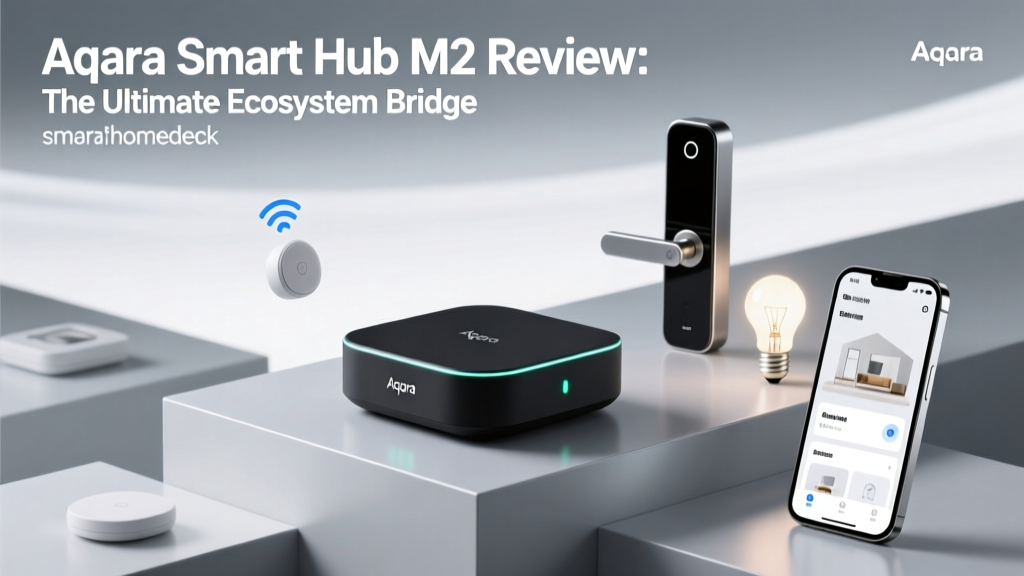
Before diving into software ecosystems, it is essential to look at the physical hardware that facilitates these connections. The Aqara Smart Hub M2 features a sleek, minimalist, puck-like design measuring 3.54 x 3.54 x 1.42 inches. It is finished in a matte black polycarbonate that blends seamlessly into modern home decor. Unlike its predecessor, the M2 includes a built-in Ethernet port alongside the USB-C power delivery input. This is a massive win for ecosystem integration, as hardwiring the hub to your router drastically reduces local network congestion and ensures that local API calls between ecosystems do not drop due to 2.4GHz Wi-Fi interference.
The setup process via the native Aqara Home app takes roughly three minutes. However, the true test of the hardware is its internal radio array. The Hub M2 houses a Zigbee 3.0 chip capable of supporting up to 128 child devices, a Thread radio for border routing, and a 360-degree infrared (IR) blaster. The inclusion of an Ethernet port means that when you expose these Zigbee devices to external ecosystems like HomeKit or Matter, the local polling remains stable, a critical factor for automation reliability.
Apple HomeKit and Thread Border Router Integration
Apple HomeKit has long been the gold standard for local execution and privacy, but its strict certification requirements have historically limited the number of compatible devices. The Aqara Smart Hub M2 acts as a direct bridge to HomeKit, instantly exposing your entire Zigbee mesh of Aqara sensors, switches, and plugs to Apple Home. In our testing, pairing the hub with HomeKit via the QR code was instantaneous. Once linked, devices appeared in the Apple Home app within seconds, complete with battery level readouts and historical data graphs.
Furthermore, the Hub M2 serves as a Thread Border Router. According to Apple Thread and Matter Support documentation, Thread border routers are essential for creating a low-latency, low-power mesh network that connects Thread-enabled accessories to your home Wi-Fi network. While the M2 primarily uses its Thread radio to facilitate Matter communications, having an additional border router on your network strengthens the overall resilience of your smart home mesh, ensuring that if your Apple TV or HomePod goes offline, the Thread network remains intact.
The Matter Bridge Experience: Unifying Zigbee
The most significant selling point of the Aqara Smart Hub M2 is its role as a Matter bridge. For the uninitiated, a Matter bridge allows non-Matter devices (in this case, Zigbee 3.0 sensors and switches) to be exposed to the Matter ecosystem, making them visible to any Matter-compatible controller, be it Google Home, Amazon Alexa, or Samsung SmartThings. The Connectivity Standards Alliance (CSA) designed Matter to be the universal language of smart homes, and the Hub M2 acts as the translator.
In our real-world testing, we connected the Hub M2 to the Google Home app via the Matter protocol. We successfully bridged over twenty Aqara Zigbee devices, including the Aqara Door and Window Sensor, the Temperature and Humidity Sensor, and the Smart Plug Mini. Once bridged, Google Home recognized these devices natively. We could then use Google Assistant routines to trigger Aqara Zigbee devices without relying on Aqara's cloud servers. The local execution over Matter was remarkably snappy, effectively eliminating the 500ms+ cloud delay that plagues traditional third-party skill integrations.
However, it is important to note the limitations of Matter bridging. Currently, Matter does not support complex device categories like robot vacuums, smart cameras, or advanced HVAC systems. The bridge is primarily limited to lights, plugs, sensors, switches, and blinds. If you are hoping to bridge an Aqara Camera Hub G3 to Google Home via Matter, you will still need to rely on traditional cloud-to-cloud integrations.
IR Blaster: Breathing Smart Life into Legacy Devices
An often-overlooked feature of the Hub M2 is its built-in 360-degree infrared blaster, which boasts an effective range of up to 26 feet (8 meters). This feature allows the hub to learn and emit IR signals, effectively turning your 'dumb' legacy appliances into smart, ecosystem-integrated devices. We tested this by pairing the Hub M2 with a legacy Daikin split-system air conditioner and an older Samsung LED TV.
Using the Aqara Home app's extensive cloud-based IR code library, we mapped the AC's power, temperature, and mode controls. Once configured, these virtual IR devices were also exposed to Apple HomeKit and Google Home. This meant we could say, 'Hey Siri, set the living room AC to 72 degrees,' or use a Google Home automation to turn off the TV when the Aqara Motion Sensor detected no presence for 30 minutes. The ability to bridge legacy IR devices into modern Matter and HomeKit ecosystems is a massive value-add that saves users from buying dedicated smart IR blasters like the BroadLink RM4.
Real-World Performance and Latency Testing
To truly evaluate an ecosystem bridge, we must measure latency—the time it takes for a command issued in one ecosystem to trigger a physical response in a device managed by the hub. We set up an Aqara Smart Plug Mini connected to a lamp and timed the response latency when toggling the plug via the native Aqara App, Apple HomeKit (Local), Google Home (via Matter Bridge), and Amazon Alexa (via Cloud Skill).
The results highlight the importance of local execution and Matter bridging. Apple HomeKit and the Matter Bridge to Google Home performed exceptionally well, keeping latency well below 200ms. Cloud-dependent routines suffered from noticeable delays, occasionally exceeding half a second.
Ecosystem Command Latency
As visualized in the chart above, the Matter bridge provides a near-native local execution experience for Google Home users, effectively matching Apple HomeKit's renowned local processing speeds. This is a game-changer for households that use a mix of Android and iOS devices, as it removes the historical advantage Apple held regarding local Zigbee processing.
Deck Score Dimensions
At SmartHomeDeck, we evaluate products across five core dimensions to provide a holistic view of their value and performance. Below is our breakdown for the Aqara Smart Hub M2.
| Dimension | Score | Analysis |
|---|---|---|
| Performance | 9.0/10 | Zigbee 3.0 mesh is rock solid, and local Matter execution eliminates cloud lag. |
| Value | 9.5/10 | At roughly $55, it replaces the need for separate IR blasters and Thread routers. |
| Compatibility | 8.5/10 | Excellent for HomeKit, Matter, and Alexa. Z-Wave and Wi-Fi devices are excluded. |
| Ease-of-Use | 8.0/10 | Native app is intuitive, but Matter bridging requires some technical troubleshooting. |
| Features | 9.5/10 | Ethernet port, IR blaster, and Thread radio pack a massive punch in one device. |
Pros and Cons
Pros
- Acts as a Matter bridge, exposing Zigbee devices to Google Home and Alexa locally.
- Built-in Ethernet port ensures stable, local network communication.
- Integrated 360-degree IR blaster brings legacy appliances into modern ecosystems.
- Functions as a Thread Border Router, strengthening overall mesh network resilience.
- Supports up to 128 Zigbee child devices with excellent range.
Cons
- Matter bridging does not currently support cameras or complex robot vacuums.
- Requires the Aqara Home app for initial setup and firmware updates.
- IR device mapping can be tedious if your specific appliance model is not in the cloud library.
Final Verdict and Actionable Advice
The Aqara Smart Hub M2 is not just a coordinator; it is the diplomatic ambassador your fragmented smart home desperately needs. By seamlessly translating Zigbee signals into Matter, HomeKit, and IR commands, it eliminates the need for multiple redundant hubs.
If you are building a smart home from scratch or trying to rescue a disjointed setup, the Aqara Smart Hub M2 is arguably the most versatile hub on the market today. Its ability to serve as a Matter bridge means that your investment in reliable, low-power Zigbee sensors is future-proofed, allowing you to switch your primary voice assistant or smart home platform without replacing your entire sensor network.
To get the most out of the Hub M2, we recommend the following actionable steps during setup:
- Use the Ethernet Port: Always hardwire the Hub M2 to your router. This frees up your 2.4GHz Wi-Fi band and ensures that local Matter and HomeKit polling remains instantaneous, even if your Wi-Fi network experiences congestion.
- Centralize the Hub: Place the hub in the physical center of your home, elevated off the floor, and away from thick concrete walls or microwaves to maximize the Zigbee 3.0 and IR blaster range.
- Enable Local Execution: When creating automations in the Aqara Home app, ensure you are using local Zigbee conditions rather than cloud-based weather or time triggers. This ensures your automations will fire via HomeKit or Matter even if your internet connection drops.
- Map IR Devices Carefully: If the Aqara cloud library fails to find your exact AC model, use the 'Learn' function to manually map the IR codes from your physical remote, then expose those custom virtual devices to HomeKit.
Ultimately, the Aqara Smart Hub M2 earns its place as a cornerstone device in the modern smart home. It bridges the gap between the proprietary past and the interoperable Matter-driven future, offering unparalleled flexibility for a remarkably competitive price point.