The Hidden Cost of Smart Home Security: A Privacy-First Review
The promise of smart home security often comes with a hidden cost: your personal data. While cloud-based cameras offer seamless remote access and effortless setup, they inherently require you to trust third-party servers with the most intimate moments of your life. As smart home adoption accelerates, so does the scrutiny on how tech companies handle biometric data, video feeds, and network telemetry. Enter the Eufy Indoor Cam 2K Pan & Tilt, a device that has heavily marketed itself as the privacy-conscious alternative to cloud-heavy giants like Ring and Nest.
But does Eufy’s "local storage" promise hold up under rigorous network analysis? In this comprehensive review, we evaluate the Eufy Indoor Cam 2K Pan & Tilt strictly through the lens of privacy architecture, cloud dependency, edge computing, and data sovereignty. We will explore what happens when you attempt to isolate this camera from the internet, how it handles on-device AI, and whether it truly earns its reputation as a privacy-first smart home device.
Hardware Overview and Onboarding Data Collection
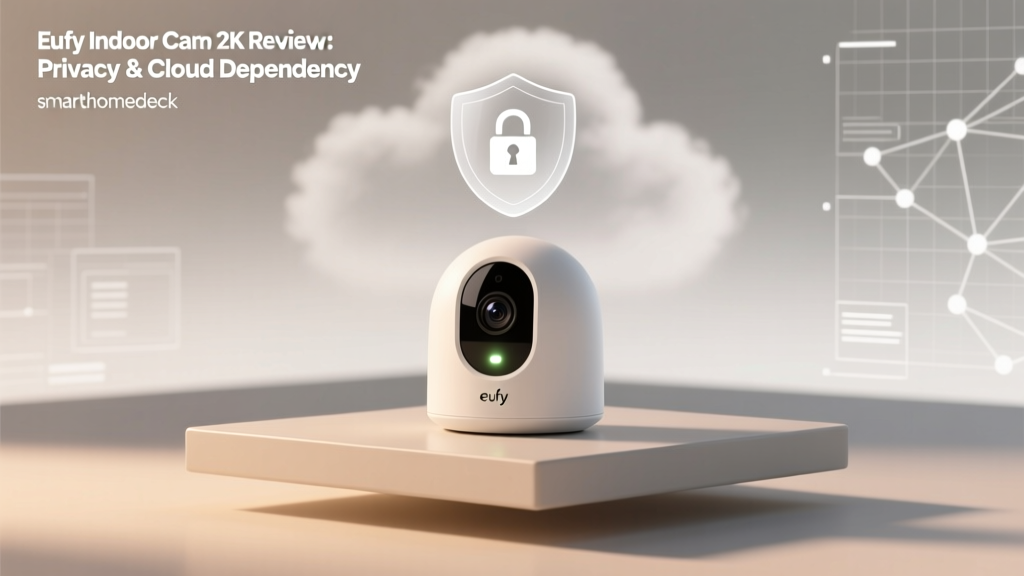
Before diving into network traffic, it is essential to understand the physical hardware. The Eufy Indoor Cam 2K Pan & Tilt features a 2K QHD sensor, 360-degree horizontal panning, 96-degree vertical tilting, and built-in AI for human and pet detection. It includes a physical privacy shutter that physically blocks the lens when you are home—a vital hardware-level privacy feature that many competitors still lack.
However, privacy begins at onboarding. When setting up the device via the Eufy Security app, users are prompted to grant various permissions. According to ongoing research by digital rights organizations, smart home apps frequently harvest telemetry, device usage patterns, and location data during the initial handshake. As highlighted by Mozilla's Privacy Not Included project, many smart home ecosystems require mandatory account creation and tie device functionality to user profiles, raising immediate questions about data minimization. Eufy requires an account to activate the camera, meaning that even if you intend to use the device purely locally, your email address and basic account metadata are registered on Anker's (Eufy's parent company) servers.
Privacy Architecture: Local Storage vs. Cloud Dependency
The core of Eufy’s value proposition is the elimination of mandatory monthly cloud subscriptions. The camera features a built-in microSD card slot (supporting up to 128GB) and supports local NAS (Network Attached Storage) recording via the RTSP (Real-Time Streaming Protocol).
The Cloud Thumbnail Controversy
No privacy evaluation of Eufy is complete without addressing the late-2022 security controversy. Security researchers discovered that even when users explicitly opted out of Eufy's cloud storage plans and relied solely on local microSD cards, the Eufy app was still uploading encrypted thumbnail images and facial recognition metadata to Amazon Web Services (AWS) servers. This was done to facilitate push notifications and app-based media previews.
"True local storage means zero data leaves your network. If a device requires an internet connection to deliver a push notification containing a thumbnail, it is inherently cloud-dependent."
Following the backlash, Eufy updated its firmware and app to provide users with granular toggles, allowing them to disable cloud-based thumbnail generation and route notifications differently. While this transparency was a necessary correction, it serves as a critical reminder: in the smart home ecosystem, "local storage" is often a spectrum, not a binary switch.
Network Isolation and Firewall Testing
To test true cloud dependency, we placed the Eufy Indoor Cam on an isolated IoT VLAN and blocked its outbound WAN (internet) access via a firewall. Here are the results:
- RTSP Streaming: Fully functional. We successfully pulled the local video feed into Synology Surveillance Station and Blue Iris without internet access.
- On-Device AI: Fully functional. Person and pet detection continued to trigger local events.
- Eufy Security App: Completely broken. The app relies on Eufy's cloud servers for P2P handshakes. Without WAN access, live viewing and playback via the mobile app are impossible.
- Push Notifications: Failed. Notifications require a route to Eufy's push servers.
This reveals that while the Eufy Cam is capable of local-only operation for advanced users with NVR setups, the standard consumer experience remains deeply tethered to Eufy's cloud infrastructure for remote access and alerts.
Edge Computing: AI Without the Cloud
One of the most significant privacy advantages the Eufy Indoor Cam 2K holds over competitors like the Ring Indoor Cam is its approach to Artificial Intelligence. Many budget cameras capture video, send snippets to the cloud for object recognition (e.g., distinguishing a human from a shadow), and then send an alert back to your phone. This means external servers are actively analyzing the contents of your home.
Eufy utilizes edge computing. The camera’s onboard chipset processes the video feed locally to identify humans, pets, and even crying sounds. This biometric and behavioral analysis never leaves your local network. By keeping AI processing on the edge, Eufy drastically reduces the risk of cloud-based data breaches exposing your daily routines or the faces of your family members.
HomeKit Secure Video (HKSV) Integration
For users deeply embedded in the Apple ecosystem, the Eufy Indoor Cam 2K Pan & Tilt supports HomeKit Secure Video (HKSV). This is arguably the most secure method for cloud-assisted camera storage available to consumers today. When enabled, the camera encrypts the video feed locally before it ever leaves the device. The encrypted stream is then uploaded to your iCloud account.
According to Apple's official HomeKit Secure Video documentation, Apple cannot view your footage, and the encryption keys remain solely in your possession. Furthermore, HKSV leverages your Apple TV or HomePod as a local hub to analyze the video feed for person, animal, and vehicle detection, entirely bypassing Eufy's servers for these specific smart home automations. If privacy is your paramount concern, utilizing this camera exclusively through HKSV is the recommended configuration.
Real-World Performance & Video Quality
Privacy features mean little if the camera fails at its primary job: security. The 2K resolution provides a noticeable bump in clarity over standard 1080p cameras, making it easier to identify small details like package labels or pet collar tags. The pan and tilt motors are remarkably quiet, avoiding the disruptive whirring sounds common in older robotic cameras.
Night vision relies on infrared LEDs, producing a crisp black-and-white image. However, because the camera uses a physical privacy shutter, users must remember to close it manually or set up automated geofencing routines via the app to ensure the lens is covered when they are home, preserving physical privacy.
Industry Best Practices for Camera Security
Regardless of the brand you choose, securing your smart home cameras requires proactive network management. The Federal Trade Commission (FTC) advises consumers to change default passwords immediately, enable multi-factor authentication (MFA) on all smart home accounts, and ensure router firmware is consistently updated to prevent unauthorized external access to local video feeds. Applying these practices to your Eufy account is non-negotiable to prevent credential-stuffing attacks.
Cloud Dependency & Privacy Score Comparison
How does the Eufy Indoor Cam stack up against its biggest competitors regarding local control and data privacy? We evaluated the top indoor cameras based on mandatory cloud accounts, local storage options, and on-device AI processing.
Privacy and Local Control Comparison
Eufy Indoor Cam 2K Feature Comparison Table
| Feature | Eufy Indoor Cam 2K | Ring Indoor Cam (2nd Gen) | Google Nest Cam (Wired) |
|---|---|---|---|
| Mandatory Cloud Account | Yes (for App access) | Yes | Yes |
| Local Storage (MicroSD) | Yes (Up to 128GB) | No | No |
| NAS / RTSP Support | Yes | No | No |
| On-Device AI Processing | Yes (Human/Pet/Crying) | Cloud-dependent | Cloud-dependent (mostly) |
| Physical Privacy Shutter | Yes | No (Software toggle only) | No (Magnetic base only) |
| HomeKit Secure Video | Yes | No | No |
| Monthly Subscription Required | No | Yes (for recording) | Yes (for history) |
SmartHomeDeck Score Evaluation
Performance: 8.5/10
The 2K sensor delivers excellent daylight clarity, and the pan/tilt mechanism is smooth and responsive. Low-light performance is adequate, though it struggles in pitch-black environments compared to dedicated starlight sensors.
Value: 9.5/10
By eliminating the need for a $3 to $10 monthly subscription fee, the Eufy Indoor Cam offers immense long-term value. The hardware cost is easily offset within the first year of ownership compared to cloud-reliant alternatives.
Compatibility: 7.5/10
While it integrates beautifully with Apple HomeKit (via HKSV) and supports Amazon Alexa and Google Assistant, the lack of native Matter support (at the time of testing) limits its future-proofing in a unified smart home ecosystem.
Ease-of-Use: 8/10
The Eufy Security app is intuitive, and setting up local NAS recording is surprisingly straightforward for advanced users. However, managing multiple cameras across different storage locations (SD vs. NAS vs. HomeKit) can become fragmented.
Features: 9/10
Between the physical privacy shutter, onboard AI, two-way audio, and RTSP streaming, the feature set is incredibly robust for a mid-tier indoor camera.
Pros and Cons
Pros:
- True local storage options via MicroSD and RTSP/NAS.
- On-device AI processing keeps biometric data off external servers.
- Physical privacy shutter provides hardware-level peace of mind.
- Full support for Apple HomeKit Secure Video (end-to-end encryption).
- No mandatory monthly subscription fees for core features.
Cons:
- Requires a Eufy cloud account for initial setup and mobile app access.
- Push notifications still rely on cloud routing unless using HomeKit.
- Privacy shutter is manual; relies on user discipline or geofencing automations.
- App interface can feel cluttered with upsells for cloud plans.
Final Verdict: Who is this Camera For?
The Eufy Indoor Cam 2K Pan & Tilt is a masterclass in balancing consumer convenience with privacy-centric architecture. It is not a perfectly isolated, offline-only device—make no mistake, Anker still relies on cloud servers for account management and push notification routing. However, compared to the walled gardens of Ring and Nest, Eufy provides the escape hatches that privacy advocates demand: local RTSP streaming, onboard AI processing, and HomeKit Secure Video support.
If you are a standard consumer looking to avoid monthly fees while maintaining solid security, this camera is an outstanding choice. If you are a hardcore privacy advocate willing to configure VLANs and local NVRs, the Eufy Indoor Cam provides the necessary protocols to keep your video feeds strictly within the walls of your home, making it one of the most versatile and respectful smart home cameras on the market today.