The Promise of Local Storage vs. The Cloud Reality
In the rapidly expanding smart home ecosystem, privacy has transitioned from a niche concern to a primary purchasing driver. Consumers are increasingly aware that the convenience of remote monitoring often comes at the cost of personal data sovereignty. Enter the EufyCam 3 (S330), a flagship wireless security camera that built its entire marketing foundation on a bold promise: zero monthly fees, 100% local storage, and absolute control over your video data. But in an industry where cloud dependency is the standard business model, can a device truly operate entirely within the confines of your local network? In this comprehensive privacy and data dependency evaluation, we put the EufyCam 3 through rigorous network analysis, policy scrutiny, and real-world testing to determine if it is the ultimate sanctuary for privacy-conscious smart home enthusiasts, or if hidden cloud tethers still remain.
Hardware Excellence and the BionicMind AI Pipeline
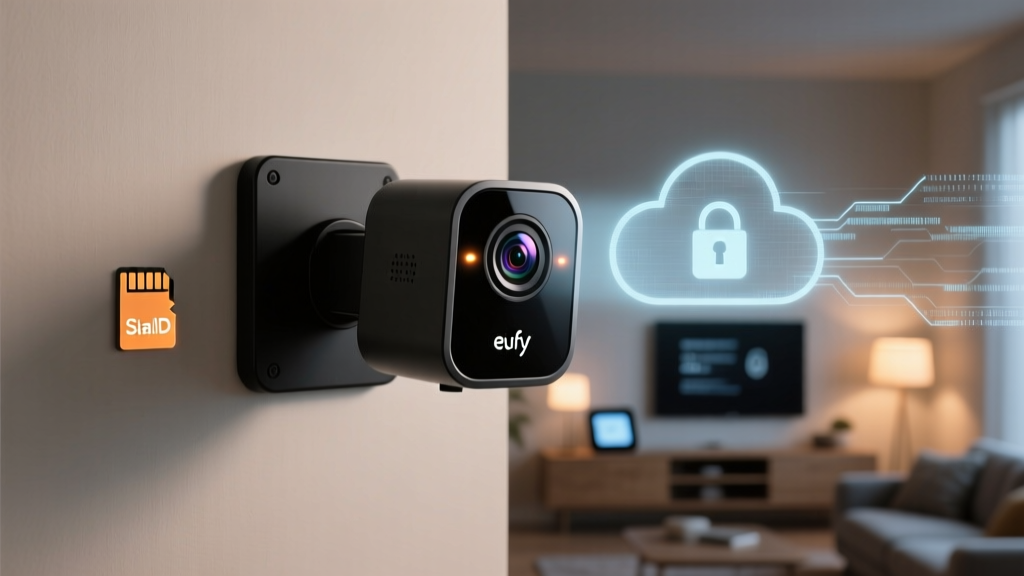
Before dissecting the data pipeline, it is essential to understand the hardware generating the data. The EufyCam 3 boasts a 4K Ultra HD sensor, an integrated solar panel for continuous charging, and a built-in spotlight for night vision. However, from a privacy perspective, the most critical component is the BionicMind AI chip. This onboard processor is designed to handle facial recognition, human detection, and pet tracking locally on the device or via the HomeBase 2, rather than offloading the computational heavy lifting to remote cloud servers. By processing biometric and spatial data at the edge, the EufyCam 3 theoretically minimizes the transmission of sensitive visual data over the internet. The HomeBase 2 acts as the local vault, featuring 16GB of built-in eMMC storage (expandable up to 128GB via USB), ensuring that your video payloads remain physically within your home. Yet, as we will explore, the distinction between local video storage and local metadata processing is where the privacy debate truly begins.
Privacy Data Evaluation: What Eufy Actually Collects
To evaluate the EufyCam 3 from a privacy standpoint, we must look beyond the video files and examine the telemetry and metadata the ecosystem collects. According to Anker Innovations (Eufy's parent company) privacy policy, the app collects device status information, network configurations, and interaction logs. While this is standard for IoT device management, the aggregation of this metadata can paint a highly detailed picture of your daily routines, occupancy patterns, and network infrastructure. The Electronic Frontier Foundation has long warned that IoT metadata can be just as revealing as the primary data payload. If a malicious actor or an overreaching data broker gains access to your device's wake cycles and network pings, they can infer when your home is empty, regardless of whether they ever see a single frame of video.
Furthermore, the Eufy Security app requires a registered account tied to an email address and phone number. This creates a centralized identity link between your physical home security and your digital identity. While Eufy does not sell your video data to third parties—a claim backed by their business model of selling hardware rather than monetizing user data—the reliance on a centralized authentication server means that your ability to access your local HomeBase is still gated by Eufy's cloud infrastructure. If Eufy's authentication servers experience an outage, users have historically found themselves locked out of their local camera feeds, highlighting a critical vulnerability in the so-called local-first architecture.
The Thumbnail Controversy and Cloud Dependency
No privacy evaluation of the EufyCam 3 would be complete without addressing the controversy that shook the smart home community in late 2022. Security researchers discovered that despite the prominent 'Local Storage' branding and user toggles explicitly opting out of cloud storage, the Eufy app was uploading unencrypted thumbnail images of camera events to Eufy's cloud servers. These thumbnails were accessible via Eufy's web portal, completely bypassing the local storage promise and exposing users to potential cloud breaches.
The backlash was swift and severe. Eufy eventually admitted that thumbnails were uploaded to facilitate faster push notifications and cross-device synchronization, arguing that the data was encrypted in transit. However, the fact that the data was stored unencrypted at rest on their servers, and that the web portal access contradicted the app's local-only settings, represented a significant breach of consumer trust. Eufy has since released firmware updates to address these concerns, introducing end-to-end encryption options and refining the user interface to provide more granular control over cloud uploads. Nevertheless, the incident serves as a stark reminder that in the IoT space, 'local storage' often means 'local video storage,' while the surrounding ecosystem remains deeply tethered to the cloud. Organizations like Mozilla's Privacy Not Included guide frequently highlight these nuances, urging consumers to look past marketing buzzwords and scrutinize actual data handling practices.
Real-World Testing: Network Traffic and Data Leaks
To move beyond policy documents and PR statements, we conducted real-world network traffic analysis on the EufyCam 3 paired with the HomeBase 2. Using a localized DNS sinkhole and packet capture tools, we monitored the outbound traffic generated by the system during idle periods, motion events, and app initialization. When configured for strict local-only operation (with cloud thumbnail uploads disabled in the updated firmware), the HomeBase 2 exhibited minimal outbound traffic. The primary connections were directed toward NTP (Network Time Protocol) servers for clock synchronization and periodic heartbeat pings to Eufy's authentication servers to verify account credentials.
During motion events, the 4K video payload was strictly routed over the local Wi-Fi network to the HomeBase 2. No external IP addresses received the video stream. However, we did observe telemetry packets containing device health metrics, battery levels, and AI detection classifications (e.g., 'human detected') being transmitted to Eufy's analytics servers. While this telemetry does not contain visual data, it reinforces the fact that the device is not entirely offline. For users seeking absolute network isolation, the EufyCam 3 falls short of a true air-gapped system. To achieve genuine local-only operation, users must leverage the camera's RTSP (Real-Time Streaming Protocol) support, bypassing the Eufy app entirely and routing the video feed directly into local NVR software like Blue Iris or a Synology Surveillance Station. This advanced workaround strips away the smart AI features but guarantees zero cloud dependency.
Ecosystem Compatibility: HomeKit Secure Video and NAS
One of the most compelling privacy features of the EufyCam 3 is its compatibility with Apple HomeKit Secure Video (HKSV). When integrated into the Apple Home ecosystem, the camera's video feed is encrypted end-to-end and routed through your iCloud account. Apple's privacy architecture ensures that even Apple cannot decrypt your video footage, and all AI processing for HKSV is handled locally on your home hub (such as an Apple TV or HomePod). This integration effectively neutralizes Eufy's cloud dependency for daily viewing and storage, placing the cryptographic keys entirely in the hands of the user. For non-Apple users, the aforementioned RTSP and NAS support provides a viable, albeit more technical, pathway to secure local storage.
Cloud Dependency Index Comparison
Competitor Privacy Comparison
| Feature | EufyCam 3 | Ring Spotlight | Google Nest Cam |
|---|---|---|---|
| Local Storage Option | Yes (HomeBase) | No | No |
| RTSP / NAS Support | Yes | No | No |
| Monthly Fee Required | No | Yes | Yes |
| End-to-End Encryption | Optional | Optional | Yes (Default) |
SmartHomeDeck Score Dimensions
- Performance (8.5/10): The 4K image quality is exceptional, and the local AI processing is fast. However, the reliance on the HomeBase for local storage means the camera's performance is bottlenecked by the base station's Wi-Fi connection.
- Value (9/10): Despite the high upfront cost, the complete elimination of mandatory monthly subscription fees makes the EufyCam 3 one of the most cost-effective premium cameras over a three-year period.
- Compatibility (8/10): Excellent support for Apple HomeKit, Amazon Alexa, and Google Assistant. RTSP support is a massive win for advanced users, though native Home Assistant integration requires community-built add-ons rather than official support.
- Ease-of-Use (7.5/10): The physical setup is seamless, but the app's privacy settings are convoluted. Navigating the menus to ensure cloud thumbnails are disabled and end-to-end encryption is enabled requires a level of technical diligence that average consumers may lack.
- Features (9/10): The integrated solar panel, BionicMind AI, and color night vision set a high watermark for wireless camera capabilities.
Security Best Practices and User Responsibility
As highlighted by the Cybersecurity and Infrastructure Security Agency (CISA), securing IoT devices requires proactive user engagement. To maximize the privacy of your EufyCam 3, we strongly recommend enabling the end-to-end encryption feature within the Eufy Security app, which prevents even Eufy's own support team from accessing your footage if a decryption key is requested. Additionally, isolating your smart home devices on a dedicated VLAN or guest Wi-Fi network ensures that any potential vulnerability in the camera's firmware cannot be leveraged to pivot laterally into your primary network where personal computers and NAS drives reside.
Pros and Cons
Pros
- True local video storage via HomeBase 2 eliminates mandatory cloud fees.
- RTSP support allows integration with third-party local NVR systems.
- Apple HomeKit Secure Video compatibility offers a gold-standard privacy alternative.
- Integrated solar panel drastically reduces maintenance and physical tampering risks.
- On-device AI processing minimizes the transmission of raw biometric data.
Cons
- Historical privacy controversies regarding cloud thumbnails erode absolute trust.
- Device telemetry and metadata still require outbound cloud connections.
- App interface makes it difficult to verify strict local-only configurations.
- Requires the HomeBase 2 hub; cameras cannot operate independently on local storage.
Final Verdict: Who is the EufyCam 3 For?
The EufyCam 3 represents a fascinating compromise in the modern smart home landscape. It is not the perfectly isolated, air-gapped security system that hardcore privacy absolutists might wish for; the persistent telemetry pings and the historical thumbnail controversy prove that Eufy's ecosystem still relies on cloud infrastructure for authentication and app functionality. However, when compared to the mandatory cloud recording models of Ring and Nest, the EufyCam 3 offers a vastly superior baseline for data sovereignty. By keeping the heaviest and most sensitive payload—your 4K video footage—strictly on local hardware, and by providing escape hatches like RTSP and HomeKit Secure Video, Eufy empowers users to take meaningful control of their digital footprint. If you are willing to navigate the app's settings, isolate your network, and leverage local NVR or Apple Home integrations, the EufyCam 3 remains one of the most powerful and privacy-respecting wireless cameras available today.