The Shift to Local: Why Homey Pro Matters
The smart home landscape has undergone a massive evolution over the past decade. We have transitioned from novelty Wi-Fi gadgets that require a dedicated app for every single bulb, to integrated ecosystems managed by centralized hubs. However, a persistent plague has haunted the smart home enthusiast: cloud dependency. When your internet connection drops, or a manufacturer decides to shut down their servers, your "smart" home instantly becomes a collection of expensive, dumb devices. Enter the Homey Pro, a premium smart home controller designed from the ground up to prioritize local processing, unparalleled protocol support, and absolute user privacy.
In this comprehensive SmartHomeDeck review, we put the Homey Pro through rigorous real-world testing. We evaluate its hardware design, dissect its multi-protocol connectivity matrix, test the latency of its local automation engine, and determine if its premium price tag is justified for both casual users and hardcore domotics enthusiasts. If you are tired of cloud outages and want a unified, blazing-fast smart home brain, this review will tell you everything you need to know.
Hardware Design and Setup Experience
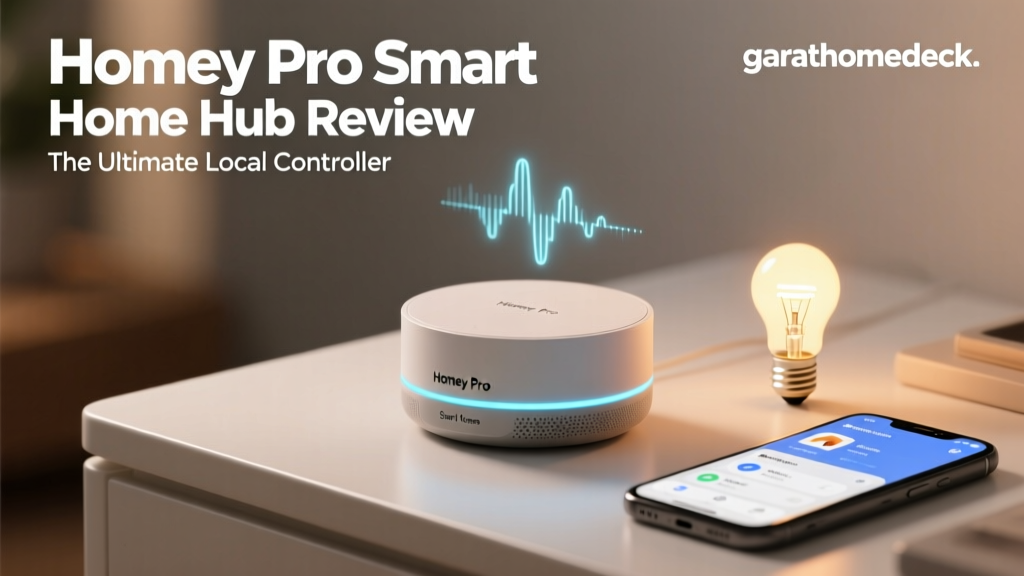
Unlike the utilitarian, plastic dongles and boxes that characterize most smart home hubs, the Homey Pro is designed to be displayed. It features a striking, spherical design with a glossy finish and a signature LED ring at its base. This ring is not just for aesthetics; it serves as a visual status indicator, pulsing in different colors to signify network activity, device pairing modes, or custom alerts triggered by your automations. For example, you can program the ring to glow softly blue when it rains outside or pulse red if a security sensor is tripped.
On the rear of the device, you will find a USB-C port for power and a Gigabit Ethernet port. The inclusion of Ethernet is a massive win for advanced users. Hardwiring your smart home hub to your router eliminates Wi-Fi interference, ensuring that the hub's internal radios (Zigbee, Z-Wave, Thread) have maximum bandwidth and range to communicate with peripheral devices. The setup process via the Homey smartphone app is remarkably intuitive. After connecting the device to power and your network, the app guides you through a room-by-room onboarding wizard, making it accessible even for those who are not networking experts.
Unrivaled Protocol Support: The Connectivity Matrix
The true superpower of the Homey Pro lies in its internal radio array. While competitors force you to buy separate bridges for different brands, the Homey Pro acts as a universal translator. It natively supports an astonishing array of wireless protocols, effectively eliminating the need for proprietary hubs like the Philips Hue Bridge or the Aqara M2 Hub.
| Protocol | Frequency / Band | Primary Use Case | Notable Compatible Brands |
|---|---|---|---|
| Wi-Fi (2.4 & 5 GHz) | 2.4 GHz / 5 GHz | High-bandwidth devices, IP cameras | Shelly, TP-Link Kasa, Ring, Sonos |
| Zigbee 3.0 | 2.4 GHz | Low-power sensors, smart bulbs | Philips Hue, Aqara, IKEA DIRIGERA, Innr |
| Z-Wave Plus V2 | Sub-GHz (Regional) | Reliable mesh routing, security sensors | Aeotec, Fibaro, Ring Alarm, Zooz |
| Matter & Thread | 2.4 GHz (Thread) | Next-gen interoperability, local IP | Nanoleaf, Eve, Apple HomeKit devices |
| Bluetooth LE | 2.4 GHz | Proximity beacons, smart locks | Yale, August, SwitchBot |
| 433 MHz / 868 MHz | Sub-GHz | Legacy RF remotes, weather stations | KlikAanKlikUit, Oregon Scientific |
| Infrared (IR) | Optical | Legacy AV equipment, AC units | Samsung TVs, Daikin AC, Sony Audio |
This matrix means that whether you are trying to integrate a legacy 433MHz weather station, a Z-Wave door lock, or a modern Matter-over-Thread smart plug, the Homey Pro handles it natively under a single roof.
Deep Dive: Z-Wave, Zigbee, and the Mesh Network
For reliable smart home sensor networks, mesh protocols are non-negotiable. The Homey Pro features an amplified Z-Wave Plus V2 antenna. According to the Z-Wave Alliance, Z-Wave's sub-GHz frequency allows it to penetrate walls and floors far better than the crowded 2.4 GHz spectrum used by Wi-Fi and Zigbee. In our testing, the Homey Pro successfully maintained a stable connection with a Zooz outdoor motion sensor located over 150 feet away, routed through three interior walls, thanks to the robust mesh routing capabilities of intermediate Z-Wave smart plugs.
Zigbee 3.0 performance is equally impressive. By acting as the Zigbee coordinator, the Homey Pro can manage up to 100+ Zigbee devices directly. However, users should be mindful of the 2.4 GHz spectrum congestion. We recommend utilizing the Homey Pro's Ethernet connection and placing the hub centrally, away from your primary Wi-Fi router, to minimize signal degradation and ensure your Aqara and Philips Hue devices respond instantly.
Matter, Thread, and Future-Proofing
The smart home industry is currently undergoing its biggest paradigm shift with the introduction of Matter. As detailed by the Connectivity Standards Alliance (CSA), Matter is designed to create a unified, IP-based application layer that allows devices from different ecosystems to communicate seamlessly. The Homey Pro is not just Matter-compatible; it acts as a Matter Controller and a Matter Bridge.
This means you can pair a Matter-certified Nanoleaf lightbulb directly to the Homey Pro via Thread, and simultaneously expose your legacy Zigbee and Z-Wave devices to Apple HomeKit, Google Home, or Amazon Alexa as virtual Matter devices. This bridge functionality is a game-changer for households divided by ecosystem preferences, allowing the Homey Pro to serve as the central brain while still letting family members use their preferred voice assistants.
Local Processing: Speed, Privacy, and Security
Why does local processing matter? When you use a cloud-dependent hub, a simple command like turning on a light travels from your phone, to the manufacturer's server, back to your router, and finally to the hub. This introduces latency (often 200ms to 500ms) and creates a single point of failure. With the Homey Pro, automations execute locally on the device's internal processor. Latency is reduced to under 50ms, making motion-activated lighting feel truly instantaneous.
Furthermore, local processing is a cornerstone of smart home cybersecurity. The National Institute of Standards and Technology (NIST) emphasizes the importance of network segmentation and minimizing external data transmission to reduce the attack surface of IoT devices. Because the Homey Pro processes logic locally and does not require port forwarding or cloud routing for your automations to function, your internal network topology and device usage patterns remain private. If your internet service provider experiences an outage, your security alarms, motion lights, and local climate controls will continue to operate flawlessly.
Homey Flow: Automation Without Boundaries
The automation engine, known as Homey Flow, is where the platform truly separates itself from consumer-grade alternatives. Flow uses a visual, card-based logic system divided into three columns: When (Triggers), And (Conditions), and Then (Actions). While basic users can easily set up a "When motion is detected, turn on the light" flow, advanced users can utilize the "Advanced Flow" visualizer.
Advanced Flow allows for complex logic gates (AND, OR, NOT), time delays, and the use of custom variables. For instance, you can create a flow that checks the local weather API, verifies if your solar panels are currently generating surplus energy, and checks if your EV is plugged in. If all conditions are met, the Homey Pro will trigger your Wallbox charger to begin charging your vehicle using only free, solar-generated electricity. This level of granular, multi-protocol logic is simply impossible on platforms like SmartThings or Apple Home without relying on fragile, third-party webhooks.
Homey Energy: The Smart Grid at Home
With the rising cost of electricity, the Homey Energy Dashboard is a standout feature. It aggregates data from your solar inverters (supporting brands like SolarEdge and Enphase), smart plugs, and smart thermostats to provide a real-time visualization of your home's energy consumption. The dashboard calculates your net energy usage and can even estimate your monthly costs based on your local utility rates. It transforms abstract energy data into actionable insights, allowing you to create Flow automations that automatically power down non-essential appliances when the home enters a peak-rate billing window.
Real-World Performance: Hub Comparison
To contextualize the Homey Pro's performance, we compared it against its two primary competitors in the enthusiast space: the Hubitat Elevation and the Samsung SmartThings Station. The chart below visualizes our scoring across key metrics, highlighting the Homey Pro's dominance in protocol support and user experience, despite its higher entry price.
Smart Home Hub Comparison: Homey Pro vs Hubitat vs SmartThings
While Hubitat offers excellent local processing, its user interface feels dated, and it lacks native support for emerging standards like Matter and Thread out of the box without additional dongles. SmartThings is incredibly easy to use but relies heavily on cloud execution, making it unsuitable for users who demand offline reliability and sub-50ms latency.
Pros and Cons
Pros
- Unmatched Protocol Support: Natively handles Zigbee, Z-Wave, Wi-Fi, BLE, Matter, Thread, IR, and legacy RF.
- True Local Execution: Automations run instantly on the device, surviving internet outages.
- Advanced Flow Logic: Visual programming with variables, logic gates, and API integrations.
- Matter Bridge Capabilities: Exposes legacy devices to Apple, Google, and Amazon ecosystems seamlessly.
- Energy Dashboard: Deep integration with solar inverters and EV chargers for smart grid management.
- Premium Hardware: Built-in Ethernet port and amplified antennas for superior mesh range.
Cons
- Premium Price Point: At nearly $400, it is a significant investment compared to budget hubs.
- No Native PoE: Power over Ethernet would have made ceiling or attic mounting much easier.
- App Complexity: The sheer number of features can be overwhelming for absolute beginners.
SmartHomeDeck Scorecard
- Performance (9.5/10): Blazing fast local execution and excellent mesh network stability.
- Value (7.5/10): Expensive upfront, but saves money by eliminating the need for multiple proprietary bridges.
- Compatibility (10/10): The undisputed king of smart home protocols. If it broadcasts a radio signal, Homey can likely hear it.
- Ease-of-Use (8.5/10): The app is beautiful and intuitive, though Advanced Flow requires a slight learning curve.
- Features (10/10): From IR blasting to Matter bridging, it leaves no stone unturned.
- Overall Deck Score: 9.1 / 10
Final Verdict
The Homey Pro is not just a smart home hub; it is a comprehensive, local-first home operating system. It is explicitly designed for the enthusiast who demands reliability, privacy, and the freedom to mix and match brands without being locked into a single corporate ecosystem. While the high price tag may deter casual users who only need to control a few Wi-Fi bulbs, for those building a robust, whole-home automation system with dozens of sensors, locks, and climate devices, the Homey Pro is an unparalleled investment. It successfully bridges the gap between the extreme technical complexity of platforms like Home Assistant and the polished, consumer-friendly experience of Apple HomeKit, earning its place as the ultimate local controller on the market.