The Hidden Cost of Smart Home Upgrades: Installation Friction
When homeowners decide to upgrade their front door with a smart lock, the conversation usually revolves around aesthetics, ecosystem compatibility, and security features. However, as senior reviewers at SmartHomeDeck, we know that the true test of a smart home device begins before it ever connects to your network. The physical installation and first-setup process can be the difference between a seamless 15-minute upgrade and a frustrating, door-jamming weekend project.
Smart locks are unique in the smart home landscape because they interact with heavy, moving mechanical parts. Unlike a smart plug or a Wi-Fi camera, a smart lock must interface perfectly with your existing door hardware, latch, and strike plate. If your door binds, sticks, or has a misaligned deadbolt, even the most expensive smart lock will fail to calibrate properly. Furthermore, the initial network provisioning—often requiring a temporary Bluetooth bridge before handing off to a 2.4GHz Wi-Fi network—remains a notorious hurdle for many consumers.
In this comprehensive Installation Difficulty & First-Setup Report, we put three of the most popular smart locks on the market through rigorous real-world testing. We evaluated the physical mounting, door preparation, app onboarding, and calibration phases to bring you the definitive guide on what it actually takes to get these devices up and running.
The Contenders: August, Yale, and Schlage
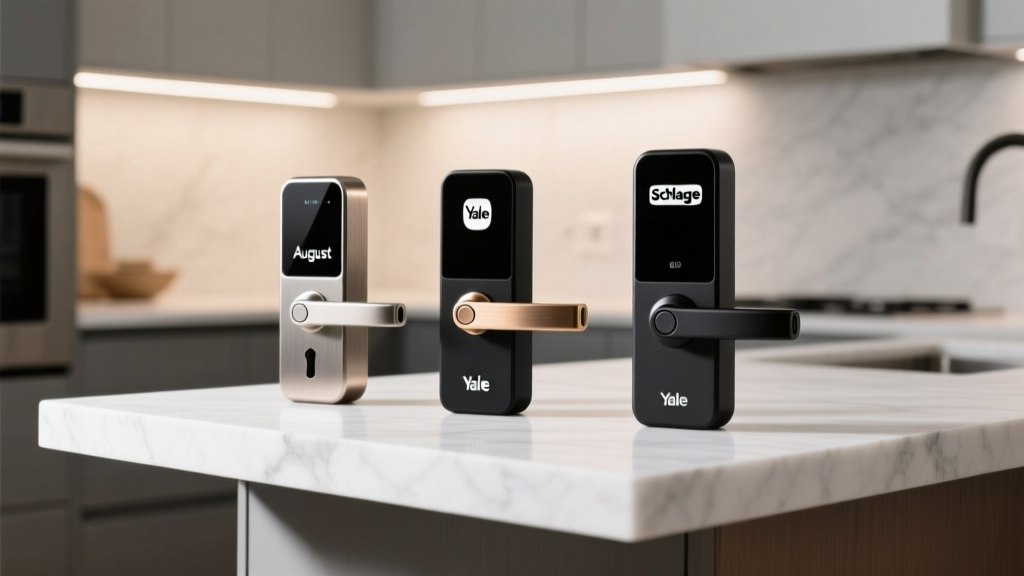
For this report, we selected three distinct approaches to smart lock hardware:
- August Wi-Fi Smart Lock (4th Gen): The interior-only retrofit designed to keep your exterior keys intact.
- Yale Assure Lock 2 (Wi-Fi Module): The sleek, full-replacement touchscreen deadbolt with a modular smart home approach.
- Schlage Encode Plus: The heavy-duty, traditional keypad deadbolt with native Apple HomeKey and Wi-Fi support.
We installed each lock on a standard interior test door (1 3/4 inches thick, 2 3/8-inch backset) and a slightly weathered exterior door (2 inches thick, 2 3/4-inch backset, minor weatherstripping friction) to simulate real-world conditions.
August Wi-Fi Smart Lock: The Retrofit Champion
Physical Installation
The August Wi-Fi Smart Lock remains the undisputed king of low-impact installation. Because it only replaces the interior thumbturn, you do not need to touch the exterior lock cylinder. This means your physical keys will continue to work exactly as they did before. The physical installation took us exactly 12 minutes on our test door.
You will need a standard Phillips-head screwdriver and a tape measure. The package includes a magnetic faceplate adapter that snaps onto your existing deadbolt tailpiece. The most critical step is ensuring the August lock body is perfectly centered over the thumbturn shaft. If it is off by even a few millimeters, the motor will bind during calibration. The mounting bracket screws directly into your existing deadbolt screws, which is incredibly stable.
App Setup & Calibration
The August app's onboarding flow is highly polished. It uses Bluetooth Low Energy (BLE) to find the lock instantly. The real challenge here is the DoorSense calibration. August includes a small magnetic sensor that tells the app whether the door is physically open or closed, not just whether the deadbolt is thrown. You must peel the 3M adhesive backing and mount the DoorSense sensor on the door frame exactly 1 to 2 inches away from the lock. If your door frame is deep or has ornate trim, finding a flat surface for the sensor can be annoying. Once mounted, the app runs an auto-calibration sequence that takes about 45 seconds, sweeping the lock from locked to unlocked to map the motor's resistance.
Yale Assure Lock 2: The Sleek but Complex Option
Physical Installation
The Yale Assure Lock 2 is a full deadbolt replacement. If you are upgrading from a standard knob-and-latch setup without an existing deadbolt, you will need a hole saw and a chisel to prep the door—a massive undertaking that adds hours to the project. Assuming you already have a deadbolt, the swap takes about 35 to 45 minutes.
The Yale hardware is premium, but the interior escutcheon houses the brain and the battery compartment, making it surprisingly heavy. The most frustrating part of the physical install is the spindle alignment. You must feed the exterior keypad's ribbon cable through the center of the door, then perfectly align the interior mounting plate. If you pinch the ribbon cable between the metal mounting plate and the door surface, you will short out the keypad. We strongly recommend having a second person hold the exterior keypad flush against the door while you secure the interior plate.
App Setup & Module Integration
Our test unit came with the pre-installed Wi-Fi smart module. Yale is currently in a transitional phase regarding its software, migrating users from the older Yale Access app to the new Yale Home app. During our setup, the app forced a firmware update immediately upon pairing, which took 14 minutes and required the phone to remain within Bluetooth range. The calibration process requires you to manually turn the thumbturn to the locked and unlocked positions so the app can learn the door's throw distance. If your door has stiff weatherstripping, the Yale motor will throw a 'calibration error' and force you to adjust your strike plate before proceeding.
Schlage Encode Plus: The Heavy-Duty Replacement
Physical Installation
The Schlage Encode Plus is a beast of a lock. It features a massive exterior keypad and a bulky interior trim that houses the Wi-Fi radio and Apple HomeKey NFC reader. Physical installation took us 55 minutes, largely due to the weight of the hardware and the precision required for the latch bolt.
Schlage includes an adjustable latch, but you must ensure the 'handedness' of the door is set correctly before installing the interior trim. The interior trim connects to the exterior via a delicate wiring harness that clicks into place. You must be incredibly gentle; bending the pins on this connector is a common reason for dead-on-arrival reports. Furthermore, the Encode Plus requires four AA batteries in the interior trim, plus a 9V battery emergency jump-start terminal on the exterior. Securing the heavy interior plate without stripping the included machine screws requires a high-quality screwdriver and a firm hand.
Apple HomeKey & App Setup
The Schlage app is functional but utilitarian. The initial Wi-Fi setup is strictly limited to 2.4GHz networks. If your smartphone is connected to a 5GHz band and your router uses a unified SSID (the same name for both bands), the Schlage lock will frequently fail to pull the Wi-Fi credentials from your phone. We had to manually separate our 2.4GHz network into a distinct SSID to get the lock online. However, the Apple HomeKit setup is magical. Scanning the HomeKit setup code on the interior trim instantly provisions the lock in the Apple Home app, and the HomeKey calibration (which allows you to tap your iPhone or Apple Watch to unlock) works flawlessly out of the box.
Installation & Setup Comparison Data
To visualize the differences in setup friction, we tracked the time and resources required for each lock across our test doors.
| Feature | August Wi-Fi (4th Gen) | Yale Assure Lock 2 | Schlage Encode Plus |
|---|---|---|---|
| Installation Type | Interior Retrofit | Full Deadbolt Replacement | Full Deadbolt Replacement |
| Door Thickness Range | 1 3/8' to 2 1/4' | 1 3/4' to 2 1/4' | 1 3/8' to 2 1/4' |
| Avg. Physical Install Time | 15 Minutes | 40 Minutes | 55 Minutes |
| Wi-Fi Requirement | 2.4GHz / 5GHz | 2.4GHz Only | 2.4GHz Only |
| App Calibration Difficulty | Moderate (DoorSense) | High (Throw mapping) | Low (Auto-detect) |
Common First-Setup Pitfalls and How to Avoid Them
Based on our testing and industry data, the vast majority of smart lock returns are not due to defective hardware, but rather improper installation and network configuration. Here are the most common pitfalls we encounter during first-setup:
1. The Door Binding Issue
A smart lock motor is surprisingly weak compared to a human hand. If you have to push, pull, or lift your door handle to get the deadbolt to slide smoothly into the strike plate, a smart lock will fail to calibrate. Before installing any smart lock, close your door and manually throw the deadbolt. It should glide with zero resistance. If it catches, you must file down the strike plate or adjust the door hinges before proceeding.
2. The 2.4GHz Wi-Fi Trap
Most smart locks utilize 2.4GHz Wi-Fi for its superior range and wall penetration. However, modern mesh routers often use a single network name for both 2.4GHz and 5GHz bands. When the lock's companion app attempts to pass your phone's Wi-Fi credentials to the lock via Bluetooth, it often grabs the 5GHz token, causing the lock's setup to hang indefinitely. The workaround is to temporarily disable the 5GHz band in your router settings, or use an older smartphone that is physically far enough from the router to force a 2.4GHz connection.
3. Ignoring Network Security Baselines
Connecting a smart lock to your network introduces a new endpoint that requires security oversight. The Federal Trade Commission recommends securing your home network by ensuring your Wi-Fi router uses strong encryption (WPA2 or WPA3) and changing default administrative passwords before adding IoT devices. A smart lock is only as secure as the network it communicates through. Furthermore, creating a dedicated IoT VLAN or guest network for your smart home devices is a best practice that prevents a compromised smart bulb from providing a backdoor to your personal computers.
4. Battery Insertion Sequence
It sounds trivial, but the order in which you insert batteries matters. For locks like the Schlage and Yale, you must insert the batteries *before* fully seating the interior trim against the door. If you mount the trim and then try to jam the batteries in, you risk bending the internal contact springs, leading to intermittent power losses that will corrupt the calibration data.
The Future of Setup: Matter and Thread
The installation friction we experienced with network provisioning is slowly being addressed by the industry. The Connectivity Standards Alliance has introduced the Matter protocol, which aims to unify smart home device onboarding. Matter-compliant locks utilize Thread (a low-power mesh networking protocol) or Wi-Fi, but more importantly, they use a standardized QR-code onboarding process that eliminates the need for proprietary app handshakes. While the locks tested in this report rely on their native ecosystems, future iterations supporting Matter will drastically reduce the 'App & Network Setup' times visualized in our chart above.
Additionally, hardware standards organizations like the Builders Hardware Manufacturers Association (BHMA) continue to refine the grading systems for electronic locks. When shopping for a replacement lock, looking for a BHMA Grade 1 or Grade 2 rating ensures that the physical deadbolt mechanism can withstand the repetitive stress of a motorized actuator, reducing the likelihood of mechanical failure during the calibration phase.
Final Deck Scores for Installation Ease
After hours of mounting, calibrating, and troubleshooting, here is how the SmartHomeDeck team rates the installation and first-setup experience for each device:
- August Wi-Fi Smart Lock: 9/10 (Ease of Use)
The clear winner for renters and those who want a 15-minute upgrade. The only deduction is for the DoorSense sensor, which requires a flat surface on the door frame that many ornate homes lack. - Yale Assure Lock 2: 6.5/10 (Ease of Use)
The hardware is beautiful, but the interior ribbon cable and heavy escutcheon make it a two-person job. The mandatory firmware update during setup is a test of patience. - Schlage Encode Plus: 7/10 (Ease of Use)
Physical installation is heavy and requires precision, but the Apple HomeKit integration and auto-calibration save it from a lower score. Just be prepared to manage your 2.4GHz Wi-Fi settings.
Ultimately, the best smart lock for your home depends on your DIY comfort level and your door's existing condition. If your door is perfectly aligned and you want a painless setup, the August Wi-Fi is unmatched. If you are willing to spend an afternoon with a screwdriver and a chisel for a premium, keyless exterior aesthetic, the Yale and Schlage options offer robust, long-term security—provided you respect the setup process.