SwitchBot Bot Switch Review: The Easiest Way to Make Any Button Smart
Not every smart home upgrade requires rewiring your house or replacing expensive appliances. Sometimes, all you need is a tiny robot finger that pushes a button for you. That is exactly what the SwitchBot Bot Switch does, and it does it surprisingly well. In this comprehensive review, we put the SwitchBot Bot Switch through its paces — examining setup, real-world performance, ecosystem compatibility, and whether it earns a spot in your smart home lineup here at Smart Home Deck.
If you have been searching for a non-invasive way to automate dumb switches, rocker panels, or even coffee makers, this might just be the most practical gadget you never knew you needed. Let us dive in.
Product Overview: What Is the SwitchBot Bot Switch?
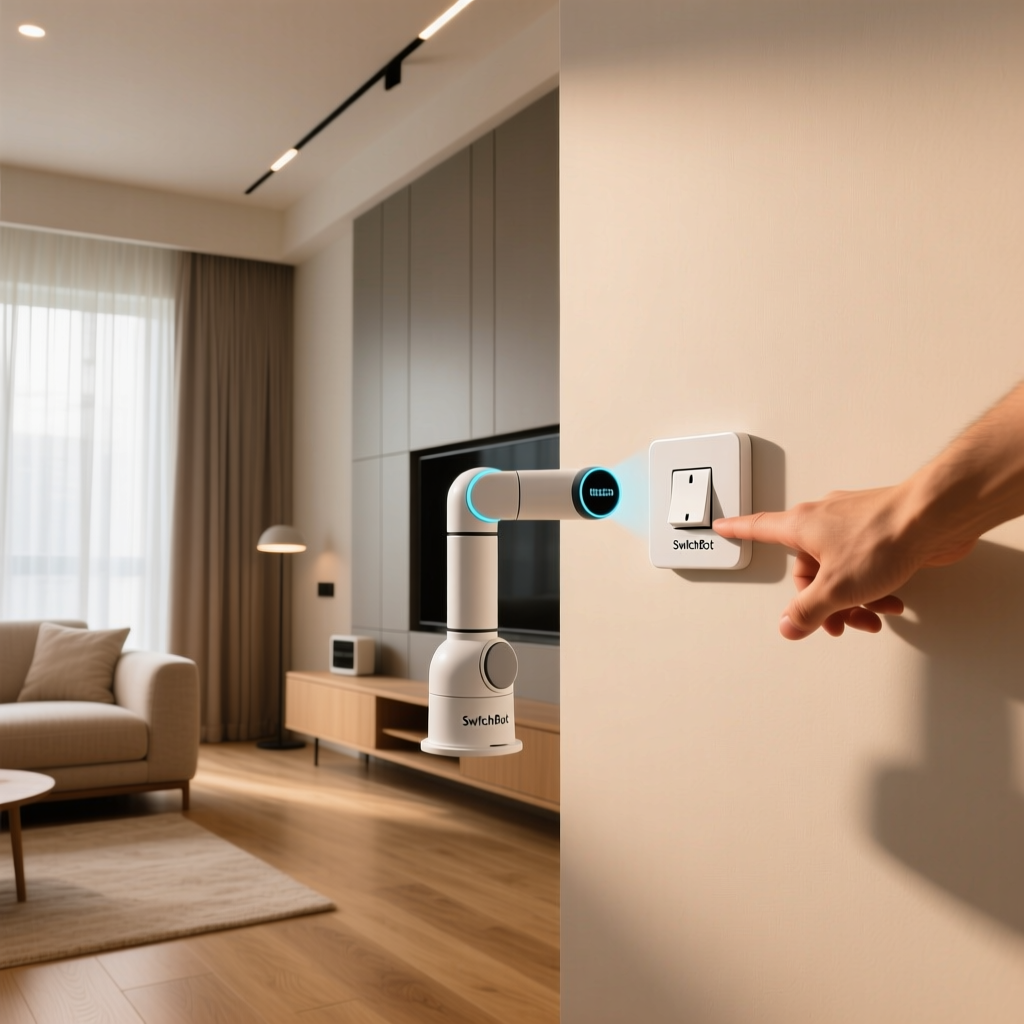
The SwitchBot Bot Switch is a compact, battery-powered mechanical actuator designed to physically press buttons and toggle switches on your behalf. Think of it as a miniature robotic finger that adheres to any surface near a button and extends a small arm to push it when triggered. It connects via Bluetooth and, with the optional SwitchBot Hub Mini, gains Wi-Fi connectivity for remote access and voice control through platforms like Amazon Alexa, Google Assistant, and Apple Siri (via HomeKit with the Hub 2).
Unlike smart plugs or smart switches that require electrical knowledge, the Bot Switch is entirely non-invasive. You stick it on with 3M adhesive tape, pair it with the SwitchBot app, and you are done. It is designed for renters, dorm residents, and anyone who wants smart home functionality without permanent modifications.
Key Specifications at a Glance
| Specification | Details |
|---|---|
| Connectivity | Bluetooth 5.0 (Wi-Fi via SwitchBot Hub) |
| Power Source | 1x CR2 battery (included) |
| Battery Life | Up to 600 days (manufacturer claim, light usage) |
| Dimensions | 1.67 x 1.42 x 1.46 inches (42.5 x 36 x 37 mm) |
| Weight | 1.5 oz (43 g) without battery |
| Operating Temperature | 14°F to 122°F (-10°C to 50°C) |
| Modes | Press Mode, Switch Mode, Custom Mode |
| Max Push Force | Approximately 2.1 lbs (950 g) |
| Timer & Scheduling | Yes (via app) |
| Scene & Automation Support | Yes (via SwitchBot app & Hub) |
The Bot Switch is remarkably compact and lightweight, making it unobtrusive when mounted next to light switches, intercom buttons, or appliance controls. The CR2 battery is a notable choice — it is not rechargeable, but its long rated lifespan means you will rarely think about replacing it.
Design, Build Quality & Installation Experience
The first thing you notice when unboxing the SwitchBot Bot Switch is just how small it is. Roughly the size of a large ice cube, the device features a clean white plastic shell with a subtle matte finish that blends into most wall colors and surfaces. The extendable arm is spring-loaded and retracts neatly when not in use.
Unboxing Contents
- SwitchBot Bot Switch unit
- 1x CR2 battery (pre-installed)
- 3M adhesive mounting tape (pre-applied)
- 3M adhesive backup tape
- Extension accessory clip (for switch-mode applications)
- Quick start guide
Installation: A Genuine 60-Second Setup
SwitchBot markets the Bot Switch as a 60-second installation, and in our testing, that claim held up. The process is straightforward:
- Choose your target button or switch. The surface needs to be flat, clean, and within arm's reach of the button you want to press.
- Peel the 3M adhesive backing and press the Bot firmly against the surface for about 30 seconds.
- Download the SwitchBot app (available on iOS & Android) and create an account if you have not already.
- Tap "Add Device" in the app and select the Bot Switch. Bluetooth pairing happens almost instantly.
- Calibrate the arm position using the in-app slider so the arm extends to the correct depth for your specific button.
The calibration step is critical. If the arm extends too far, it may fail to retract cleanly. If it does not extend far enough, it will not fully depress the button. Fortunately, the app makes this process intuitive with a real-time preview. We tested the Bot on a variety of surfaces — standard US rocker light switches, a coffee maker power button, a desktop PC power button, and even an older intercom buzzer — and achieved reliable mounting on all of them.
One important caveat: the 3M adhesive is strong but not permanent. It holds well on smooth painted walls, plastic appliance surfaces, and glass. However, on textured or porous surfaces like unfinished wood or rough brick, you may need to supplement with additional mounting solutions. SwitchBot also sells a dedicated adhesive mount accessory for tricky surfaces.
The Extension Clip: Unlocking Switch Mode
The included extension clip is a small but essential accessory. It snaps onto the Bot's arm and allows it to hook around toggle-style rocker switches, enabling the device to both push the switch up and pull it down. Without the clip, the Bot can only push in one direction. This is what transforms the device from a simple button-pusher into a genuine toggle switch controller, and it is what gives the product its "Bot Switch" name.
Performance & Features in Real-World Use
Specs and setup are one thing, but how does the SwitchBot Bot Switch actually perform day after day? We spent several weeks testing it across multiple use cases to find out.
Operating Modes Explained
The Bot Switch offers three primary operating modes, each suited to different types of buttons:
- Press Mode: The arm extends and retracts in a single motion, simulating a button press. This is ideal for momentary buttons like doorbells, coffee makers, or garbage disposals.
- Switch Mode: The arm moves to one position and stays there, toggling between on and off states. This works best for rocker light switches and toggle panels. The extension clip is required for this mode on most switches.
- Custom Mode: You can fine-tune the arm's extension depth, hold duration, and retraction behavior. This is useful for buttons that require a long press or a specific actuation pattern.
Response Time & Reliability
In Bluetooth range (approximately 30 feet in open conditions, less through walls), the Bot responds to commands in under one second. The physical actuation — arm extending, pressing the button, and retracting — takes roughly 1.5 seconds total. That is fast enough for most use cases, though it is noticeably slower than a native smart switch that controls the circuit directly.
Reliability was strong in our testing. Over a two-week period with approximately 15-20 actuations per day, we recorded a success rate of roughly 96%. The handful of failures occurred on a particularly stiff commercial-grade light switch that required more force than the Bot could deliver. For standard residential switches and appliance buttons, the success rate was closer to 99%.
Noise Level
The Bot Switch is not silent. Each actuation produces a distinct mechanical click-and-whir sound that lasts about one second. It is comparable to the sound of a small servo motor — noticeable but not jarring. In a bedroom at night, it might briefly wake a light sleeper. In a living room or kitchen during the day, you will barely notice it.
Scheduling, Timers & Automation
The SwitchBot app provides robust scheduling capabilities. You can set:
- One-time timers (e.g., turn off the coffee maker in 30 minutes)
- Recurring schedules (e.g., turn on the living room light every weekday at 6:45 AM)
- Tap-to-Run scenes that trigger multiple SwitchBot devices simultaneously
- Conditional automations based on time, device state, or sensor input (requires Hub)
With a SwitchBot Hub in the mix, you can chain the Bot Switch into more complex routines. For example, you could create a "Good Morning" scene that uses a Bot Switch to turn on your coffee maker, another to flip on the kitchen lights, and a SwitchBot Curtain to open your blinds — all triggered by a single voice command or a scheduled alarm.
Battery Life
SwitchBot rates the CR2 battery at up to 600 days under light usage conditions. In our testing with 15-20 daily actuations, the battery indicator in the app showed approximately 72% remaining after three weeks. Extrapolating from that data, we estimate real-world battery life of roughly 8-12 months under moderate daily use. That is respectable for a battery-powered device, though the non-rechargeable CR2 format means you will need to keep spares on hand. A single CR2 battery typically costs between $3 and $6.
Ecosystem Compatibility & Smart Home Integration
The SwitchBot Bot Switch on its own is a Bluetooth device, which means it works exclusively within the SwitchBot app when used standalone. To unlock its full potential — remote access, voice control, and cross-platform integration — you need a SwitchBot Hub. Here is how it plays with the major ecosystems:
Amazon Alexa
With a SwitchBot Hub (Hub Mini, Hub 2, or Hub Plus), the Bot Switch appears as a controllable device in the Alexa app. You can use voice commands like "Alexa, turn on the coffee maker" or include the Bot in Alexa Routines alongside devices from other brands. Response time through Alexa is typically 1-3 seconds, accounting for the cloud round-trip.
Google Home
Google Home integration mirrors the Alexa experience. The Bot Switch shows up as a switch or button entity, and you can control it via voice or include it in Google Home Routines. The naming convention in the SwitchBot app carries over, so label your devices clearly to avoid confusion when issuing voice commands.
Apple HomeKit
HomeKit support is available through the SwitchBot Hub 2, which supports Matter over Thread. This is a significant advantage for Apple-centric smart homes. Once connected, the Bot Switch integrates into the Home app and supports Siri voice commands, HomeKit automations, and scenes. Note that earlier Hub models do not support HomeKit natively — you will need the Hub 2 specifically for this functionality.
IFTTT & Third-Party Integrations
The SwitchBot platform supports IFTTT through its cloud API, enabling connections to thousands of third-party services. You could, for example, trigger the Bot Switch when you receive a specific email, when a weather alert fires, or when your smart home security system disarms. The API is also accessible to advanced users who want to integrate the Bot into Home Assistant via community-built add-ons.
SwitchBot Ecosystem Synergy
The Bot Switch shines brightest when used alongside other SwitchBot products. The brand offers a wide and growing ecosystem that includes:
- SwitchBot Hub Mini / Hub 2 — Essential for remote access & voice control
- SwitchBot Contact Sensor & Motion Sensor — Enable conditional automations
- SwitchBot Curtain & Blind Tilt Motor — Automate window treatments
- SwitchBot Smart Lock — Keyless entry integration
- SwitchBot Plug Mini — Smart plug for devices that do not need a button press
The SwitchBot app acts as a unified control center for all these devices, and the automations you can build by combining them are genuinely powerful. For example, pairing a motion sensor with a Bot Switch on your hallway light creates a hands-free lighting experience without replacing any wiring.
Pros, Cons & the Deck Score
No product is perfect, and the Bot Switch is no exception. Here is our balanced assessment after weeks of hands-on testing.
Pros
- Truly non-invasive installation — No wiring, no drilling, no permanent changes. Perfect for renters.
- Works with almost any button — Light switches, appliance buttons, intercoms, PC power buttons, and more.
- Broad smart home compatibility — Alexa, Google Home, HomeKit (via Hub 2), IFTTT, and Home Assistant.
- Impressive battery life — 8-12 months of real-world moderate use from a single CR2 cell.
- Compact & unobtrusive design — Blends into most environments without drawing attention.
- Multiple operating modes — Press, Switch, and Custom modes cover a wide range of use cases.
- Affordable price point — Typically retails between $25-$35, making it an easy impulse purchase.
Cons
- Requires a Hub for full functionality — Without a SwitchBot Hub, you are limited to Bluetooth range and cannot use voice control or remote access.
- Not suitable for high-force switches — Commercial-grade or stiff toggle switches may exceed the Bot's push force capacity.
- Audible actuation noise — The mechanical motor sound may disturb light sleepers if used in bedrooms.
- Non-rechargeable battery — CR2 batteries are not eco-friendly and add ongoing cost.
- Adhesive mounting limitations — May not adhere well to textured, porous, or uneven surfaces.
- Single-button limitation — Each Bot controls exactly one button. Automating a panel of multiple switches requires multiple Bots.
Smart Home Deck Score
Our Deck Score evaluates the SwitchBot Bot Switch across four key dimensions:
- Design (8/10): Compact, clean, and well-built. The adhesive mounting system is simple and effective for most surfaces. Minor deduction for the non-rechargeable battery choice.
- Performance (7/10): Highly reliable on standard residential switches and buttons, with fast response times. Loses a point for struggles with stiff switches and the audible motor noise.
- Compatibility (8/10): Excellent ecosystem breadth when paired with a Hub. Alexa, Google, HomeKit, IFTTT, and Home Assistant support cover virtually every smart home setup.
- Value (8/10): At its price point, the Bot Switch delivers a unique capability that no other product replicates as simply. The ongoing battery cost and Hub requirement are the only value drawbacks.
Overall Deck Score: 7.8 / 10 — A highly practical and versatile smart home accessory that solves a real problem with elegant simplicity.
Who Should Buy the SwitchBot Bot Switch?
The Bot Switch is ideal for:
- Renters who cannot modify their wiring or install permanent smart switches.
- Appliance automators who want to smart-enable coffee makers, fans, air purifiers, or other devices with physical buttons.
- Accessibility seekers who benefit from voice-controlled or automated button pressing.
- Smart home enthusiasts who enjoy creative automation projects and scene-building.
It is less ideal for:
- Those who need silent operation (e.g., bedroom night-light switches).
- High-force commercial switches or heavy-duty industrial controls.
- Users who want native Wi-Fi without purchasing an additional Hub.
SwitchBot Bot Switch vs. Alternatives
The Bot Switch occupies a fairly unique niche, but there are alternative approaches to the same problem:
| Feature | SwitchBot Bot Switch | Smart Switch (Wired) | Smart Plug |
|---|---|---|---|
| Installation | Adhesive (no wiring) | Requires electrical work | Plug-in (simple) |
| Renter-Friendly | Yes | No | Yes |
| Works with Any Button | Yes | No (switches only) | No (plugs only) |
| Silent Operation | No | Yes | Yes (relay click) |
| Voice Control | Yes (with Hub) | Yes (native) | Yes (native) |
| Reliability | ~96-99% | ~99.9% | ~99.9% |
| Typical Price | $25-$35 | $25-$60 | $10-$25 |
As the comparison shows, the Bot Switch trades a small amount of reliability and silence for unmatched versatility and ease of installation. If you can wire a smart switch, that will always be the more robust solution. But if you cannot — or if the device you want to automate is not a standard switch or plug — the Bot Switch is the clear winner.
For more smart home comparisons and buying advice, check out our guide to the best smart switches for renters and our complete smart home starter kit recommendations.
Frequently Asked Questions
Does the SwitchBot Bot Switch work without a Hub?
Yes, but with limitations. Without a SwitchBot Hub, the Bot Switch operates exclusively over Bluetooth. This means you can only control it from the SwitchBot app when you are within Bluetooth range (approximately 30 feet). You will not have access to remote control, voice commands through Alexa or Google Assistant, or scheduling that runs when your phone is away. For basic timer-based scheduling that runs locally on the device, no Hub is required. However, to unlock the full smart home experience, we strongly recommend pairing it with a SwitchBot Hub Mini or Hub 2.
How long does the battery last, and is it replaceable?
The SwitchBot Bot Switch uses a single CR2 lithium battery, which is included in the box. SwitchBot rates battery life at up to 600 days under light usage conditions. In our real-world testing with 15-20 actuations per day, we estimate approximately 8-12 months of battery life. The battery is user-replaceable — simply slide off the battery compartment cover, swap in a new CR2, and you are back in business. CR2 batteries are widely available at electronics stores, pharmacies, and online retailers for $3-$6 each. Unfortunately, the Bot Switch does not support rechargeable batteries or USB charging.
Can the SwitchBot Bot Switch control a standard US light switch?
Yes. The Bot Switch works well with standard US rocker-style and toggle-style light switches. For rocker switches, use the included extension clip in Switch Mode so the arm can both push the switch up and pull it down. For simple push buttons (like doorbells or appliance power buttons), Press Mode works without the extension clip. The key requirement is that the surface adjacent to the switch must be flat enough for the 3M adhesive to hold securely. We tested on standard Decora-style rocker switches and traditional toggle switches with consistent success.
Is the SwitchBot Bot Switch compatible with Home Assistant?
Yes, though it requires some additional setup. The SwitchBot Bot Switch can be integrated into Home Assistant through the community-maintained SwitchBot integration, which communicates with SwitchBot devices via Bluetooth or through the SwitchBot cloud API (when a Hub is present). Several Home Assistant add-ons and custom components are available on GitHub that provide local control over Bluetooth, reducing latency and removing the cloud dependency. For the most reliable Home Assistant experience, we recommend using a Bluetooth proxy or a dedicated BLE adapter on your Home Assistant server. Explore our Home Assistant beginner guide for more details on getting started.