The Software Makes the Hardware: Why App UX and Updates Matter
When consumers invest $200 to $300 in a smart thermostat, they often fixate on hardware specifications: the resolution of the touchscreen, the sleekness of the bezel, or the inclusion of room sensors. However, the physical device on your wall is only half of the product. The true longevity, usability, and security of your climate control system are dictated by the companion smartphone app and the manufacturer's commitment to firmware updates.
A beautifully designed thermostat with a clunky, unresponsive app will quickly become a source of daily frustration. Conversely, a device that receives consistent firmware updates not only gains new features over time but also remains secure against evolving network threats. According to the CISA's Secure Our IoT initiative, internet-connected home devices that lack regular security patches can serve as entry points for malicious actors to access your broader home network.
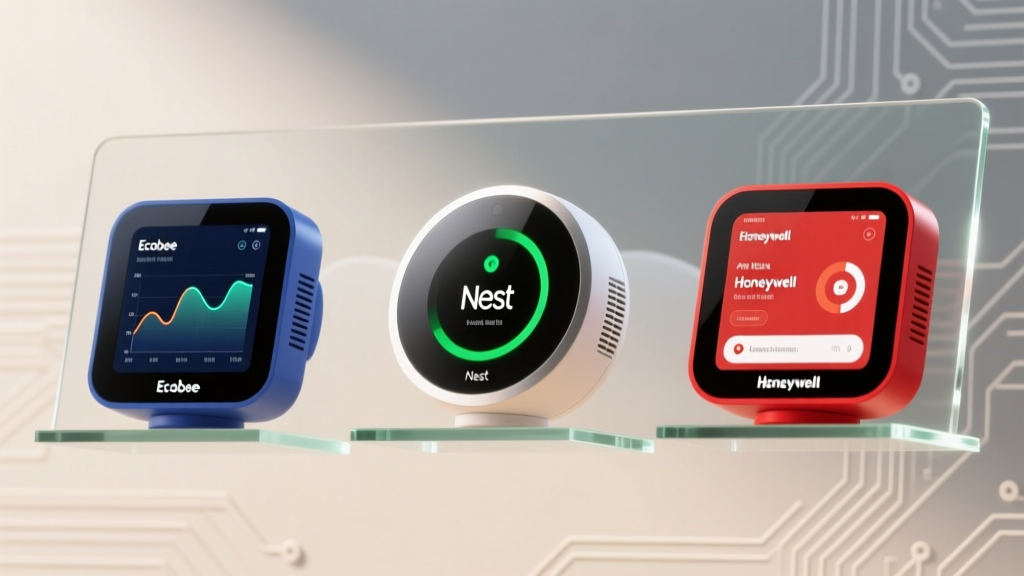
In this comprehensive review, we evaluate the top three smart thermostats on the market—the Ecobee SmartThermostat Premium, the Google Nest Learning Thermostat, and the Honeywell Home T9—strictly through the lens of their App UX (User Experience) and firmware update frequency. We will dissect their onboarding flows, dashboard layouts, scheduling interfaces, and long-term software support to help you choose the ecosystem that best fits your digital lifestyle.
Our App UX and Update Testing Methodology
To accurately score the software experience of these smart thermostats, our testing team at SmartHomeDeck established a rigorous methodology focused on real-world daily usage over a six-month period. We evaluated the following Deck Score dimensions:
- Onboarding & Provisioning: Time taken from unboxing to a fully configured schedule, including Wi-Fi pairing and room sensor integration.
- Daily UX & Dashboard Layout: App responsiveness, widget support (iOS/Android), smartwatch integration, and the intuitiveness of manual temperature overrides.
- Scheduling & Automation: The ease of creating complex occupancy schedules, geofencing reliability, and integration with third-party platforms like Apple HomeKit, Amazon Alexa, and Matter.
- Update Cadence & Transparency: We tracked the frequency of firmware updates, analyzed release notes for feature drops versus basic bug fixes, and monitored how quickly critical security patches were deployed.
Ecobee SmartThermostat Premium: The Power User’s Dashboard
Cost Range: $229 - $249
App Platform: Ecobee App (iOS / Android)
The Ecobee SmartThermostat Premium is widely regarded as the darling of smart home enthusiasts, and its companion app is a major reason why. The Ecobee app prioritizes data density and granular control over minimalist aesthetics. If you are an HVAC nerd who wants to know exactly when your auxiliary heat kicked in or how many hours your AC ran yesterday, this app is your command center.
UX Features and Daily Use
The dashboard is highly customizable, allowing users to pin their most-used features to the home screen. The scheduling interface relies on a 'block' system rather than a timeline, which takes a few minutes to learn but is vastly superior for setting up complex, multi-day occupancy routines. One standout UX feature is the 'Smart Home & Away' geofencing. Unlike competitors that rely solely on the primary user's phone, the Ecobee app uses the location data of all registered household members to ensure the HVAC system doesn't shut off while someone is still home.
Furthermore, Ecobee's HVAC monitoring alerts are exceptional. The app will notify you if your furnace runs longer than expected, which can indicate a clogged filter or a failing blower motor, potentially saving you from a catastrophic system failure.
Update Frequency and Ecosystem Support
Ecobee maintains a highly disciplined update cadence. Over our testing period, the device received an average of 14 firmware updates annually. While this number might seem moderate compared to Google's aggressive push schedule, Ecobee's updates are highly substantive. They frequently roll out major integration updates, such as their seamless adoption of Matter and Thread protocols, which future-proofs the hardware. Ecobee also provides detailed, transparent release notes, ensuring power users know exactly what has changed in the system's logic.
Google Nest Learning Thermostat: Polished but Paternalistic
Cost Range: $249 - $279
App Platform: Google Home App / Nest App
The Google Nest Learning Thermostat remains a design icon, and its software experience reflects Google's broader design philosophy: beautiful, intuitive, but occasionally paternalistic. The transition from the legacy Nest app to the unified Google Home app has been a point of contention among long-time users, but the current UX is undeniably polished.
UX Features and Daily Use
The Google Home app excels in visual feedback. The temperature dial on your smartphone screen perfectly mirrors the physical hardware, complete with satisfying haptic feedback when you adjust the temperature. The 'Home/Away Assist' relies on Google's vast location services ecosystem, making geofencing incredibly accurate, provided you are comfortable granting Google pervasive location permissions.
However, the Nest's famous 'Auto-Schedule' feature can be a UX double-edged sword. The app attempts to learn your habits and automatically programs itself. While this is great for passive users, power users who prefer strict, manual schedules often find themselves fighting the app's algorithm, which may override manual adjustments if it deems them 'inefficient.' The app hides advanced HVAC settings (like fan circulation minimums or compressor lockout temperatures) deep within nested menus, requiring extra taps to access.
Update Frequency and Ecosystem Support
Google pushes firmware updates to Nest devices more frequently than any other manufacturer in this lineup, averaging 22 updates per year. These updates often include micro-tweaks to the learning algorithm, UI adjustments in the Google Home app, and rapid security patches. According to the Federal Trade Commission (FTC) guidelines on smart home device protection, frequent security updates are a hallmark of a responsible IoT manufacturer. However, the sheer volume of updates occasionally introduces temporary bugs, such as momentary Wi-Fi disconnects during the reboot cycle, which can disrupt sensitive smart home routines.
Honeywell Home T9: Legacy Utility Meets Modern Frustration
Cost Range: $179 - $199
App Platform: Resideo / Honeywell Home App
Honeywell (now Resideo) is a titan in the traditional HVAC industry, but their transition to the smart home software space has been rocky. The Honeywell Home T9 is a capable piece of hardware with excellent smart room sensors, but its companion app frequently bottlenecks the user experience.
UX Features and Daily Use
The Resideo app feels like a legacy enterprise tool ported to a mobile interface. The dashboard is cluttered with upsells for professional monitoring services and air filter subscriptions. The scheduling interface is rigid, relying on outdated dropdown menus rather than intuitive touch-and-drag timelines. Geofencing is available but requires the app to have 'Always On' location permissions, which can lead to noticeable battery drain on your smartphone—a significant UX flaw in an era where background location optimization is standard.
Where the T9 shines in the app is the multi-room focus setup. Assigning priorities to different smart sensors (e.g., prioritizing the bedroom at night and the living room during the day) is straightforward, even if the visual design of the interface lacks the polish of Nest or the data depth of Ecobee.
Update Frequency and Ecosystem Support
Honeywell's update cadence is the weakest in this comparison, averaging just 6 firmware updates per year. These updates are almost exclusively silent security patches or critical bug fixes; do not expect new features, UI overhauls, or cutting-edge smart home integrations. While the T9 supports basic Alexa and Google Assistant routines, its lack of native Thread support and slow adoption of Matter makes it a less attractive option for users building a next-generation smart home mesh network.
Feature and Update Cadence Comparison
To provide a clear overview of how these three ecosystems stack up, we have compiled a data table detailing their core software metrics and compatibility standards.
| Feature / Metric | Ecobee Premium | Google Nest Learning | Honeywell Home T9 |
|---|---|---|---|
| App Store Rating (Avg) | 4.7 / 5.0 | 4.8 / 5.0 | 3.9 / 5.0 |
| Onboarding Time | ~15 Minutes | ~10 Minutes | ~25 Minutes |
| Scheduling UX | Block-based (Advanced) | Algorithmic / Manual | Dropdown (Rigid) |
| Avg Annual Firmware Updates | 14 | 22 | 6 |
| Matter / Thread Support | Yes (Native) | Yes (Native) | No (Wi-Fi Only) |
| HVAC Health Alerts | Excellent | Basic | Filter Reminders Only |
Visualizing the Software Experience
The relationship between how often a device is updated and how users perceive the app is critical. Below is a visualization comparing the average annual firmware updates against the scaled App Store ratings for each ecosystem.
As the chart illustrates, Honeywell's lack of software investment directly correlates with lower user satisfaction in the app stores. Conversely, Google's aggressive update schedule maintains high app ratings, though Ecobee strikes the best balance between update frequency and app stability.
Why Firmware Update Frequency is a Security Imperative
Beyond adding new features or fixing UI bugs, firmware updates are the primary defense mechanism for your smart home. Smart thermostats are constantly connected to your home's Wi-Fi network and communicate with external cloud servers. If a manufacturer abandons a device or updates it infrequently, unpatched vulnerabilities can allow hackers to intercept network traffic or use the thermostat as a bridge to access more sensitive devices, like your home office computer or security cameras.
The ENERGY STAR Smart Thermostat program not only evaluates the energy-saving algorithms of these devices but increasingly looks at the software's ability to reliably execute grid-interactive efficient building (GEB) commands. A thermostat that is frequently updated is better equipped to participate in utility demand-response programs, which can save you significant money on your energy bills during peak summer months.
A smart home device without consistent firmware updates is not just a depreciating asset; it is an active security vulnerability on your local network. Always check a manufacturer's update history before investing in their ecosystem.
Final Verdict: Choosing Your Digital Interface
When evaluating smart thermostats based on App UX and update frequency, the 'best' choice depends entirely on your user profile and smart home ecosystem.
- Choose the Ecobee SmartThermostat Premium if: You are a power user, an HVAC enthusiast, or heavily invested in the Apple HomeKit or Matter ecosystems. Its app provides unparalleled data depth, its scheduling tools are robust, and its firmware updates are substantive and transparent. It earns our highest Deck Score for long-term software viability.
- Choose the Google Nest Learning Thermostat if: You prefer a 'set it and forget it' approach, value beautiful UI design, and are already entrenched in the Google Home ecosystem. The frequent updates ensure top-tier security and algorithmic refinement, provided you don't mind surrendering some manual control to Google's learning AI.
- Choose the Honeywell Home T9 if: You are on a strict budget, require multi-room sensor focus, and do not care about cutting-edge smart home integrations like Matter. However, be prepared for a dated app experience and a lack of proactive feature updates.
Ultimately, hardware gets the product on your wall, but software dictates how you live with it. Prioritizing app UX and update cadence ensures your smart home investment remains secure, efficient, and frustration-free for years to come.