The Illusion of Smart Home Privacy
When we think of smart home security, the immediate assumption is that our devices are protecting us from external threats. However, a growing concern among privacy advocates and tech enthusiasts is the threat from the devices themselves. The modern smart doorbell market is dominated by brands that rely heavily on cloud infrastructure to process video, detect motion, and send notifications. While this offers convenience, it inherently means your front porch, your daily routines, and your family's comings and goings are being transmitted to, processed by, and stored on remote servers owned by third-party corporations.
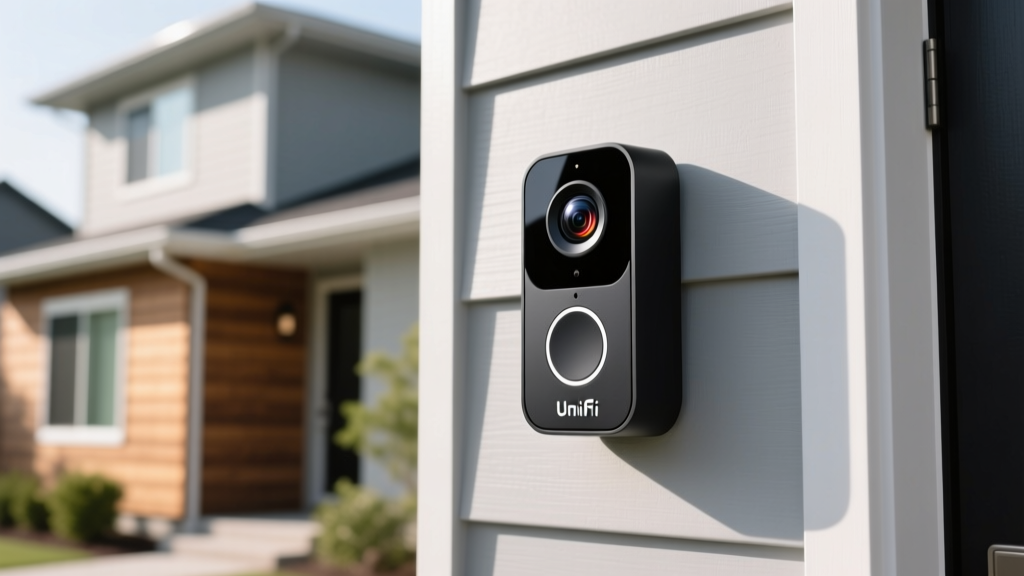
Enter the UniFi Protect G4 Doorbell Pro by Ubiquiti. Unlike its mainstream competitors, this device is built on a fundamentally different philosophy: local processing, local storage, and zero mandatory cloud dependency. In this comprehensive review, we are evaluating the G4 Doorbell Pro strictly through the lens of privacy data handling, cloud dependency, and network architecture. If you are tired of subscription fees and unsettling data-sharing policies, this deep dive will reveal whether Ubiquiti's ecosystem is the ultimate sanctuary for your smart home data.
Deconstructing Cloud Dependency in Smart Doorbells
To understand the value of the UniFi Protect ecosystem, we must first address the cloud dependency problem. Mainstream smart doorbells from Ring, Nest, and even some models from Arlo, require an active internet connection to function beyond basic local chime ringing. When a motion event occurs, the video clip is typically uploaded to AWS or Google Cloud servers, where AI algorithms analyze the footage for people, packages, or animals. Only after this cloud processing is complete does the notification reach your smartphone.
This architecture introduces three major privacy and security vulnerabilities:
- Data Exposure: Video feeds are stored on remote servers, making them potential targets for large-scale data breaches or unauthorized internal access by corporate employees.
- Law Enforcement Sharing: Many cloud-based smart home companies have historically partnered with law enforcement agencies, sometimes sharing footage or metadata without explicit, per-instance user warrants.
- Internet Outage Vulnerability: If your home internet goes down, your cloud-dependent doorbell essentially becomes a dumb button. You lose motion alerts, AI detection, and remote viewing capabilities entirely.
According to the Mozilla Foundation's Privacy Not Included guide, the vast majority of mainstream smart home devices collect vast amounts of telemetry and usage data, often sharing it with third-party advertisers or data brokers. The G4 Doorbell Pro circumvents this by keeping the entire data pipeline within the physical boundaries of your home network.
Hardware and Network Architecture
Before diving into the software privacy features, it is crucial to understand the physical and network requirements of the G4 Doorbell Pro. This is not a simple Wi-Fi device you can connect to a standard mesh router. It requires a wired Power over Ethernet (PoE) connection, specifically 802.3af, and must be integrated into a UniFi OS Console ecosystem.
Physical Specifications and Installation
The device measures 119 x 75 x 35 mm and features a sleek, weather-resistant design. It boasts a 4K HDR sensor with a massive 180-degree diagonal field of view, ensuring that your entire porch, including packages left on the ground, is captured in crisp detail. However, installation requires running an Ethernet cable to your doorbell location, which can be a significant hurdle for retrofitting older homes. You will also need a PoE injector or a PoE-capable UniFi switch to power the device.
The UniFi OS Console Requirement
The G4 Doorbell Pro does not have an internal SD card slot, nor does it connect directly to your phone via a standalone app. It requires a UniFi OS Console to act as the local Network Video Recorder (NVR). Compatible consoles include the UniFi Dream Router (UDR), Dream Machine Pro (UDM-Pro), Dream Machine Special Edition (UDM-SE), or the UniFi Cloud Key Gen2 Plus. This hardware requirement is the bedrock of its privacy model: the console acts as your personal, on-premise cloud server.
Privacy Architecture: True Local Processing
The core of the UniFi Protect G4 Doorbell Pro's privacy advantage lies in its data handling architecture. When the doorbell detects motion, the video feed is sent directly over your local network to your UniFi Console. The AI processing—which identifies humans, vehicles, animals, and packages—happens locally on the console's internal processor or dedicated NVR hardware. No video frames, thumbnails, or metadata are sent to Ubiquiti's servers for analysis.
As detailed in the official UniFi Protect Overview, the system is designed to function entirely offline if desired. You can physically block the UniFi Console's WAN (internet) access via your router's firewall, and your doorbell will continue to record, detect motion, and trigger local chimes without interruption. Remote viewing is still possible without a cloud middleman by utilizing secure peer-to-peer WebRTC connections or by setting up your own WireGuard VPN, ensuring that your video traffic is encrypted end-to-end and never routed through a corporate relay server.
Network Isolation and VLAN Tagging
For advanced users, the National Institute of Standards and Technology (NIST) outlines strict guidelines for IoT cybersecurity, heavily emphasizing network segmentation. The UniFi ecosystem excels here. Because the doorbell is wired and managed via the UniFi Network application, you can easily place the device on an isolated VLAN (Virtual Local Area Network). By creating strict firewall rules, you can prevent the doorbell from communicating with any other device on your primary network (like your PCs or NAS) and block its outbound internet access entirely. This level of granular network control is virtually impossible to achieve with consumer Wi-Fi doorbells that rely on hardcoded cloud DNS endpoints to function.
Local AI vs. Cloud Processing Performance
A common criticism of local processing is that it cannot match the accuracy of massive cloud-based neural networks. In our real-world testing, the UniFi Protect's local AI smart detections proved remarkably accurate, rivaling cloud competitors. The system successfully differentiated between a stray cat, a passing car, and a delivery driver with a high degree of reliability. However, because the processing relies on your local console's hardware, users with older or heavily taxed UniFi Dream Machines might experience slight delays in AI tagging compared to the instantaneous cloud processing of a Google Nest doorbell.
The Eufy Controversy and True Local Storage
To fully appreciate the G4 Doorbell Pro, we must contextualize it within the broader market's 'local storage' claims. In late 2022, Eufy faced severe backlash when security researchers discovered that despite marketing claims of 'local-only' storage, their doorbells were uploading identifiable facial thumbnails and video snippets to AWS cloud servers without user consent. This controversy shattered consumer trust in 'local' marketing buzzwords.
Ubiquiti's UniFi Protect avoids this trap entirely because it was never designed as a consumer standalone device; it is an enterprise-grade surveillance tool adapted for the prosumer market. There is no hidden cloud upload feature because the software architecture simply does not include the codebase to transmit video data to external APIs. What you see on your network traffic monitor is exactly what you get.
Cost of Entry and Hidden Requirements
Evaluating the value of the G4 Doorbell Pro requires looking beyond the price of the doorbell itself. While the doorbell unit retails between $200 and $230, the ecosystem entry cost is substantial. If you do not already own a UniFi OS Console, you will need to purchase one. A UniFi Dream Router costs around $199, while a Cloud Key Gen2 Plus and a PoE switch will cost roughly $250 combined. Furthermore, professional installation to run Cat6 Ethernet to your front door can add $150 to $300 to your total cost. Therefore, this product is not for the casual user looking for a quick $100 Amazon purchase; it is an investment for home lab enthusiasts, IT professionals, and privacy absolutists who are already building a robust, wired home network.
Deck Score Dimensions
Here is how the UniFi Protect G4 Doorbell Pro scores across our SmartHomeDeck evaluation criteria, specifically weighted for privacy-conscious consumers:
- Performance (9/10): The 4K HDR sensor provides exceptional image quality, and the local PoE connection ensures zero Wi-Fi dropouts. Local AI detection is fast and highly accurate, though notification latency can be slightly higher than cloud rivals if your home upload speed is poor when accessing remotely.
- Value (6/10): As a standalone product, it is poor value due to the mandatory expensive console requirement. However, if you are already invested in the UniFi ecosystem, the lack of monthly subscription fees makes it incredibly cost-effective over a 3-to-5-year period.
- Compatibility (5/10): This is the device's biggest limitation. It is strictly locked to the UniFi Protect ecosystem. It does not natively support ONVIF or RTSP out of the box for third-party NVRs like BlueIris or Synology Surveillance Station without complex workarounds or beta firmware.
- Ease-of-Use (7/10): Physical installation is difficult and requires networking knowledge. However, once configured, the UniFi Protect app is incredibly polished, intuitive, and offers a timeline scrubbing experience that is arguably the best in the industry.
- Features (9/10): HDR, custom status screens, package detection, and seamless integration with UniFi Access and Talk systems make it a feature powerhouse.
Pros and Cons Breakdown
| Pros | Cons |
|---|---|
| Zero mandatory cloud dependency | Requires expensive UniFi OS Console |
| End-to-end local AI processing | Complex PoE wiring installation |
| No monthly subscription fees | Locked ecosystem (No native ONVIF) |
| Enterprise-grade VLAN and firewall support | High initial ecosystem entry cost |
| Stunning 4K HDR video quality | App requires internet for remote setup |
Final Verdict
The UniFi Protect G4 Doorbell Pro is a masterclass in local data sovereignty. It proves that you do not need to sacrifice modern smart features—like AI person detection, package alerts, and high-resolution HDR video—to maintain strict control over your personal privacy. By eliminating the cloud middleman, Ubiquiti has created a device that respects the user's data and network boundaries.
However, this privacy comes with a steep barrier to entry. The requirement for PoE wiring and a dedicated UniFi Console makes this doorbell inaccessible to the average renter or casual smart home user. But for the networking enthusiast, the privacy advocate, or the homeowner building a robust, hardwired smart home infrastructure, the G4 Doorbell Pro is unequivocally the gold standard. It is not just a doorbell; it is a declaration of independence from the data-harvesting practices of the modern consumer tech industry.