The Great Smart Lighting Debate
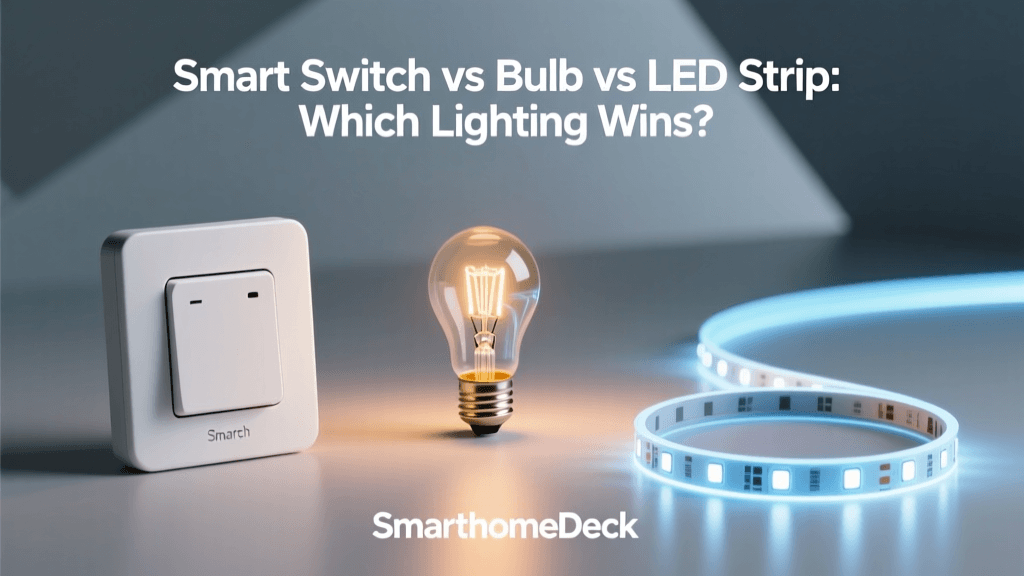
When you decide to upgrade your home with intelligent lighting, you are immediately faced with a fundamental dilemma: should you replace the wall switches, swap out the individual bulbs, or install accent LED strips? Each approach fundamentally changes how you interact with your living space, and each comes with its own unique set of installation requirements, ecosystem limitations, and cost structures. At SmartHomeDeck, we have tested hundreds of lighting products across the three primary categories: smart switches, smart bulbs, and smart LED strips. In this comprehensive head-to-head comparison, we will break down the technical specifications, real-world performance, and long-term viability of each method to help you make the most informed decision for your specific home environment.
Smart Light Switches: The Whole-Home Foundation
Smart switches replace the physical wall switch that controls the electrical current to your light fixtures. Instead of making the bulb itself intelligent, the switch becomes the brain, allowing you to control standard, non-smart fixtures via an app, voice assistant, or automated routine.
Installation Realities and Wiring Requirements
The most significant hurdle with smart switches is the installation process. Unlike smart bulbs, which simply screw into an existing socket, smart switches require you to interact with your home electrical wiring. Most modern smart switches require a neutral wire to remain powered on at all times, ensuring they can receive Wi-Fi or Zigbee signals even when the light is turned off. If your home was built before the 1980s, you may not have neutral wires in your switch boxes, which severely limits your options. Furthermore, you must account for single-pole versus 3-way or 4-way switch configurations, which dictate how you wire the devices across multiple control points.
Top Contenders: Lutron Caseta vs. Kasa Smart
The Lutron Caseta ecosystem remains the gold standard for smart switches. Utilizing its proprietary Clear Connect RF protocol, Lutron switches operate on a dedicated frequency that does not interfere with your home Wi-Fi network. They are incredibly reliable, offer instant response times, and do not strictly require a neutral wire for their standard dimmer models. However, they require the Lutron Smart Bridge and come at a premium price point, often exceeding $60 per switch.
On the budget-friendly end, TP-Link Kasa Smart switches (like the KS200M) connect directly to your 2.4GHz Wi-Fi network without the need for a hub. While they are highly affordable and integrate seamlessly with Alexa and Google Home, they can contribute to Wi-Fi network congestion if you install dozens of them throughout a large property.
Smart Bulbs: The Ultimate in Color and Flexibility
Smart bulbs contain the wireless radio and dimming circuitry directly inside the base of the bulb. This category is where you find the most vibrant color options, tunable white temperatures, and dynamic scene capabilities. They are the ideal solution for renters or homeowners who want to avoid electrical work entirely.
The 'Dumb Switch' Dilemma
The most notorious drawback of smart bulbs is the physical wall switch problem. Because the bulb requires constant electrical power to maintain its wireless connection and execute smart commands, the wall switch must remain in the 'on' position at all times. If a guest or family member flips the physical switch off, the smart bulb loses power, goes offline, and becomes completely unresponsive to app or voice commands. To combat this, many users pair smart bulbs with wireless smart buttons or install smart switches configured in 'smart accessory' mode to cut the physical load wire while maintaining digital control.
Top Contenders: Philips Hue vs. WiZ
The Philips Hue White and Color Ambiance bulbs are the undisputed champions of color accuracy, brightness, and ecosystem integration. Operating on a Zigbee mesh network via the Hue Bridge, they offer rock-solid reliability and deep integration with HomeKit, Alexa, and Google Home. However, outfitting a whole home with Hue bulbs is an expensive endeavor, with color bulbs often retailing for $50 or more each.
WiZ bulbs (also owned by Signify, the parent company of Hue) offer a compelling alternative. They connect directly via Wi-Fi, do not require a hub, and cost a fraction of the price of Hue bulbs. While their color accuracy and minimum dimming thresholds are not quite as refined as Hue, they represent the best value proposition for whole-home smart bulb adoption.
Smart LED Strips: Accent and Ambiance Mastery
LED strips are not meant to replace primary overhead lighting; rather, they are designed for accent, task, and ambient lighting. They are typically installed under kitchen cabinets, behind television sets for bias lighting, or along the baseboards of gaming rooms and home theaters.
Placement, IP Ratings, and LED Tech
When selecting LED strips, understanding IP (Ingress Protection) ratings is crucial. An IP20 strip is fine for a dry bedroom, but for under-cabinet kitchen lighting or outdoor patio accents, you need at least an IP65 rating to protect against moisture and dust. Additionally, the market is currently shifting from traditional SMD (Surface Mounted Device) strips to COB (Chip on Board) strips. COB strips feature a dense, continuous line of LEDs encased in a silicone diffuser, eliminating the harsh 'dot' effect and providing a smooth, neon-like ribbon of light.
Top Contenders: Govee vs. Philips Hue Lightstrip
Govee dominates the budget and enthusiast LED strip market. Their RGBIC technology allows multiple colors to be displayed on a single strip simultaneously, creating stunning chasing and gradient effects. The Govee M1 and Neon Rope lines offer incredible brightness and app customization for under $50.
The Philips Hue Lightstrip Plus is the premium choice. It offers superior color consistency, a highly flexible silicone coating, and the ability to be cut and extended with official connectors. It also integrates perfectly into the broader Hue ecosystem, allowing for sync with Hue motion sensors and outdoor cameras.
Head-to-Head Comparison Matrix
| Feature | Smart Switches | Smart Bulbs | Smart LED Strips |
|---|---|---|---|
| Best Use Case | Overhead, multi-bulb fixtures, whole-home | Lamps, color accents, rented properties | Under-cabinet, TV bias, architectural accents |
| Installation | Hardwired (requires electrical knowledge) | Plug-and-play (screw into socket) | Adhesive backing (requires power outlet nearby) |
| Color Options | None (depends on installed bulb) | Full RGB + Tunable White | Full RGBIC + Gradient effects |
| Offline Control | Yes (physical toggle still works) | No (requires constant power) | Varies (some have inline physical buttons) |
| Avg. Cost Per Unit | $25 - $65 | $12 - $55 | $20 - $90 (per kit) |
Cost Analysis: Equipping a Standard Home
To understand the financial commitment of each approach, we modeled the cost of upgrading a standard 3-bedroom home. This model includes 15 primary overhead fixtures and 5 accent lighting zones.
As the data illustrates, smart LED strips are the most cost-effective way to add dramatic smart lighting effects, though they do not replace primary illumination. Smart switches offer a more economical route for whole-home overhead control compared to buying premium smart bulbs for every multi-bulb chandelier and ceiling fan.
Protocols and Ecosystem Compatibility
The underlying wireless protocol dictates the reliability and responsiveness of your lighting setup. Wi-Fi is ubiquitous and requires no extra hardware, but dozens of Wi-Fi bulbs can overwhelm standard consumer routers, leading to dropped connections and latency. Zigbee and Thread create dedicated mesh networks that bypass your Wi-Fi entirely, offering superior reliability and lower latency.
The most significant recent development in this space is the Matter standard. According to the Connectivity Standards Alliance (CSA), Matter is designed to unify smart home ecosystems, allowing devices to work seamlessly across Apple HomeKit, Amazon Alexa, Google Home, and Samsung SmartThings simultaneously. When purchasing new switches or bulbs, prioritizing Matter-over-Thread compatible devices ensures your lighting system will remain viable and interoperable for years to come, regardless of which voice assistant you ultimately prefer.
Energy Efficiency and Longevity
Regardless of whether you choose a switch, bulb, or strip, transitioning to smart lighting inherently involves LED technology. The U.S. Department of Energy notes that LED lighting uses at least 75% less energy, and lasts 25 times longer, than incandescent lighting. However, smart bulbs and strips draw a small amount of 'vampire power' to keep their wireless radios active and listening for commands. While this standby power draw is minimal (usually between 0.2W and 0.5W per bulb), it is a factor to consider if you are installing hundreds of smart bulbs across a large estate. For maximum efficiency, smart switches controlling standard, non-smart LED bulbs remain the most energy-conscious choice, as the switch only draws standby power, rather than every individual bulb in a multi-bulb fixture.
Furthermore, the EPA ENERGY STAR program provides rigorous testing for LED lifespan and lumen depreciation. Premium brands like Philips Hue and Lutron consistently meet or exceed these standards, ensuring that the color quality and brightness do not degrade significantly over the 25,000-hour rated lifespan of the diodes.
Final Verdict: Which Should You Choose?
There is no single 'correct' answer in the smart lighting debate; the best solution depends entirely on your housing situation, budget, and technical comfort level.
Choose Smart Switches If:
- You are a homeowner planning to stay in your house long-term.
- You have multi-bulb fixtures (like chandeliers or vanity lights) where buying 5-6 individual smart bulbs would be prohibitively expensive.
- You want to preserve the traditional physical control experience for guests and family members.
- You are comfortable with basic electrical wiring and have neutral wires in your switch boxes.
Choose Smart Bulbs If:
- You are renting and cannot modify the electrical wiring or switch plates.
- You want vibrant RGB color mixing and tunable white temperatures for lamps and accent fixtures.
- You need a plug-and-play setup that requires zero tools or electrical knowledge.
- You are willing to manage the 'dumb switch' dilemma by using wireless remotes or smart switch accessories.
Choose LED Strips If:
- You want to create high-impact ambiance, bias lighting, or architectural accents.
- You are building a gaming setup, home theater, or modern kitchen.
- You want the most dramatic visual effects for the lowest overall cost.
SmartHomeDeck Pro Tip: The ultimate smart home lighting setup is often a hybrid approach. Use hardwired smart switches for your primary overhead lighting in high-traffic areas like kitchens and hallways, deploy premium smart bulbs in living room lamps for color-tuning, and utilize LED strips for under-cabinet task lighting and entertainment center accents. This layered strategy maximizes both functionality and aesthetic appeal while optimizing your overall budget.