The Hidden Cost of Phantom Loads and Inefficient Appliances
As utility rates continue to climb across the globe, homeowners are increasingly searching for ways to regain control over their monthly expenses. According to the U.S. Energy Information Administration (EIA), the average American household consumes approximately 899 kilowatt-hours (kWh) of electricity per month. However, a significant portion of this energy is not used to actively power our lives; rather, it is silently drained by inefficient appliances and standby power consumption.
Often referred to as "vampire power" or "phantom loads," standby power is the electricity consumed by electronic devices while they are turned off or in standby mode. Research from the Lawrence Berkeley National Laboratory (LBNL) indicates that standby power can account for 5% to 10% of total residential energy use. This translates to roughly $100 to $200 per year in wasted electricity per household. By integrating smart energy monitors and intelligent plugs into your home ecosystem, you can unmask these hidden energy drains, optimize high-draw appliances, and fundamentally shift your home's energy profile to align with off-peak utility rates.
Whole-Home Energy Monitors vs. Smart Plugs
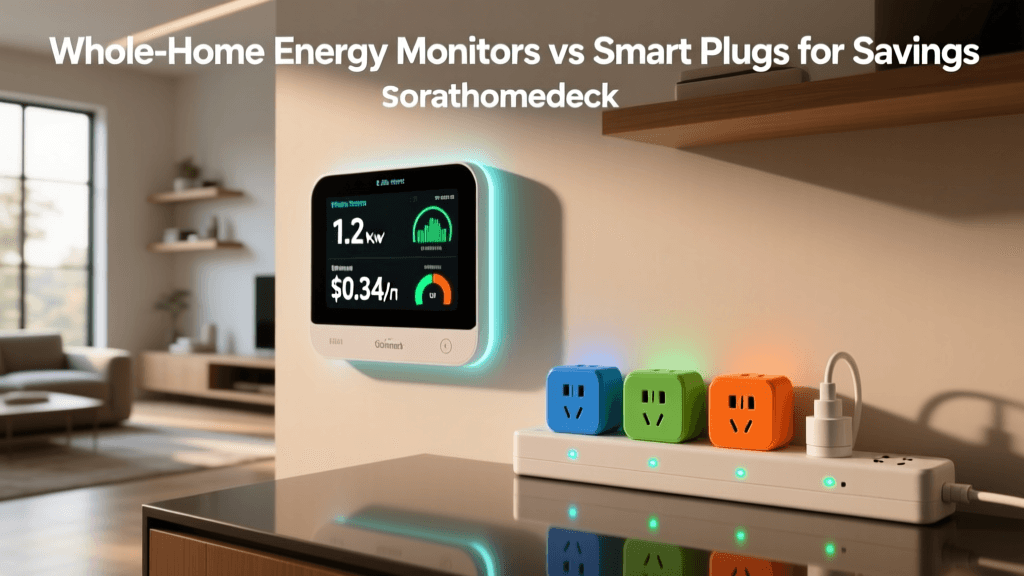
When building an energy-conscious smart home, you generally have two distinct hardware categories at your disposal: whole-home panel monitors and appliance-level smart plugs. Understanding the difference is critical for deploying the right tool for the right job.
Whole-home monitors connect directly to your electrical panel using Current Transformer (CT) clamps. They measure the magnetic field around your main power lines and individual breaker circuits to provide a macro-level view of your home's total energy consumption. Conversely, smart plugs sit between the wall outlet and the appliance, offering micro-level, highly accurate data for specific devices. Most comprehensive energy reduction strategies utilize a combination of both.
| Feature | Whole-Home Panel Monitors | Smart Plugs with Energy Monitoring |
|---|---|---|
| Installation | Moderate to Hard (Requires electrical panel access) | Easy (Plug-and-play) |
| Cost Range | $100 - $350 | $12 - $45 per plug |
| Granularity | Macro (Main mains + individual circuits) | Micro (Single appliance level) |
| Best Used For | HVAC, Water Heaters, EV Chargers, Solar tracking | Entertainment centers, PCs, window ACs, dehumidifiers |
| Network Protocol | Wi-Fi, Ethernet | Wi-Fi, Zigbee, Thread/Matter |
Top Smart Plugs for Appliance-Level Tracking
Smart plugs are the most accessible entry point into home energy monitoring. They require no electrical knowledge to install and immediately begin logging wattage, voltage, and historical kWh usage. Here are the top contenders in the current market:
1. Kasa Smart Plug with Energy Monitoring (EP25)
The TP-Link Kasa EP25 is widely considered the best value in energy monitoring. Priced around $15 to $20, it supports up to 15 amps, making it suitable for high-draw appliances like window air conditioners, space heaters, and dehumidifiers. The Kasa app provides excellent historical data visualization, allowing you to view real-time wattage, daily consumption, and monthly cost projections based on your local utility rate.
2. Eve Energy (Matter and Thread Enabled)
For users deeply embedded in the Apple HomeKit ecosystem or those looking to future-proof their home with the new Matter and Thread protocols, the Eve Energy plug is the premium choice. Costing around $40, it operates on a local Thread mesh network, meaning it does not clog up your Wi-Fi router or rely on cloud servers to report data. This local processing ensures lightning-fast response times and unparalleled privacy, though it requires a Thread border router (like an Apple TV 4K or HomePod Mini) to function optimally.
3. Wyze Plug Outdoor
Priced at approximately $15, this dual-outlet outdoor plug is rated for IP64 weather resistance. It is the perfect solution for tracking and automating outdoor lighting, pond pumps, or patio heaters. The ability to monitor the energy draw of outdoor equipment helps homeowners identify failing motors or inefficient landscape lighting setups that silently inflate utility bills.
Whole-Home Monitors: The Heavy Hitters
While smart plugs are excellent for individual devices, they cannot monitor hardwired appliances like your central HVAC system, electric oven, or water heater. For this, you need a whole-home energy monitor installed inside your main electrical breaker box. Safety Note: Always turn off the main breaker and consult a licensed electrician if you are not comfortable working inside an exposed electrical panel.
Emporia Vue 2 Smart Home Energy Monitor
The Emporia Vue 2 is currently the undisputed king of value in the panel-monitor space. For roughly $100 to $150, it includes 16 individual CT clamps, allowing you to monitor your main power feeds plus up to 16 specific circuits (e.g., separating the kitchen outlets, the HVAC compressor, and the EV charger). The Emporia app is incredibly robust, offering real-time solar production tracking, net metering calculations, and the ability to trigger smart plugs based on circuit-level thresholds. Its high sampling rate provides highly accurate data that closely mirrors your utility company's actual meter.
Sense Energy Monitor
Priced closer to $300, the Sense monitor takes a different approach. Instead of using 16 individual clamps, Sense uses a single pair of CT clamps on your main power lines and relies on advanced machine learning algorithms to "listen" to the electrical noise signatures of your appliances. Over time, the Sense AI attempts to automatically identify and separate your devices (e.g., recognizing the specific motor signature of your refrigerator compressor). While brilliant when it works, users with modern variable-speed inverter motors or complex HVAC systems may find the AI struggles to accurately disaggregate the data compared to Emporia's physical circuit-level tracking.
Visualizing Your Home's Energy Drain
Understanding where your money goes is the first step toward reducing your utility bill. The chart below illustrates a typical breakdown of monthly energy costs in an average American home, highlighting the massive impact of climate control and the persistent drain of phantom loads.
Average Monthly Energy Costs by Appliance Category
Actionable Strategies to Reduce Your Utility Bill
Owning the hardware is only half the battle. The true savings come from interpreting the data and automating your home's response. Here are actionable strategies to implement once your monitors are online.
1. Automate Vampire Power Elimination
Entertainment centers, gaming consoles, and desktop computers are notorious for drawing power even when "off." A large OLED TV and a gaming PC can easily draw 20 to 40 watts continuously in standby mode. By plugging these setups into a high-amperage smart plug, you can create a routine that completely cuts power to the circuit at 2:00 AM and restores it at 7:00 AM. This simple automation can save up to 15 kWh per month on a single entertainment setup.
2. Optimize HVAC and Dehumidifier Duty Cycles
Basement dehumidifiers and older window AC units often run inefficiently, cycling on and off without regard for actual room conditions or energy pricing. Using a smart plug with energy monitoring, you can track the exact kWh draw. If you notice your dehumidifier is pulling 300 watts continuously, you can integrate it with a separate smart temperature and humidity sensor. Set an automation to cut power via the smart plug once the room reaches 45% humidity, rather than relying on the appliance's often-inaccurate internal humidistat.
3. Shift Loads to Off-Peak Hours (Time-of-Use Rates)
Many utility companies are moving toward Time-of-Use (TOU) rate plans, where electricity is significantly more expensive during peak evening hours (e.g., 4:00 PM to 9:00 PM) and very cheap late at night. The U.S. Department of Energy highly recommends load shifting for homes on TOU plans. If you have an EV charger, a smart water heater, or a dishwasher on a smart circuit, configure your smart home hub to delay the activation of these high-draw appliances until after 11:00 PM. Shifting 100 kWh of usage from peak ($0.35/kWh) to off-peak ($0.08/kWh) rates saves you $27 in a single month on just one appliance.
4. Identify Failing Equipment via Wattage Spikes
Energy monitors are excellent diagnostic tools. A refrigerator compressor that normally draws 150 watts during its cooling cycle but suddenly begins drawing 350 watts and running for longer durations is a massive red flag. This spike in energy consumption often indicates failing door seals, dirty condenser coils, or a dying compressor motor. Catching this anomaly via your Emporia Vue or Kasa plug data allows you to perform maintenance before the appliance breaks down completely or runs up a massive electric bill.
Calculating Your ROI (Return on Investment)
Smart home energy devices are unique in that they are one of the few smart home products that can literally pay for themselves. To calculate your ROI, you must first determine your local cost per kWh (found on your utility statement).
The ROI Formula:
1. Identify a phantom load or inefficient appliance using your monitor.
2. Calculate its monthly wasted kWh.
3. Multiply by your utility rate to find the monthly dollar waste.
4. Divide the cost of the smart plug/monitor by the monthly savings to find your break-even point in months.
For example, if you discover an old secondary refrigerator in your garage is costing you $18 a month to run, and you replace it with a modern Energy Star unit or use a smart plug to turn it off during winter months, a $15 smart plug pays for itself in less than 30 days. Whole-home monitors like the Emporia Vue typically achieve ROI within 6 to 12 months through a combination of behavioral changes, load shifting, and identifying faulty hardwired equipment.
Conclusion
Transitioning to a smart home is often marketed as a pursuit of convenience and luxury, but its most profound impact is often financial and environmental. By deploying a strategic mix of whole-home panel monitors and appliance-level smart plugs, you transform your home from a passive consumer of electricity into an actively managed micro-grid. Whether you are looking to eliminate phantom loads, shift heavy appliances to off-peak TOU windows, or simply gain peace of mind knowing exactly where your money is going, smart energy monitoring is the foundational first step toward a truly optimized, cost-efficient home.