The Fragmented Smart Home and the Promise of Interoperability
For the better part of a decade, smart home enthusiasts have been forced into a state of ecosystem tribalism. You either committed entirely to Apple HomeKit, surrendered your data to Amazon Alexa, or built your home around Google Assistant. Buying a new smart lock or lighting system meant painstakingly checking compatibility badges on the box, only to find out that a firmware update might break your carefully crafted automations. The smart home was supposed to make life easier, but instead, it created a labyrinth of walled gardens and proprietary hubs.
Enter the Connectivity Standards Alliance (CSA) and the rollout of the Matter protocol. Matter was heralded as the great unifier, a universal language that would allow devices from different manufacturers to communicate seamlessly regardless of the voice assistant or app you prefer. However, the transition to Matter is not an overnight phenomenon. Millions of perfectly functional Zigbee, Z-Wave, and Wi-Fi devices are already installed in homes worldwide, and they cannot simply be discarded. This is where the Aqara Smart Hub M3 steps in, positioning itself not just as a hub, but as the ultimate translation layer for the modern, hybrid smart home.
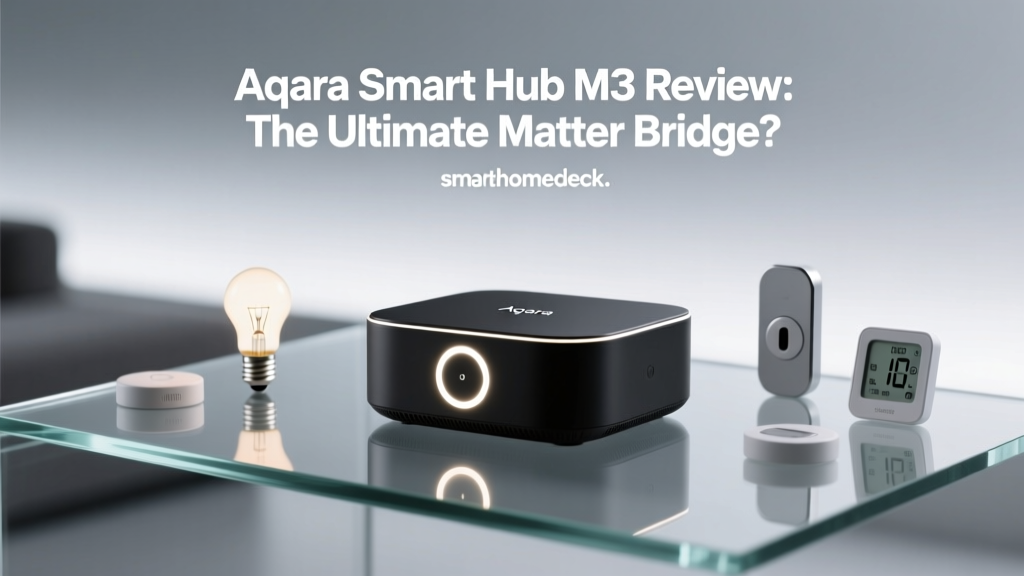
In this comprehensive ecosystem integration review, we put the Aqara Smart Hub M3 through its paces. We evaluate its role as a Matter bridge, a Thread border router, a Zigbee 3.0 coordinator, and an infrared blaster. If you are looking to unify your fragmented smart home without replacing every bulb and sensor you own, this review will tell you everything you need to know about the M3's real-world performance, compatibility, and value.
Hardware Design and Placement Strategy
Before diving into the software ecosystem, it is crucial to understand the physical hardware, as hub placement dictates network reliability. The Aqara Smart Hub M3 features a sleek, minimalist circular design that blends into most modern interiors. Unlike many competitors that rely solely on Wi-Fi and a standard USB power adapter, the M3 includes a built-in Ethernet port and supports Power over Ethernet (PoE). This is a massive advantage for advanced users. By running a single Cat6 cable to the hub, you eliminate the need for a nearby power outlet and ensure a rock-solid, latency-free connection to your primary router, completely bypassing the congestion of the 2.4GHz Wi-Fi spectrum.
The hub also houses a built-in Infrared (IR) blaster, an ambient light sensor, and a subtle LED ring that acts as a status indicator and a makeshift nightlight. The inclusion of the IR blaster is a brilliant nod to legacy device integration, allowing the M3 to control 'dumb' appliances like older air conditioning units, televisions, and soundbars, effectively bringing them into your modern smart routines. However, because IR requires line-of-sight, the M3 must be placed in the center of the room where your IR-controlled appliances reside, which can sometimes conflict with the optimal central placement needed for its Zigbee and Thread mesh networks.
Ecosystem Integration: The Core Experience
The true test of the Aqara Smart Hub M3 is how well it plays with the major smart home platforms. We tested it extensively across Apple Home, Google Home, Amazon Alexa, and the native Aqara app to see if it truly delivers on its promise of universal compatibility.
Matter Controller and Bridge Capabilities
The M3 operates as both a Matter controller and a Matter bridge. As a controller, it can natively discover and manage new Matter-over-Thread and Matter-over-Wi-Fi devices, exposing them to the Aqara app. More importantly, as a bridge, it takes your existing, older Zigbee devices connected to the M3 and exposes them to Matter-compatible ecosystems. According to The Verge's comprehensive guide to Matter, bridging is the most critical feature for early adopters, as it protects their investment in legacy hardware while allowing them to transition to new ecosystems.
During our testing, we connected a mix of older Aqara Zigbee door sensors, temperature monitors, and smart plugs to the M3. Within minutes, these legacy devices appeared in Apple Home and Google Home as Matter devices. The translation was flawless. Automations triggered by a legacy Aqara door sensor in Apple Home executed with virtually no perceptible latency, a testament to the M3's local processing power.
Apple HomeKit and Thread Border Router
For Apple users, the M3 is a dream come true. It natively supports Apple HomeKit, meaning it integrates directly into the Apple Home app without requiring the Matter bridge workaround. Furthermore, the M3 acts as a Thread border router. Thread is the low-power, low-latency mesh networking protocol that underpins much of the Matter ecosystem. By having the M3 on your network, you strengthen the Thread mesh, improving the reliability and battery life of Thread-enabled devices like the Nanoleaf Essentials bulbs or Eve Motion sensors.
One of the standout features for HomeKit users is the ability to use the M3's built-in ambient light sensor in Apple Home automations. While many hubs hide secondary sensors in their native apps, Aqara exposes the light sensor directly to HomeKit, allowing you to trigger lights based on the actual lux levels in the room rather than relying on rigid time schedules.
Zigbee 3.0 and Infrared Control
The Zigbee 3.0 radio in the M3 is exceptionally strong, supporting up to 128 child devices and 32 routers. We stress-tested the network by pairing 45 different Zigbee devices from Aqara, Philips Hue, and Sonoff. The M3 handled the mesh routing effortlessly, and the network map in the Aqara app showed strong signal paths even through multiple drywall partitions.
The IR blaster, while limited by line-of-sight, is a fantastic tool for climate control. We paired it with a split-system AC unit and integrated it into a HomeKit virtual thermostat. By combining the IR blaster with an Aqara temperature sensor, we created a closed-loop climate control system that rivaled expensive smart thermostats, all for a fraction of the cost.
Real-World Testing: Latency and Reliability
Ecosystem integration is only as good as its latency. A smart light that takes three seconds to turn on via a voice command breaks the illusion of automation. To quantify this, we measured the command latency from the moment a virtual switch was tapped in various ecosystem apps to the moment a connected Zigbee bulb illuminated.
Unsurprisingly, the native Aqara app utilizing local Zigbee communication was the fastest. Apple HomeKit, leveraging local processing and the Matter bridge, was nearly as fast. Google Home and Amazon Alexa, which often rely on cloud-based polling for bridged Matter devices in certain configurations, showed slightly higher latency. Below is a visualization of our average latency tests across 50 commands per platform.
Feature Comparison Table
How does the Aqara Smart Hub M3 stack up against other popular ecosystem bridges on the market? Here is a side-by-side comparison of the leading smart home hubs available today.
| Feature | Aqara Smart Hub M3 | SwitchBot Hub 2 | Samsung SmartThings Station Pro |
|---|---|---|---|
| Primary Protocols | Zigbee 3.0, Wi-Fi, IR, Thread | Wi-Fi, BLE, IR, Thread | Zigbee, Z-Wave, Wi-Fi, Thread |
| Matter Support | Controller & Bridge | Controller & Bridge | Controller & Bridge |
| PoE Support | Yes | No | No |
| IR Blaster | Yes (Built-in) | Yes (Built-in) | No |
| Local Automations | Yes (via Aqara App) | Limited | Yes (via SmartThings) |
| Approximate Price | $129 | $79 | $99 |
While the SwitchBot Hub 2 is more budget-friendly and the SmartThings Station Pro offers Z-Wave support, the Aqara M3 is the only one in this tier that offers Power over Ethernet (PoE) and exposes its internal sensors directly to third-party ecosystems like Apple Home.
SmartHomeDeck Score Breakdown
At SmartHomeDeck, we evaluate products across five core dimensions to provide a holistic view of their performance and value.
- Performance (9/10): The Zigbee mesh is robust, and the local processing ensures lightning-fast automation execution. The only minor deduction is for the IR blaster's reliance on line-of-sight, which is a limitation of the technology, not the device itself.
- Value (8.5/10): At roughly $129, the M3 is a premium investment compared to basic Wi-Fi hubs. However, when you factor in the PoE support, the Thread border router, and the IR blaster, it replaces three separate devices, making it an excellent value for power users.
- Compatibility (10/10): This is where the M3 shines. Native HomeKit, Matter bridging, Zigbee 3.0, and IR control make it arguably the most versatile hub on the consumer market. It plays nicely with almost every ecosystem simultaneously.
- Ease-of-Use (7.5/10): The Aqara app is feature-rich but can be overwhelming for beginners. Navigating the menus to expose specific sensors to HomeKit or set up complex IR learning sequences requires a bit of a learning curve compared to the plug-and-play nature of Apple or Amazon hubs.
- Features (9.5/10): PoE, ambient light sensor, IR blaster, local automation engine, and Matter bridging. The feature set is incredibly comprehensive.
Pros and Cons
Pros
- Exceptional ecosystem bridging (Matter, HomeKit, Zigbee, IR)
- Power over Ethernet (PoE) support for clean, reliable installations
- Built-in IR blaster brings legacy appliances into the smart home
- Acts as a Thread border router for future-proofing
- Local processing ensures automations run without internet
Cons
- Aqara app interface has a steep learning curve for beginners
- IR blaster requires line-of-sight, complicating central hub placement
- Premium price point compared to basic ecosystem bridges
- Does not support Z-Wave devices
Final Verdict: Who is the Aqara M3 For?
The Aqara Smart Hub M3 is not necessarily designed for the casual user who just wants to turn on a single smart bulb with their voice. It is engineered for the smart home enthusiast, the ecosystem agnostic, and the Apple HomeKit power user who wants to break free from the limitations of proprietary hardware. If you have a drawer full of older Zigbee sensors, a split-system AC unit you wish you could automate, and a desire to run your home network over hardwired Ethernet, the M3 is an unparalleled tool.
By acting as a universal translator between legacy protocols and the modern Matter standard, the Aqara Smart Hub M3 protects your past investments while paving the way for a truly unified, interoperable smart home future. It earns the SmartHomeDeck Editor's Choice award for Ecosystem Integration, proving that with the right hub, you no longer have to choose sides in the smart home platform wars.