Inovelli Red Series Smart Dimmer Switch Review
When building a truly automated and responsive smart home, the physical controls on your walls matter just as much as the software running in the background. For smart home enthusiasts who demand granular control, advanced scene triggering, and visual feedback, the Inovelli Red Series Smart Dimmer Switch has long been considered the gold standard. Unlike basic smart switches that simply turn lights on & off via an app, the Red Series is engineered for power users who want to push the boundaries of home automation.
In this comprehensive review, we will break down the performance, unique features, installation requirements, and ecosystem compatibility of the Inovelli Red Series dimmer. Whether you are running a massive Zigbee or Z-Wave mesh network, or looking for the perfect companion for your smart bulbs, this switch might just be the missing piece in your smart home puzzle. If you are comparing options, be sure to check out our roundup of the best smart dimmer switches on the market.
Product Overview
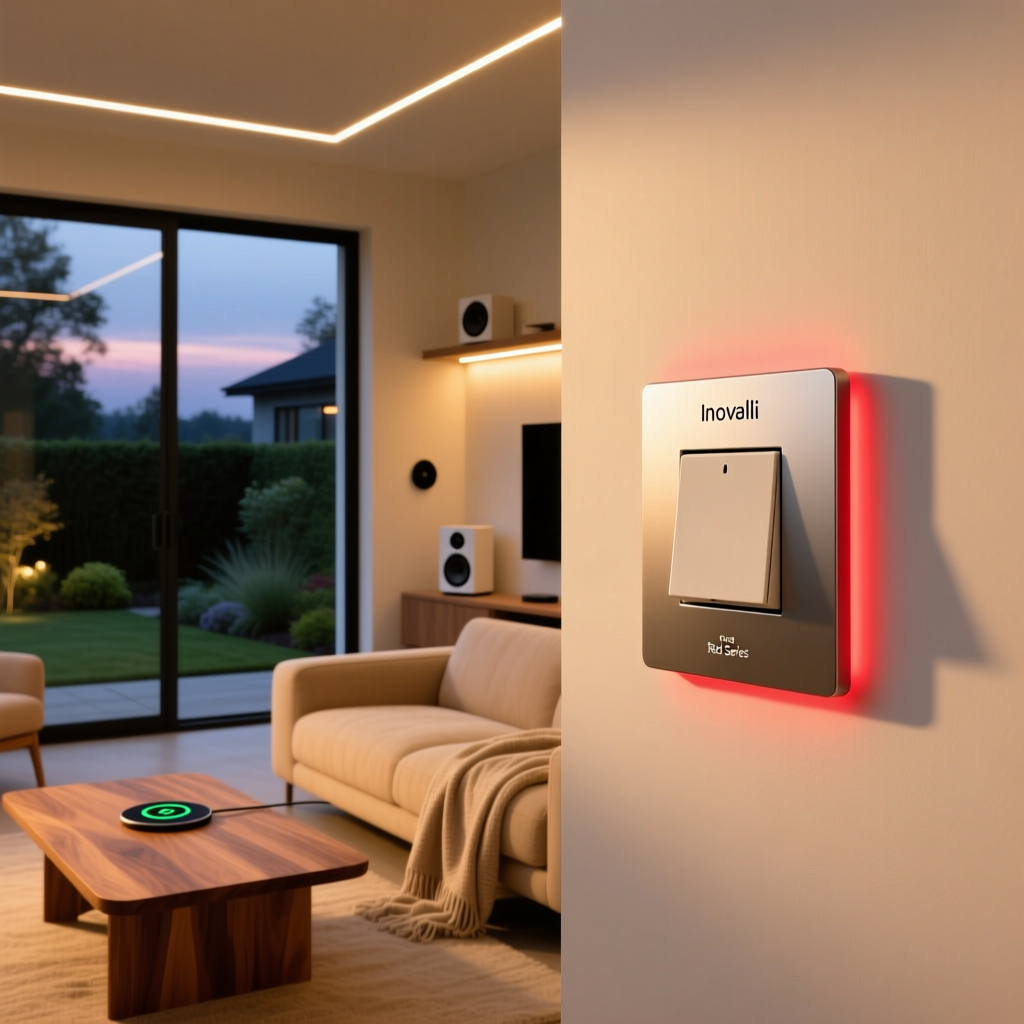
The Inovelli Red Series represents the brand's premium, enthusiast-tier line of smart switches. While their Black Series offers reliable, no-frills smart control, the Red Series is packed with advanced hardware and firmware capabilities designed for heavy automation routines. The dimmer switch features a sleek, modern paddle design with a signature RGB LED notification bar that runs vertically along the side of the switch.
Built to support complex mesh networks, the Red Series dimmer acts as a repeater (when hardwired), strengthening your overall smart home signal. It supports advanced scene control, allowing you to trigger different automations based on how many times you tap the paddle. Furthermore, it includes a dedicated 'Smart Bulb Mode,' which solves one of the most common dilemmas in smart lighting: how to use smart switches without cutting power to your color-changing smart bulbs. For a deeper dive into this common dilemma, read our guide on smart bulbs vs. smart switches.
Design & Key Features
The physical design of the Inovelli Red Series is both minimalist and highly functional. The large rocker paddle provides a satisfying tactile click, while the bottom of the switch houses a small, physical air-gap switch. This air-gap switch is a brilliant safety feature that completely cuts power to the fixture, allowing you to safely change light bulbs without needing to flip the breaker at your electrical panel.
The RGB LED Notification Bar
The standout feature of the Red Series is undoubtedly the vertical RGB LED bar. This is not merely an indicator light to help you find the switch in the dark; it is a fully customizable notification center. Through your smart home hub, you can program the LED bar to display specific colors, brightness levels, and even animated effects like pulsing or chasing. For example, you can set the bar to pulse red if your smoke detectors are triggered, turn blue if rain is in the forecast, or glow green when your front door is unlocked. This visual feedback system transforms a standard wall switch into an ambient information display.
Advanced Scene Control
Standard smart switches typically only register an 'on' or 'off' command. The Inovelli Red Series dimmer recognizes multi-tap sequences. You can program up to five taps up, five taps down, and various hold sequences. This means a single physical switch can trigger dozens of different automations. A single tap up might turn on the ceiling light, while a double tap up could trigger a 'Movie Time' scene that dims the lights, lowers the smart blinds, and turns on the television.
Smart Bulb Mode & Local Protection
Smart Bulb Mode is a critical feature for modern lighting setups. When enabled, the internal relay of the switch is decoupled from the paddle. This means that physically pressing the switch no longer cuts the electrical current to the fixture. Instead, the paddle sends a digital signal to your hub, which then commands your smart bulbs (like Philips Hue or LIFX) to turn on or off. This ensures your smart bulbs never lose power and remain accessible to your network. Additionally, the Local Protection feature allows you to disable physical control entirely, preventing guests or children from accidentally turning off your smart lighting routines.
Performance & Reliability
When it comes to performance, the Inovelli Red Series dimmer is exceptionally responsive. Because it processes commands locally at the switch level before sending them to the hub, the latency between pressing the paddle and the lights reacting is virtually non-existent. This local processing is a massive advantage over Wi-Fi-based switches that rely on cloud servers to execute basic commands.
The dimming resolution is incredibly smooth, offering granular control from 1% to 100%. Unlike cheaper dimmers that cause LED bulbs to flicker or buzz at low levels, the Inovelli switch utilizes advanced phase-cut dimming technology that keeps most modern LED bulbs stable and quiet. Users can also configure the minimum and maximum dimming thresholds via hub parameters to ensure their specific brand of LED bulbs never flicker at the bottom end of the dimming spectrum.
From a network perspective, the Red Series is a powerhouse. If you are utilizing a Z-Wave or Zigbee mesh network, this switch acts as an always-on repeater. It actively routes signals for other devices, significantly improving the reliability and range of your smart home mesh. For those looking to optimize their network topology, understanding how mesh networks operate is crucial, and the Inovelli dimmer serves as an excellent backbone node.
Setup Experience & Installation
Installing the Inovelli Red Series dimmer requires a basic understanding of home electrical wiring. It is important to note that this switch requires a neutral wire to function. While most modern homes have neutral wires in their switch boxes, older homes may not. If your home lacks a neutral wire, you will need to look into alternative no-neutral smart switches or consult an electrician to run new wiring.
The wiring process involves connecting the Line (power from the breaker), Load (power to the light fixture), Neutral, and Ground wires. Inovelli provides clear, color-coded wiring diagrams, and the terminal screws are deep and secure, accommodating both solid and stranded copper wire. Once wired, the physical air-gap switch at the bottom must be flipped on to provide power to the switch's internal radio.
Pairing the switch to your hub is straightforward. By tapping the configuration button (located near the top of the switch) a specific number of times, the device enters inclusion mode. The RGB LED bar will pulse to indicate it is searching for a hub. Once paired, the real setup begins: configuring the dozens of device parameters. While basic on/off/dim functionality works immediately, unlocking the full potential of the multi-tap scenes and LED notifications requires diving into the custom device handlers or parameter settings within your specific smart home hub.
Ecosystem Compatibility
The Inovelli Red Series is designed to be hub-agnostic, but the level of integration varies depending on the platform you choose. Because it relies on standard Z-Wave or Zigbee protocols (depending on the specific model variant you purchase), it avoids the walled gardens of proprietary Wi-Fi ecosystems.
- Hubitat: Hubitat is arguably the best platform for Inovelli switches. The community and Inovelli themselves have developed advanced native drivers that expose every single parameter, multi-tap scene, and LED notification effect directly in the Hubitat dashboard without requiring complex custom code.
- Home Assistant: For the ultimate tinkerer, pairing the Red Series with Home Assistant via Z-Wave JS or Zigbee2MQTT unlocks limitless potential. You can create complex YAML automations based on the exact tap sequences and manipulate the LED bar using hex color codes and effect enums.
- SmartThings: While SmartThings supports the switch out of the box for basic dimming, getting the advanced scene control and LED notifications to work seamlessly requires installing custom Edge Drivers developed by the Inovelli community.
Ultimately, the Red Series thrives in local, enthusiast-grade ecosystems. If you are building a system that prioritizes local execution and privacy, this switch is a perfect fit.
Pros & Cons
Pros:
- Highly customizable RGB LED notification bar for visual alerts.
- Advanced multi-tap scene control for triggering complex automations.
- True Smart Bulb Mode prevents cutting power to smart fixtures.
- Excellent mesh repeater capabilities for Z-Wave & Zigbee networks.
- Physical air-gap switch for safe bulb changes.
- Local processing ensures zero latency for physical paddle presses.
Cons:
- Strictly requires a neutral wire, limiting use in older homes.
- Steep learning curve for configuring advanced parameters and scenes.
- Premium price point compared to basic, entry-level smart dimmers.
- Requires a compatible smart home hub (no built-in Wi-Fi or cloud app).
Smart Home Deck Score
The Inovelli Red Series Smart Dimmer Switch earns an outstanding overall Deck Score of 9.2 out of 10. It loses minor points in the Setup category due to the strict neutral wire requirement and the technical knowledge needed to configure advanced parameters. However, it scores near-perfect marks in Features and Performance, cementing its status as a top-tier choice for smart home enthusiasts.
Frequently Asked Questions
Does the Inovelli Red Series require a neutral wire?
Yes, the Inovelli Red Series dimmer and on/off switches strictly require a neutral wire to operate. The neutral wire is necessary to keep the internal Z-Wave or Zigbee radio and the RGB LED bar powered at all times, even when the light fixture itself is turned off. If your home was built before the 1980s, you may need to consult an electrician to verify if a neutral wire is present in your switch boxes.
Can I use the Red Series dimmer with smart bulbs?
Absolutely. In fact, this is one of the primary use cases for the switch. By enabling 'Smart Bulb Mode' in the device settings, the internal relay is bypassed. The switch will no longer cut physical power to the smart bulbs, ensuring they stay connected to your network. Instead, the paddle will send digital signals to your hub to control the bulbs' brightness and color states.
What is the difference between the Red Series and Black Series?
The Black Series is Inovelli's entry-level, budget-friendly line designed for basic smart control (on, off, and dimming). The Red Series is the premium enthusiast line. The Red Series includes the RGB LED notification bar, advanced multi-tap scene control, Smart Bulb Mode, and local protection features. If you just want app control for standard dumb bulbs, the Black Series is sufficient. If you want visual notifications and complex scene triggering, the Red Series is required.
Which hub works best with Inovelli switches?
While Inovelli switches work with almost any Z-Wave or Zigbee hub, Hubitat and Home Assistant offer the best out-of-the-box experiences for advanced features. These local hubs allow for deep parameter configuration, custom LED effects, and complex multi-tap scene routing without relying on cloud servers. SmartThings users can also achieve full functionality, but it typically requires installing community-developed custom Edge Drivers.