The Invisible Language of Your Smart Home
When you unbox a new smart bulb, plug it in, and connect it to your app, a complex symphony of wireless communication begins. But how do these devices actually talk to your phone, your voice assistant, and each other? The answer lies in smart home wireless protocols. A protocol is essentially the language and set of rules that devices use to transmit data. Choosing the right protocol—or understanding how to mix them—is the single most important decision you will make when building a reliable, responsive smart home.
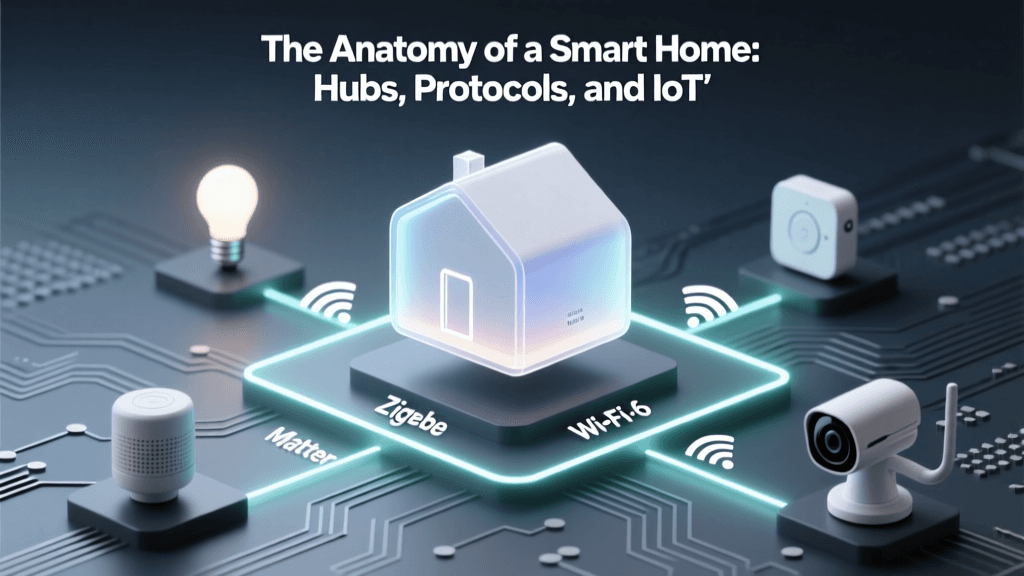
Unlike standard consumer electronics that simply rely on Wi-Fi, the smart home ecosystem is fragmented across several specialized wireless standards. Each was designed to solve specific problems regarding power consumption, bandwidth, range, and network congestion. In this deep explainer, we will dissect the foundational technologies powering your home: Wi-Fi, Zigbee, Z-Wave, Thread, and the revolutionary new application layer, Matter.
Breaking Down the Core Wireless Protocols
To build a robust smart home, you must understand the strengths and limitations of the underlying radio frequencies and network topologies. Let us explore the 'Big Four' radio protocols and the unifying layer that sits on top of them.
Wi-Fi: The High-Bandwidth Heavyweight
Wi-Fi (based on the IEEE 802.11 standard) is the most ubiquitous wireless protocol in the world. Operating primarily on the 2.4 GHz and 5 GHz bands, Wi-Fi offers massive bandwidth, making it ideal for data-heavy devices like security cameras, video doorbells, and smart displays.
- Best For: Ring Video Doorbells, Ecobee Thermostats, TP-Link Kasa Smart Plugs, and high-definition streaming devices.
- The Drawback: Wi-Fi is power-hungry and operates on a 'star' topology, meaning every device must connect directly to your router. If you have 50 Wi-Fi smart bulbs, your standard consumer router will likely crash under the strain of managing that many simultaneous IP addresses. Furthermore, battery-operated devices cannot use standard Wi-Fi because it drains batteries in a matter of days.
- Cost Range: $15 for a smart plug up to $250 for a smart camera.
Zigbee: The Low-Power Mesh Standard
Zigbee operates on the same 2.4 GHz frequency as Wi-Fi but uses the IEEE 802.15.4 standard, which prioritizes low data rates and ultra-low power consumption. Zigbee utilizes a mesh network topology. Instead of every device talking to the router, devices talk to each other. A smart plug can relay a signal from a distant motion sensor back to the central hub.
- Best For: Philips Hue smart bulbs, Aqara door/window sensors, and battery-powered leak detectors.
- The Drawback: Because it shares the 2.4 GHz band with Wi-Fi and Bluetooth, Zigbee can suffer from interference in dense apartment buildings. It also requires a dedicated Zigbee coordinator (hub) to bridge the mesh network to your home internet.
- Cost Range: $10 for basic sensors, $50 for advanced smart bulbs.
Z-Wave: The Interference-Free Security Choice
Z-Wave is a proprietary, highly regulated mesh protocol designed exclusively for home automation. Its biggest advantage is its operating frequency. In North America, Z-Wave operates on the 908.42 MHz sub-GHz band (868.42 MHz in Europe). Because it avoids the crowded 2.4 GHz spectrum entirely, Z-Wave experiences virtually zero interference from your Wi-Fi network or your neighbor's Bluetooth devices.
- Best For: Schlage smart locks, Aeotec multipurpose sensors, and critical security infrastructure where signal reliability is non-negotiable.
- The Drawback: Lower bandwidth means it cannot support audio or video. Additionally, because it is a proprietary standard controlled by Silicon Labs, hardware certification can make Z-Wave devices slightly more expensive than their Zigbee counterparts.
- Cost Range: $25 for sensors, $150+ for premium smart locks.
According to the Z-Wave Alliance, the protocol's S2 security framework and SmartStart feature make it one of the most secure and user-friendly ways to add physical security devices to a smart home network without risking IP-based hacking vulnerabilities.
Thread: The Future of IP-Based Mesh
Thread is the newest major radio protocol, and it is fundamentally changing the landscape. Like Zigbee, Thread is built on the 802.15.4 low-power mesh radio. However, Thread is IPv6 native using 6LoWPAN. This means every Thread device gets its own IP address, allowing it to communicate directly with the internet and other IP devices without needing a proprietary translation bridge.
- Best For: Eve Energy smart plugs, Nanoleaf smart lighting, and next-generation Apple HomeKit and Google Home ecosystems.
- The Drawback: Thread requires a 'Border Router' (like an Apple TV 4K, Nest Hub, or HomePod mini) to connect the Thread mesh to your Wi-Fi network. While adoption is growing rapidly, the selection of Thread-native devices is still smaller than Zigbee.
The Thread Group emphasizes that Thread's self-healing mesh network eliminates single points of failure; if one router goes offline, the network dynamically reroutes data through other devices seamlessly.
Matter: The Unifying Application Layer
It is crucial to understand that Matter is not a wireless radio protocol. Matter is an application layer that runs on top of Thread, Wi-Fi, and Ethernet. Developed by the Connectivity Standards Alliance (CSA), Matter standardizes how devices interpret commands. Before Matter, an Apple HomeKit bulb and a Google Home bulb spoke different software languages. Matter creates a universal translator.
'Matter allows devices to work seamlessly across different ecosystems, ensuring that consumers are not locked into a single vendor or voice assistant. It operates on the principle of local control, reducing latency and cloud dependency.' — Connectivity Standards Alliance (CSA)
If you are buying new devices today, looking for the Matter logo ensures future-proof compatibility across Apple, Google, Amazon, and Samsung ecosystems.
Protocol Comparison Matrix
| Protocol | Frequency Band | Topology | Power Draw | Max Network Nodes | Best Use Case |
|---|---|---|---|---|---|
| Wi-Fi | 2.4 GHz / 5 GHz | Star | High | ~50-100 (Router dependent) | Cameras, Thermostats, Displays |
| Zigbee | 2.4 GHz | Mesh | Very Low | 65,000+ | Lighting, Battery Sensors |
| Z-Wave | Sub-GHz (908.42 MHz) | Mesh | Very Low | 232 | Smart Locks, Security Systems |
| Thread | 2.4 GHz | Mesh (IPv6) | Very Low | 250+ | Next-Gen Plugs, Fast Lighting |
Visualizing Smart Home Protocol Costs
When budgeting for a smart home, the protocol you choose impacts the bottom line. Wi-Fi devices often carry a premium for internal IP chips, while Zigbee sensors are incredibly cheap to manufacture. Z-Wave commands a premium due to its proprietary certification and sub-GHz radios.
Local vs. Cloud Control: Why It Matters
One of the most vital concepts in smart home basics is understanding the difference between local and cloud control. When you press a button in an app to turn on a Wi-Fi smart plug, the signal often travels from your phone, to the manufacturer's cloud server in another country, and back down to your home router. This introduces latency (lag) and creates a single point of failure: if your internet goes down, your smart home breaks.
Protocols like Zigbee, Z-Wave, and Thread (via Matter) are designed for local control. When paired with a local hub, the command travels directly from the hub to the device inside your house. The response time drops from 500 milliseconds to under 50 milliseconds, and the system continues to function perfectly even if your ISP experiences an outage.
Actionable Guide: Building Your Multi-Protocol Hub
The modern smart home is not a monolith; it is a hybrid ecosystem. To achieve the best results, you should utilize a multi-protocol hub that can manage Zigbee, Z-Wave, and Thread simultaneously, while reserving your Wi-Fi bandwidth for high-data devices. Here are the top hub recommendations for different user profiles:
1. The Beginner: Samsung SmartThings Station
- Cost: ~$129
- Protocols: Zigbee, Matter-over-Thread (via firmware updates), Wi-Fi.
- Why choose it: Plug-and-play simplicity, deep integration with Samsung appliances and standard consumer brands.
2. The Enthusiast: Hubitat Elevation
- Cost: ~$149
- Protocols: Zigbee 3.0, Z-Wave Plus V2, LAN.
- Why choose it: 100% local processing. Hubitat is famous for its blazing-fast automation execution and robust Rule Machine, making it perfect for complex logic without relying on the cloud.
3. The Power User: Home Assistant Green
- Cost: ~$99 (Requires external USB dongles for Zigbee/Z-Wave)
- Protocols: Agnostic (supports virtually every protocol via integrations and USB radios like the Sonoff Zigbee 3.0 Dongle Plus).
- Why choose it: Open-source, unparalleled privacy, and supports over 2,000 integrations. It is the ultimate command center for a mixed-protocol home.
Pro Tips for Network Optimization
- Separate your SSIDs: Create a dedicated 2.4 GHz Wi-Fi network specifically for your IoT devices. This prevents smart plugs from congesting the 5 GHz network your laptops and phones use for streaming.
- Build a strong Mesh: For Zigbee and Z-Wave, mains-powered devices (like smart plugs and wall switches) act as signal repeaters. Place them strategically between your hub and battery-powered sensors to eliminate dead zones.
- Check Z-Wave Frequencies: Z-Wave frequencies are regional. A 908.42 MHz US Z-Wave lock will not communicate with an 868.42 MHz European Z-Wave hub. Always buy hardware native to your region.
- Embrace Border Routers: If you are investing in the Apple or Google ecosystem, ensure you have at least one Thread Border Router (like a Nest Wifi Pro or HomePod mini) on each floor of your house to ensure a strong Thread mesh signal.
Conclusion
Understanding smart home wireless protocols is the key to transitioning from a frustrating collection of disconnected gadgets to a truly intelligent, automated home. By offloading low-power sensors and switches to Zigbee, Z-Wave, or Thread, you free up your Wi-Fi network for the heavy lifting. As the industry rallies behind the Matter standard, the boundaries between these ecosystems are blurring, promising a future where compatibility is guaranteed, and local control is the default. Plan your network topology wisely, invest in a quality local hub, and your smart home will operate flawlessly for years to come.