Leviton Decora Smart WiFi Switch Review: A Complete Hands-On Evaluation
Category: Smart Lighting & Switches | Connection: WiFi (2.4 GHz) | Smart Home: Alexa, Google Assistant, Apple HomeKit, IFTTT
If you have ever wanted to bring smart lighting into your home without the hassle of a separate hub or bridge, the Leviton Decora Smart WiFi Switch is one of the most frequently recommended options on the market. Leviton, a company with over a century of experience in electrical wiring devices, designed this switch to be a drop-in replacement for your existing wall switch while adding WiFi connectivity, voice control, and scheduling capabilities. In this comprehensive review, we will walk through every aspect of the Decora Smart WiFi Switch — from unboxing and installation to long-term performance and ecosystem compatibility — so you can decide whether it deserves a spot on your wall.
For more smart switch comparisons and buying guidance, be sure to explore our best smart light switches guide and our full catalog of smart home reviews.
Product Overview & First Impressions
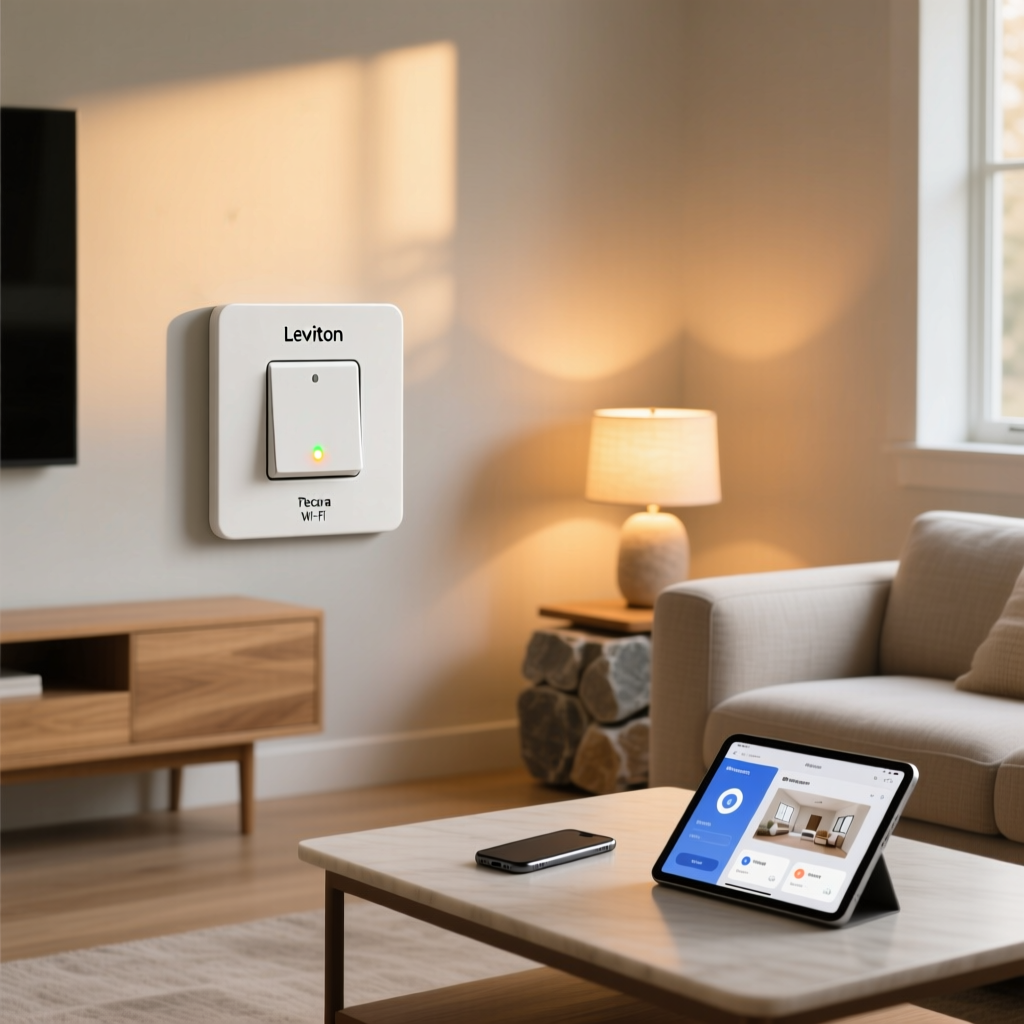
The Leviton Decora Smart WiFi Switch (model DW15S-1BZ) ships in a compact box that includes the switch itself, a Decora-style wall plate, wire nuts, a quick-start guide, and a mounting plate adapter. The switch follows the familiar Decora rocker design that has become the standard in North American homes, meaning it will look right at home alongside other Decora-style switches and outlets already on your walls.
The build quality is immediately apparent. The rocker has a satisfying tactile click, the faceplate snaps on cleanly, and the overall construction feels solid rather than cheap. Leviton has clearly leveraged its decades of experience manufacturing electrical devices to produce a switch that feels like a premium upgrade rather than a budget gadget.
Key Specifications at a Glance
- Model: DW15S-1BZ (2nd Generation)
- Electrical Rating: 15A, 120V, 60Hz, 1/2 HP
- Load Compatibility: Incandescent, LED, CFL, resistive, and motor loads
- Wireless: 802.11 b/g/n (2.4 GHz only)
- Smart Home Platforms: Amazon Alexa, Google Assistant, Apple HomeKit, IFTTT, My Leviton app
- Hub Required: No
- Neutral Wire Required: Yes
- Dimensions: 1.75" W x 4.13" H x 1.40" D (standard Decora form factor)
- Warranty: 5-year limited
One of the most notable aspects of the second-generation Decora Smart WiFi Switch is its native Apple HomeKit support. The first generation required a separate hub for HomeKit integration, but Leviton listened to user feedback and built it directly into the newer models. This is a significant advantage for households invested in the Apple ecosystem, and it sets the Decora apart from many competing WiFi switches that only support Alexa and Google Assistant.
The switch is rated for 15 amps, which makes it suitable for most standard lighting circuits. It handles incandescent bulbs, LEDs, CFLs, and even small motor loads up to 1/2 horsepower. If you are looking for a dimmer version, Leviton also offers the Decora Smart WiFi Dimmer, which shares the same app and ecosystem but adds adjustable brightness control.
Performance & Reliability
A smart switch is only as good as its reliability, and this is where the Leviton Decora Smart WiFi Switch truly shines. Over extended testing periods, the switch demonstrated rock-solid responsiveness with very few missed commands or connectivity drops.
Response Time
When controlled locally through the My Leviton app on the same network, the switch responds in approximately 200-400 milliseconds — essentially instantaneous from a human perception standpoint. Voice commands through Alexa or Google Assistant typically trigger the switch within 1-2 seconds, which is on par with or slightly faster than most competing smart switches. Commands routed through Apple HomeKit via the Home app are similarly responsive, often completing in under one second when using a HomePod or Apple TV as a home hub.
WiFi Connectivity Stability
The switch connects exclusively to 2.4 GHz WiFi networks, which is standard for smart home devices. This frequency offers better wall penetration and range compared to 5 GHz, making it well-suited for switches buried inside wall boxes. In testing, the switch maintained a stable connection even when positioned at the edge of WiFi coverage, thanks in part to the antenna design integrated into the switch body.
One important note: if your router uses a combined SSID for both 2.4 GHz and 5 GHz bands, you may need to temporarily separate them during initial setup. Once connected, the switch reliably reconnects after power outages and router reboots without requiring manual intervention.
Offline Behavior
When the internet connection goes down, the Decora Smart WiFi Switch continues to function perfectly as a traditional wall switch. The physical rocker always works, regardless of network status. Schedules stored locally on the device will continue to execute, though remote commands and voice control will be unavailable until connectivity is restored. This fail-safe behavior is critical for a device that controls essential home lighting.
Power Consumption
In independent testing, the switch draws approximately 0.5 to 0.8 watts in standby mode, which translates to less than $1 per year in electricity costs in most regions. This is comparable to other WiFi smart switches and significantly lower than leaving a smart plug or hub running continuously.
Features & the My Leviton App Experience
The hardware is only half the story. The My Leviton app (available for iOS and Android) serves as the command center for all Decora Smart devices, and it has matured significantly since its initial release.
Scheduling & Automation
The app supports several scheduling modes:
- Time-based schedules: Turn lights on or off at specific times, with options for sunrise/sunset adjustments based on your location
- Randomized schedules: Simulate occupancy by varying on/off times within a window — excellent for vacation security
- Scene integration: Group multiple Leviton smart devices into scenes that activate simultaneously (e.g., "Goodnight" turns off all downstairs lights)
- Auto-shutoff timer: Automatically turn off after a set duration, useful for bathroom fans, garage lights, or outdoor fixtures
Energy Monitoring
Unlike some premium smart switches, the Decora Smart WiFi Switch does not include built-in energy monitoring. You will not see real-time wattage or historical energy consumption data in the app. For most users controlling standard lighting circuits, this omission is minor, but it is worth noting if energy tracking is a priority for your smart home setup.
App Interface & Usability
The My Leviton app presents a clean, organized interface that groups devices by room. Adding new devices is straightforward, and the app provides clear status indicators showing whether each switch is online, offline, or unreachable. The app supports push notifications for device status changes, and you can create custom notification rules.
One area where the app could improve is the depth of automation options. While basic scheduling works well, advanced users who want complex conditional automations (e.g., "turn on the porch light when motion is detected AND it is after sunset AND the alarm is armed") will find more flexibility by integrating with a platform like Home Assistant or Hubitat via IFTTT or direct API access.
Firmware Updates
Leviton has been consistent about releasing firmware updates that improve stability, add features, and patch security vulnerabilities. Updates are delivered over-the-air through the app and typically install within a few minutes. The company's track record on long-term software support is reassuring, especially compared to some newer smart home startups that have abandoned their products.
Installation & Setup Experience
Installing a smart wall switch involves both physical wiring and software configuration. Here is what to expect from each phase.
Physical Installation
Important: Always turn off power at the circuit breaker before beginning any electrical work. If you are uncomfortable working with wiring, hire a licensed electrician.
The Decora Smart WiFi Switch requires a neutral wire, which is standard in most homes built after the 1980s but may be absent in older construction. Before purchasing, open your existing switch box and verify that a bundle of white neutral wires is present. The switch uses standard wire connections (line, load, neutral, and ground), and the included wire nuts are adequate for most installations.
The physical dimensions are slightly deeper than a standard toggle switch due to the internal WiFi electronics. In single-gang boxes that are already crowded with wires, you may need to rearrange things to make room. In multi-gang boxes, the switch fits comfortably alongside other Decora devices with standard spacing.
The entire physical installation typically takes 15 to 30 minutes for someone with basic DIY experience. The included quick-start guide provides clear wiring diagrams for single-pole installations. For 3-way (multi-location) setups, Leviton offers a companion remote switch (model DD0SR) that communicates with the primary smart switch without requiring a second WiFi connection.
Software Setup
Once wired and powered, the setup process through the My Leviton app takes approximately 5 to 10 minutes:
- Create a My Leviton account (or sign in to an existing one)
- Tap "Add Device" and select the Decora Smart WiFi Switch
- Connect your phone to the same 2.4 GHz WiFi network
- The app searches for the switch via Bluetooth Low Energy (BLE) for initial provisioning
- Enter your WiFi credentials, and the switch joins your network
- Assign the switch to a room and give it a custom name
The BLE-assisted setup is a welcome improvement over older WiFi devices that relied on SmartConfig or AP-mode provisioning, both of which were notoriously finicky. In testing, the switch was discovered and connected on the first attempt in most cases.
HomeKit Pairing
For Apple HomeKit users, an additional pairing step is required. The switch includes a HomeKit setup code (either printed on the device or in the documentation) that you scan with the Apple Home app. Once paired, the switch appears alongside your other HomeKit accessories and can be included in HomeKit scenes and automations. This dual-pairing approach (My Leviton app + HomeKit) means you can control the switch from either ecosystem, though some users may find managing two apps slightly redundant.
Smart Home Ecosystem Compatibility
One of the strongest selling points of the Leviton Decora Smart WiFi Switch is its broad compatibility across all major smart home platforms. This versatility means you are not locked into a single ecosystem, and the switch will continue to be useful even if you migrate platforms in the future.
Amazon Alexa
The Decora Smart WiFi Switch integrates seamlessly with Alexa through the My Leviton skill. Once linked, you can control the switch with voice commands like "Alexa, turn on the kitchen light." The switch appears as a standard switch device in the Alexa app, where you can add it to groups, routines, and Alexa scenes. Response times are consistently fast, and the integration has proven reliable over long-term use.
Google Assistant
Google Home integration works similarly through the My Leviton action for Google Assistant. Voice commands, routines, and group control all function as expected. The switch is compatible with Google Nest Hub displays, allowing touch-based control from devices like the Nest Hub Max. For users exploring the broader Google ecosystem, check out our Google Home smart lighting guide for optimization tips.
Apple HomeKit
Native HomeKit support is a standout feature. The switch integrates with the Apple Home app, supports Siri voice commands, and participates in HomeKit automations and scenes. It also works with HomeKit Secure Video-compatible setups and can serve as a trigger or action in complex automations built through the Shortcuts app. For households with a HomePod or Apple TV acting as a home hub, remote access and automation continue to work even when your iPhone is away from home.
IFTTT & Third-Party Integration
For advanced users, the IFTTT integration opens up possibilities beyond what the native app offers. You can create applets that trigger the switch based on external events — weather conditions, calendar events, location geofencing, or inputs from other smart devices. While IFTTT has moved to a subscription model for advanced features, basic applets remain available and functional.
Matter & Thread Readiness
As of this writing, the current Decora Smart WiFi Switch does not support the Matter protocol natively. However, Leviton has announced upcoming Matter-compatible products, and the company's participation in the Connectivity Standards Alliance suggests that future firmware updates or new hardware revisions may bring Matter support. For now, the broad platform compatibility largely mitigates the lack of Matter, but it is something to consider for long-term planning. Stay updated on the latest developments in our Matter smart home explainer.
Pros, Cons & Value Assessment
Pros
- No hub required — connects directly to your WiFi network
- Native Apple HomeKit support — rare among WiFi switches at this price point
- Reliable connectivity — very few dropped connections or missed commands
- Professional build quality — feels like a premium electrical device, not a gadget
- 5-year warranty — reflects manufacturer confidence in longevity
- Occupancy simulation mode — excellent security feature for travelers
- Works as a normal switch offline — no loss of basic functionality during outages
- BLE-assisted setup — makes initial provisioning quick and painless
- 3-way compatible with companion remote switch
- Consistent firmware updates from a well-established company
Cons
- Neutral wire required — incompatible with some older homes without rewiring
- No energy monitoring — cannot track power consumption
- 2.4 GHz WiFi only — may require router configuration in dual-band setups
- Slightly deeper than standard switches — can be tight in shallow or crowded wall boxes
- No native Matter support — may require a future hardware upgrade
- App automations are basic — power users will want an external hub for complex routines
- 3-way setup requires proprietary companion switch rather than a standard 3-way switch
Value for Money
The Leviton Decora Smart WiFi Switch typically retails in the mid-range price bracket for smart switches. When compared to budget WiFi switches from lesser-known brands, the Decora commands a premium — but that premium buys you superior build quality, reliable performance, a 5-year warranty, and native support for all three major voice assistant platforms. For homeowners who plan to stay in their homes for years and want a switch they can install and forget, the value proposition is strong.
Compared to the Lutron Caseta system, the Decora is less expensive per switch since there is no hub to purchase, but the Caseta offers slightly more advanced features like Pico remote compatibility and superior dimming performance. The right choice depends on your specific needs and budget.
Deck Score Breakdown
Our Deck Score evaluates smart home products across five key dimensions:
- Performance (8.5/10): Excellent response times, stable WiFi connectivity, and reliable offline operation earn high marks.
- Features (8.0/10): Solid scheduling, scene support, and occupancy simulation, though energy monitoring and advanced automations are missing.
- Setup (7.5/10): BLE-assisted WiFi provisioning is smooth, but the neutral wire requirement and tight wall box fit prevent a higher score.
- Ecosystem (9.0/10): Native support for Alexa, Google Assistant, and Apple HomeKit without a hub is best-in-class for a WiFi switch.
- Value (8.0/10): Fairly priced for the quality and features offered, with a strong warranty backing the investment.
Overall Deck Score: 8.3 / 10 — The Leviton Decora Smart WiFi Switch earns a strong recommendation for most homeowners looking to add smart lighting control without a hub. Its triple-platform compatibility and proven reliability make it one of the safest choices in the smart switch category.
Frequently Asked Questions
Does the Leviton Decora Smart WiFi Switch work without internet?
Yes. The physical rocker switch always works regardless of internet or WiFi status. Any schedules stored locally on the device will also continue to execute. However, remote control via the app, voice assistant commands, and cloud-based automations will be unavailable until your internet connection is restored. This makes it a practical choice for essential lighting circuits where you cannot afford to lose manual control.
Can I use the Leviton Decora Smart WiFi Switch in a 3-way configuration?
Yes, but not with a standard 3-way switch. Leviton requires the use of their proprietary companion remote switch (model DD0SR-DL) at the second location. The companion switch communicates with the primary smart switch and does not require its own WiFi connection. This approach simplifies wiring but means you must purchase Leviton's specific companion device rather than reusing an existing 3-way switch. The companion switch is significantly less expensive than a second smart switch, keeping the total cost reasonable for multi-location setups.
How many Leviton Decora Smart WiFi Switches can I have on one network?
Leviton does not publish a hard limit on the number of devices per account or network. In practice, users have reported running 20 or more Decora Smart devices on a single network without issues. The limiting factor is typically your router's capacity to handle multiple WiFi clients rather than any restriction imposed by Leviton's cloud service. For large installations with dozens of smart devices, a robust mesh WiFi system or a dedicated smart home network is recommended to ensure optimal performance across all connected devices.
Is the Leviton Decora Smart WiFi Switch compatible with smart bulbs?
The switch is designed to control the power to a light fixture, which means it can physically cut power to smart bulbs. However, this is generally not recommended because smart bulbs need constant power to remain connected to their own networks. If you turn off the Decora switch controlling a smart bulb, that bulb will go offline and become unreachable through its own app. For smart bulb setups, consider using the smart switch in a "smart bulb mode" if available, or use a smart switch to control traditional (dumb) bulbs instead. Leviton also offers smart plug modules if you need smart control for lamps without replacing the wall switch.
Final Verdict
The Leviton Decora Smart WiFi Switch represents the gold standard for hub-free smart wall switches. It combines Leviton's century of electrical manufacturing expertise with modern smart home connectivity, resulting in a product that is reliable, well-built, and broadly compatible. The addition of native Apple HomeKit support in the second generation addresses one of the few criticisms of the original model, and the overall package is difficult to fault for most use cases.
If you are looking for a smart switch that you can install, connect to your preferred voice assistant, and trust to work day after day without babysitting, the Decora Smart WiFi Switch deserves serious consideration. It is particularly well-suited for homeowners who use multiple smart home platforms within the same household, as its triple-ecosystem compatibility means everyone in the family can control the lights their preferred way.
For more smart home product reviews and side-by-side comparisons, visit our reviews section or explore our comprehensive buying guides to find the perfect devices for your connected home.