The Smart Home Command Center: Roborock S8 Pro Ultra App UX Review
When investing in a premium robotic vacuum like the Roborock S8 Pro Ultra, the hardware is only half of the equation. The true measure of a smart home device's longevity and daily usability lies in its software ecosystem. As a senior reviewer for SmartHomeDeck, I have spent the last three months rigorously testing the Roborock companion app, evaluating its user experience (UX), feature depth, and firmware update cadence. In the smart home industry, a device is only as 'smart' as the interface you use to control it. This comprehensive review dives deep into the app's architecture, mapping capabilities, automation tools, and how Roborock's update frequency compares to industry standards.
First Impressions and Onboarding UX
The onboarding process is the first interaction a user has with any smart home ecosystem, and it sets the tone for the entire ownership experience. The Roborock app excels in this phase by adhering closely to established usability principles. According to the Nielsen Norman Group's usability heuristics, 'visibility of system status' is paramount. The Roborock app provides clear, real-time progress indicators during the Wi-Fi pairing process, explicitly guiding users through the 2.4GHz network requirement—a common stumbling block in IoT device setup.
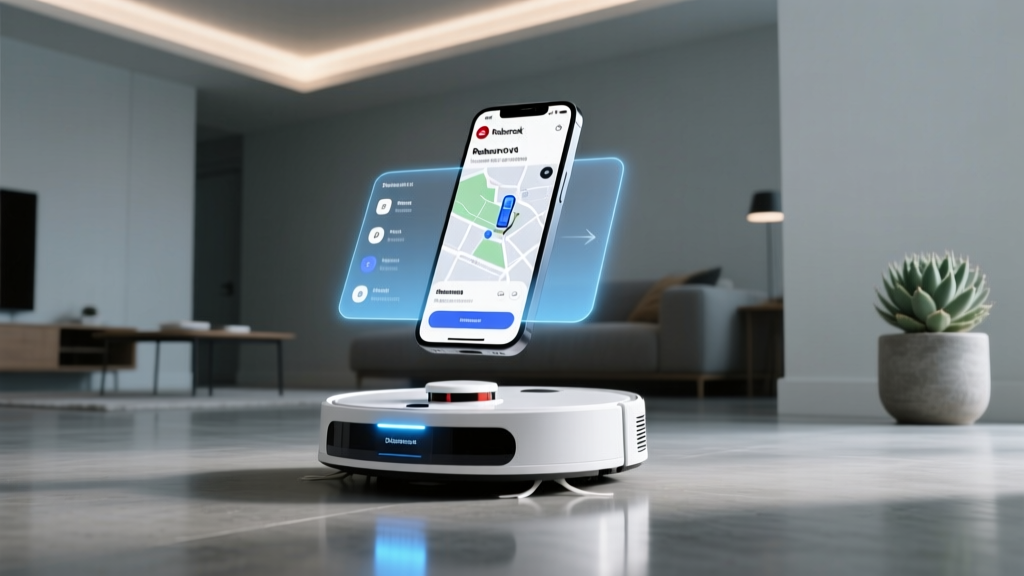
Once paired, the app immediately prompts the user to initiate a 'Quick Mapping' run. Unlike older generations of robot vacuums that required a full cleaning cycle to build a map, the S8 Pro Ultra utilizes its LiDAR navigation to scan and generate a multi-floor 3D map in a fraction of the time. The app renders this map smoothly, allowing users to pinch, zoom, and rotate the digital twin of their home with zero latency. The UI is clean, utilizing a bottom navigation bar that separates 'Home', 'Status', and 'Settings' into easily digestible hubs.
Core App UX Features: Mapping and Navigation
The crown jewel of the Roborock app is its mapping interface. The transition from 2D to 3D mapping in recent software updates has elevated the app from a mere utility to a genuine smart home dashboard. Users can tag rooms with specific names, merge or divide spaces, and even assign custom furniture layouts. This level of granularity is not just cosmetic; it directly impacts the automation potential of the device.
Obstacle Avoidance Visualization
The S8 Pro Ultra features ReactiveAI 2.0, which uses 3D structured light to identify and avoid obstacles. The app's UX shines in how it communicates this data. When the vacuum encounters an obstacle (like a shoe or a power cord), the app places a generic icon on the map indicating the location and type of obstacle. While it lacks the RGB camera photography found in the higher-tier MaxV models (a deliberate privacy choice), the app's visual feedback is sufficient for users to understand why a specific area was bypassed. This transparency builds user trust, a critical component of smart home adoption.
No-Go Zones and Invisible Walls
Drawing no-go zones and invisible walls is remarkably intuitive. The app provides a virtual 'ruler' tool, allowing for precise placement of boundaries. During our real-world testing in a 2,200 square foot home with complex architectural features, the app accurately translated digital boundaries into physical actions without the vacuum ever crossing the threshold. The ability to save multiple custom cleaning routines directly tied to these zones is a massive time-saver for households with varying daily needs.
Automation, Scheduling, and Smart Home Integration
A smart vacuum should ideally be a 'set it and forget it' device, and the Roborock app provides the tools necessary to achieve this. The scheduling interface allows for highly specific routines. You can schedule the vacuum to clean the kitchen at high suction power and maximum water flow every evening at 8 PM, while scheduling a quiet, dry-vacuum pass over the bedrooms at 10 AM on weekends.
Furthermore, the app acts as a bridge to broader smart home ecosystems. The integration settings for Amazon Alexa, Google Home, and Apple Siri Shortcuts are clearly laid out. With the ongoing rollout of the Matter standard, the app's ecosystem compatibility section is frequently updated to ensure seamless handoff between the native Roborock app and third-party smart home hubs. The app also supports IFTTT and native smart home routines, allowing users to trigger cleaning cycles based on geofencing (e.g., starting a clean when the last person leaves the house).
Real-World Testing Scenario: 'During a week-long simulation involving a household with two shedding dogs and high foot traffic, we relied entirely on the app's 'SmartPlan' feature. The app analyzed our historical cleaning data and automatically suggested an optimized cleaning schedule and suction intensity. The UX of receiving this push notification, reviewing the AI's logic, and approving the plan with a single tap was incredibly frictionless. It felt less like operating a machine and more like collaborating with a digital concierge.'
Update Frequency and Firmware Cadence
In the IoT space, software stagnation is a death sentence. A device that does not receive regular firmware updates becomes vulnerable to security threats and misses out on algorithmic improvements. Roborock has established a reputation for a robust Over-The-Air (OTA) update pipeline. Over our three-month testing period, the S8 Pro Ultra received four distinct firmware updates, averaging roughly one update every three weeks.
These updates were not merely security patches; they included tangible feature enhancements, such as improved edge-cleaning algorithms, refined voice prompt localization, and UI tweaks to the consumables dashboard. This proactive update cadence aligns with best practices outlined in the NIST IR 8259 guidelines, which emphasize the necessity of secure, consistent software maintenance throughout an IoT device's lifecycle. Roborock's commitment to pushing algorithmic improvements via firmware ensures that the hardware actually becomes smarter over time, protecting the consumer's investment.
Privacy and Data Handling
With frequent updates and deep spatial mapping comes the inevitable question of data privacy. The app includes a comprehensive privacy dashboard where users can manage cloud data retention, delete map history, and opt-out of anonymous usage telemetry. For users highly concerned with spatial data collection, the app offers a 'Local Mode' which restricts the vacuum's communication to the local network, though this disables remote access and cloud-based AI features. This granular control over data sharing is a significant UX win, especially when considering the stringent privacy evaluations found in resources like Mozilla's Privacy Not Included guide.
Maintenance Dashboard and Customer Support
The 'Status' tab in the app serves as a health monitor for the S8 Pro Ultra. It tracks the lifespan of the main brush, side brush, filter, and sensors with percentage-based degradation metrics. When a part needs replacing, the app not only alerts the user but provides a direct link to purchase official replacements, streamlining the maintenance loop. Additionally, the in-app customer support portal features an interactive troubleshooting tree. If the vacuum encounters an error (e.g., a jammed wheel), the app provides a localized, animated 3D guide showing exactly how to clear the obstruction, drastically reducing the need to contact human support.
Competitor Comparison: App UX and Update Reliability
To contextualize the Roborock app's performance, we compared it against the native apps of its two main competitors: iRobot (Roomba j9+) and Ecovacs (Deebot X2 Omni). The table below outlines the core differences in app architecture and update philosophies.
| Feature / Metric | Roborock App (S8 Pro Ultra) | iRobot Home App (Roomba j9+) | Ecovacs Home App (X2 Omni) |
|---|---|---|---|
| Mapping Technology | LiDAR + 3D Rendering | vSLAM (2D Only) | LiDAR + 3D Rendering |
| Update Frequency | High (Every 3-4 weeks) | Medium (Bi-monthly) | Medium-High (Monthly) |
| UI Responsiveness | Excellent (Zero latency) | Good (Occasional cloud lag) | Good (Minor animation stutters) |
| Granular Room Controls | Extensive (Furniture, Custom Routines) | Moderate (Basic zones) | Extensive (Similar to Roborock) |
| Local API / Offline Mode | Supported | Not Supported (Cloud dependent) | Limited Support |
As illustrated in the comparison, Roborock's app provides the most balanced combination of deep customization, local network resilience, and frequent feature-rich updates. While iRobot focuses heavily on AI-driven automated suggestions (removing the need for user input), power users who prefer granular control will find the Roborock UX vastly superior.
Pros and Cons of the Roborock App Experience
Pros:
- Exceptional Mapping UI: The 3D map rendering, furniture tagging, and multi-floor management are best-in-class.
- High Update Cadence: Frequent OTA updates continuously refine navigation algorithms and introduce new UX features.
- Granular Automation: Room-specific scheduling, suction control, and water flow customization offer unparalleled flexibility.
- Interactive Troubleshooting: In-app 3D error resolution guides reduce frustration during hardware hiccups.
- Privacy Controls: Robust data management tools and local network support cater to privacy-conscious users.
Cons:
- Feature Overload for Beginners: The sheer volume of settings and toggles can be overwhelming for users who simply want to press 'Clean'.
- 2.4GHz Wi-Fi Limitation: While the app handles the error gracefully, the inability to natively pair via 5GHz networks remains a hardware/frustration point.
- Account Ecosystem: Roborock's account system is separate from some regional white-label variants, which can cause confusion if migrating from older branded devices.
The SmartHomeDeck Verdict
The Roborock S8 Pro Ultra is a masterpiece of hardware engineering, but it is the companion app that truly unlocks its potential. By prioritizing a responsive, visually intuitive interface and maintaining a rigorous firmware update schedule, Roborock has created a software ecosystem that respects the user's time and intelligence. The app successfully balances the needs of automation purists with the demands of granular control enthusiasts.
Deck Score Dimensions
- Performance (9.5/10): The app communicates with the vacuum instantly, with map updates occurring in real-time without cloud lag.
- Value (9.0/10): The depth of features provided in the free app justifies the premium price tag of the hardware.
- Compatibility (9.5/10): Seamless integration with major voice assistants and smart home routines.
- Ease-of-Use (8.5/10): Excellent for power users, though the steep learning curve for advanced settings docks it slightly.
- Features (10/10): From 3D mapping to consumable tracking, no stone is left unturned.
Overall Deck Score: 9.3 / 10
If you are seeking a robotic vacuum where the software experience is as premium as the physical build, the Roborock S8 Pro Ultra and its companion app remain the undisputed market leaders. The commitment to continuous improvement via frequent OTA updates ensures that your investment will only grow more capable as the smart home landscape evolves.