The Ultimate Guide to Setting Up a Smart Home System
Transforming a traditional house into an intelligent, responsive living space is one of the most rewarding home improvement projects you can undertake. Setting up a smart home system goes beyond simply buying a few connected gadgets; it requires a strategic approach to network infrastructure, device compatibility, and interior design. Whether you are looking to automate a single apartment or wire a sprawling estate, this comprehensive guide will walk you through the entire process. From establishing your core ecosystem to executing complex automation routines, we will cover everything you need to build a seamless, evergreen smart home that adapts to your lifestyle.
Whole-Home Smart System Overview & Ecosystems
Before purchasing a single smart bulb or security camera, it is crucial to understand the foundation of a connected home. A smart home system relies on a central ecosystem—a software platform that allows disparate devices to communicate, share data, and execute commands. Choosing the right ecosystem is the most critical decision you will make, as it dictates which devices you can buy and how they will interact.
Currently, the market is dominated by three major consumer ecosystems, alongside a growing open-source alternative:
- Amazon Alexa: Known for its vast device compatibility and aggressive pricing. Alexa is ideal for users who want a plug & play experience with thousands of third-party integrations.
- Google Home: Excels in voice recognition, natural language processing, and integration with Google services. It is a fantastic choice for households heavily invested in Android, Google Calendar, and Nest products.
- Apple HomeKit: Prioritizes privacy, security, and a polished user interface. While it historically had a smaller pool of compatible devices, it offers the most reliable local processing and seamless integration for iPhone & Mac users.
- Home Assistant: An open-source, local-first platform for advanced users. It requires technical know-how but offers unparalleled customization, complete privacy, and zero reliance on cloud servers.
Fortunately, the introduction of the Matter & Thread protocols is bridging the gap between these ecosystems, allowing devices to work across multiple platforms simultaneously. However, picking a primary ecosystem to serve as your daily driver will streamline your setup process and ensure a cohesive user experience.
Smart Home Budget Tiers: Starter, Mid, & Pro
The cost of automating a home can range from a modest weekend project to a comprehensive architectural integration. To help you plan your finances, we have broken down the smart home setup process into three distinct budget tiers.
The Starter Tier ($100 - $400)
The Starter Tier is perfect for renters, apartment dwellers, or homeowners who want to test the waters without committing to hardwired installations. This tier focuses on non-invasive, plug & play devices that deliver immediate convenience.
- Core Hub: A basic smart speaker with a built-in voice assistant (e.g., Echo Dot or Nest Mini).
- Lighting: Smart plugs for existing lamps and a handful of color-changing smart bulbs for accent lighting.
- Climate: A smart plug for a window AC unit or a basic Wi-Fi enabled thermostat.
- Security: A standalone, battery-powered Wi-Fi video doorbell.
The Mid-Tier ($500 - $2,000)
The Mid-Tier represents the sweet spot for most homeowners. It transitions from controlling individual gadgets to managing whole-home systems. This tier introduces hardwired devices, dedicated hubs, and comprehensive security.
- Core Hub: A dedicated smart hub or premium smart display (e.g., Hubitat, Apple TV 4K, or Nest Hub Max) to ensure local processing and reliability.
- Lighting: Hardwired smart switches and dimmers, replacing standard wall plates for a cleaner look. Check out our smart lighting guide for wiring tips.
- Climate: A premium learning thermostat and smart radiator valves for zone heating.
- Security: A smart lock, wired floodlight cameras, and a multi-sensor alarm system. See our smart security setups for recommendations.
- Sensors: Door/window contact sensors, motion detectors, and water leak sensors placed under sinks.
The Pro Tier ($2,500+)
The Pro Tier is designed for custom builds, major renovations, and enthusiasts who demand absolute reliability, luxury, and invisible technology. This tier often requires professional installation and low-voltage wiring.
- Lighting: Architectural lighting systems (like Lutron RadioRA) with custom keypads and motorized roller shades.
- Audio/Video: Multi-room distributed audio systems, hidden in-wall speakers, and centralized AV racks.
- Network: Enterprise-grade networking with hardwired Ethernet access points and dedicated IoT VLANs.
- Integration: Advanced local servers running complex logic, integrating HVAC, pool controls, and landscape lighting into a single glass-pane interface.
Room-by-Room Device Recommendations & Design
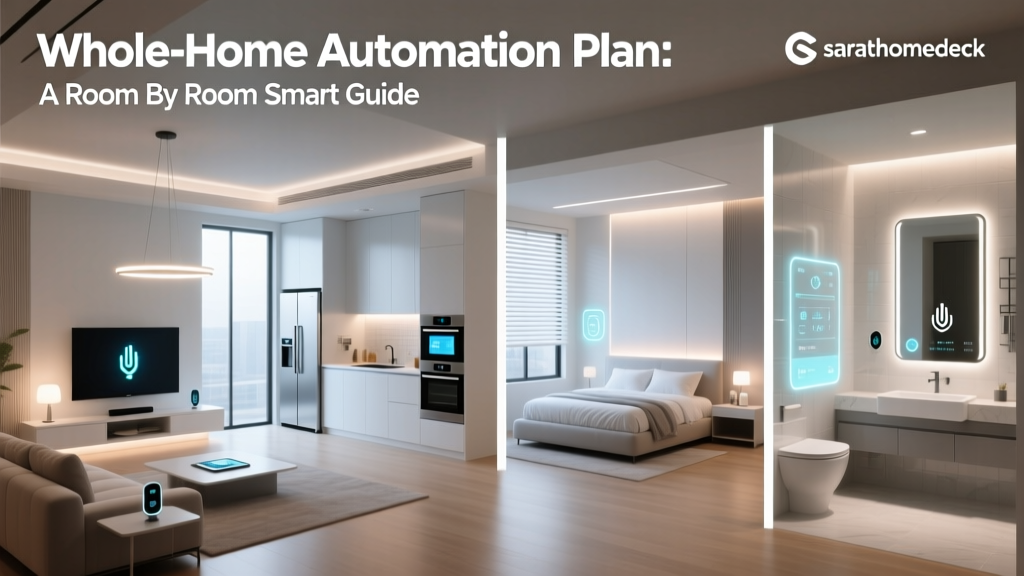
A successful smart home does not look like a science experiment; the technology should blend seamlessly into your interior design. Here is a room-by-room breakdown of how to integrate smart devices while maintaining aesthetic appeal.
The Living Room
The living room is the entertainment hub of your home. The goal here is to create immersive experiences without cluttering the space with remotes and wires. Start by installing a smart TV or a high-quality streaming device integrated into your ecosystem. Pair this with a smart soundbar that supports voice commands. For lighting, avoid placing smart bulbs in main ceiling fixtures; instead, use smart switches for overhead lights and rely on smart LED light strips hidden behind the TV console for bias lighting. To complete the cinematic feel, integrate motorized smart blinds that automatically lower when you trigger your 'Movie Night' scene. For a deeper dive, read our complete living room smart home guide.
The Kitchen
The kitchen demands utility, hygiene, and safety. Because your hands are often wet or messy, voice control and touchless sensors are paramount. Install a premium smart display near your prep area to follow recipes, manage grocery lists, and watch tutorials. Under-cabinet smart lighting is highly recommended for task illumination; wire these to a smart dimmer so you can adjust the brightness while cooking. Safety is also critical in the kitchen. Place smart water leak sensors under the sink and behind the dishwasher. If a leak is detected, the system can automatically trigger a smart water shutoff valve, preventing catastrophic damage. Explore more appliance integrations in our kitchen automation guide.
The Bedroom
The bedroom should be a sanctuary optimized for sleep hygiene and relaxation. The design focus here is on minimizing blue light and eliminating disruptions. Replace harsh overhead lights with smart bulbs tuned to circadian rhythms—bright and cool during the day, dim and warm amber at night. Install a smart bedside switch or a wireless dial so you can turn off the lights without reaching for your phone. Motorized blackout shades are a game-changer for the bedroom, allowing you to wake up naturally to simulated sunlight. Finally, use a smart plug to control a white noise machine or a traditional fan, ensuring it turns off automatically after you fall asleep. Read more in our bedroom smart setup guide.
The Bathroom
Bathrooms present unique challenges due to high humidity and strict electrical codes. Avoid placing standard smart speakers near the shower unless they are specifically rated for moisture resistance. Instead, focus on ventilation and luxury. Install a smart switch connected to your exhaust fan, programmed to run for twenty minutes after the humidity sensor detects a spike from a hot shower. Smart mirrors with built-in defoggers and adjustable LED lighting add a touch of modern luxury. For safety, ensure all smart electrical components are on GFCI circuits and keep hubs and plugs well away from water sources.
Entryway & Exterior
Your entryway sets the tone for your home and serves as your primary line of defense. A smart video doorbell is essential, providing two-way audio and package detection alerts. Pair this with a smart lock that features auto-unlock capabilities via geofencing, allowing you to walk in with groceries without fumbling for keys. For exterior design, utilize smart pathway lighting that adjusts its brightness based on the ambient light sensor in your hub. A smart garage door controller is also highly recommended, allowing you to check the status of your door from anywhere and grant temporary access to delivery drivers. Browse our smart lock reviews to find the perfect fit for your front door.
Network Preparation & Installation Tips
The backbone of any smart home system is its network. If your network is weak, your smart home will be a frustrating experience filled with offline devices and delayed responses. Before installing devices, you must prepare your infrastructure.
Upgrade to a Mesh Wi-Fi System
Traditional single-router setups struggle to penetrate walls and reach the corners of a home, especially when dozens of IoT (Internet of Things) devices are competing for bandwidth. Invest in a high-quality mesh Wi-Fi system. Look for routers that support Wi-Fi 6 or newer, as these handle high device densities much more efficiently. For larger homes, ensure you have at least two or three nodes placed strategically to eliminate dead zones.
Segregate Your IoT Devices
Many smart home devices, particularly older or budget-friendly models, only operate on the 2.4GHz Wi-Fi band. Modern mesh routers often combine 2.4GHz and 5GHz bands into a single SSID, which can cause setup failures for smart plugs and bulbs. Create a dedicated 'IoT Network' or 'Guest Network' specifically for your smart home devices. This not only resolves connection issues but also adds a layer of security by isolating your smart devices from your personal computers and smartphones.
Understand Hub Placement & Protocols
If you are using devices that rely on Zigbee, Z-Wave, or Thread, you will need a dedicated hub or border router. Unlike Wi-Fi, these protocols create a mesh network where each plugged-in device acts as a repeater. Place your primary hub in a central, elevated location in your home—avoid hiding it in a basement cabinet or behind a metal TV console, as these materials block radio frequencies. For a comprehensive list of the best central controllers, check out our best smart hubs roundup.
Electrical Preparation: The Neutral Wire
If you plan to install hardwired smart light switches, you must check your electrical boxes for a neutral wire. Most smart switches require a constant trickle of power to keep their internal Wi-Fi or Zigbee radios online, even when the light is turned off. In older homes, switch boxes often lack a neutral wire (usually a bundle of white wires capped in the back of the box). If you do not have neutral wires, you must either hire an electrician to run them or purchase specific 'no-neutral' smart switches, which have limitations on the types of bulbs they can control.
Mastering Automation Routines & Scenes
Devices that you control via an app or voice command are merely 'connected.' A true 'smart' home operates autonomously, anticipating your needs through automation routines. Understanding the difference between a scene and a routine is the key to mastering your system.
A Scene is a static snapshot of device states. For example, a 'Relax' scene might set the living room lights to 30% warm white, turn on the fireplace smart plug, and lower the blinds. You trigger a scene manually via a button, voice command, or widget.
A Routine (or automation) is a dynamic set of rules based on triggers. It follows an 'IF/THEN' logic. IF a specific condition is met, THEN execute a series of actions. Here are four essential routines every smart home should implement:
1. The Geofencing 'Away' Mode
By using the GPS location of your smartphone, your home can detect when the last person leaves the perimeter. Trigger: All users leave the geofence zone. Actions: Turn off all lights, adjust the smart thermostat to an eco-friendly temperature, lock all doors, arm the security system, and start the robot vacuum.
2. Circadian Lighting Rhythm
Align your home's lighting with the sun to improve your natural sleep cycle. Trigger: Time of day and local sunset/sunrise data. Actions: At sunrise, lights slowly fade up to a cool, energizing daylight temperature. At sunset, lights transition to a warm, dim amber glow. At bedtime, all non-essential lights turn off completely.
3. Smart Climate & Presence Detection
Heating and cooling an empty house is a waste of energy. Trigger: Motion sensors detect no movement in the home for 45 minutes. Actions: Set HVAC to away mode. Trigger: Front door contact sensor opens after being away. Actions: Restore HVAC to comfort settings and turn on the entryway lights.
4. The Midnight Pathway
Navigating a dark house to get a glass of water or use the restroom can be disruptive. Trigger: Motion sensor in the hallway detects movement between 11:00 PM and 6:00 AM. Actions: Turn on under-cabinet kitchen lights and bathroom vanity lights to 5% brightness in a deep red or warm amber hue, which will not ruin your night vision or wake you up fully.
Frequently Asked Questions
Do I need a smart hub to set up a smart home system?
Not necessarily, but it is highly recommended. Many modern devices connect directly to your Wi-Fi, allowing you to use them with just a smartphone app and a voice assistant. However, relying solely on Wi-Fi can clog your router's bandwidth and cause lag. A dedicated smart hub utilizes low-power mesh protocols like Zigbee, Z-Wave, or Thread. These protocols are faster, do not rely on your internet connection for local processing, and keep your Wi-Fi network free for streaming and browsing.
How do I secure my smart home network from hackers?
Security is paramount when bringing internet-connected cameras and locks into your home. First, ensure your Wi-Fi network uses WPA3 or WPA2 encryption with a strong, unique password. Second, create a separate guest network or IoT VLAN specifically for your smart devices, isolating them from your personal data. Third, enable Two-Factor Authentication (2FA) on all your smart home accounts (Amazon, Google, Apple, Ring, etc.). Finally, keep your router's firmware and all device firmware updated to patch known vulnerabilities.
Can I mix and match different smart home brands?
Yes, and it is becoming easier than ever. In the past, buying a Philips Hue bulb and a Lutron switch meant managing two separate apps. Today, platforms like Amazon Alexa, Google Home, and Apple HomeKit act as universal aggregators, allowing you to control different brands within a single interface. Furthermore, the new Matter standard is designed specifically to unify the industry, ensuring that a Matter-certified smart lock from one brand will seamlessly integrate into a Matter-supported hub from another brand without complex workarounds.
What is the best order to install smart home devices?
The most logical approach is to build from the infrastructure up. Start by upgrading your router and establishing your core ecosystem (hubs and smart speakers). Next, tackle hardwired electrical projects, such as installing smart switches and thermostats, as these require turning off the breaker and dealing with dust. Once the infrastructure and lighting are set, move on to mounting security cameras and video doorbells. Finally, place your plug-and-play sensors, smart plugs, and decorative smart bulbs, integrating them into your automations last.
Will my smart home devices work if the internet goes down?
This depends entirely on how your system is architected. Cloud-dependent devices (like many budget Wi-Fi cameras and basic smart plugs) will lose remote access and advanced features if your internet drops. However, systems built around local hubs (like Home Assistant, Hubitat, or Apple HomeKit with an Apple TV hub) will continue to function perfectly offline. Your physical smart switches will still turn on the lights, and your local motion sensor automations will still trigger, ensuring your home remains functional even during an ISP outage.