The Ultimate Smart Living Room Setup Guide
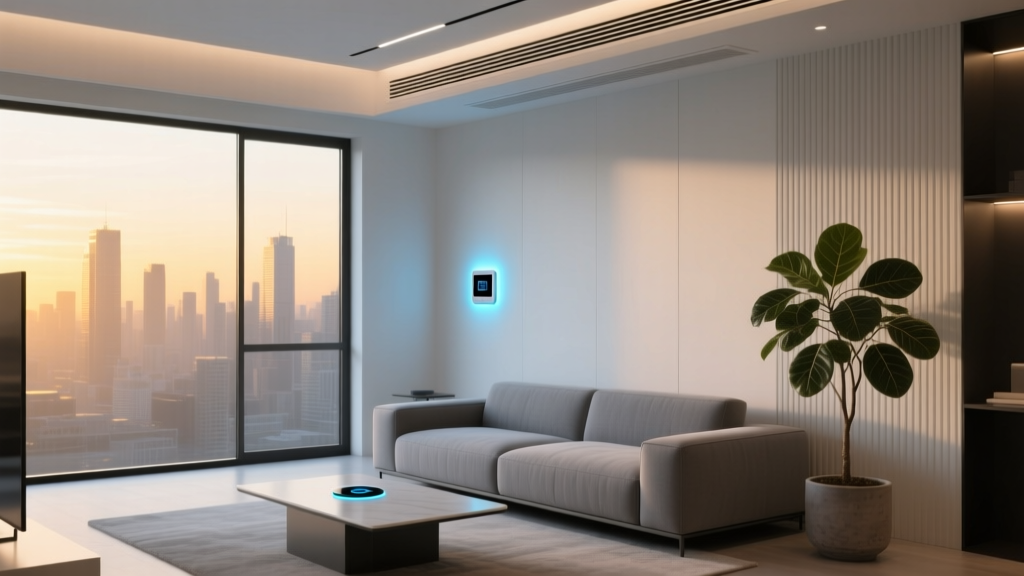
The living room is the undisputed heart of the modern home. It is where we gather to watch movies, play games, entertain guests, and unwind after a long day. Because it serves as the primary hub for entertainment and relaxation, the living room is the perfect place to anchor your smart home ecosystem. A well-designed smart living room setup seamlessly blends cutting-edge technology with comfort, allowing you to control lighting, audio, video, and climate with simple voice commands or automated routines.
However, transforming a traditional living space into an intelligent environment can feel overwhelming. With countless protocols, devices, and ecosystems available, it is easy to end up with a cluttered coffee table full of remote controls and disjointed apps. This comprehensive guide will walk you through everything you need to know to build a cohesive, responsive, and aesthetically pleasing smart living room. From budget-friendly starter kits to professional-grade home theater automations, we will cover the best devices, installation tips, automation routines, and interior design strategies to elevate your space.
Smart Living Room Budget Tiers
Before diving into specific devices, it is crucial to establish a budget and a vision for your space. Smart home technology is highly scalable, meaning you can start small and expand over time, or invest in a premium, fully integrated system from day one. Here is a breakdown of three distinct budget tiers to help you plan your smart living room setup.
Starter Tier: The Essentials
The Starter Tier is perfect for renters, beginners, or those who want to dip their toes into home automation without committing to major renovations or massive expenses. This tier focuses on plug-and-play devices that offer immediate convenience and entertainment upgrades.
- Smart Streaming Stick: Upgrade any existing TV with a smart media player to access voice search and cast content from your phone.
- Smart Speaker: A basic voice assistant hub to control other devices, play music, and answer questions.
- Smart Bulbs & Plugs: Replace a few key lamps with smart bulbs and use smart plugs to control 'dumb' electronics like standing fans or decorative lights.
- Estimated Focus: Convenience, basic voice control, and entry-level automation.
Mid Tier: The Connected Entertainer
The Mid Tier bridges the gap between basic convenience and a truly immersive experience. This tier introduces dedicated audio equipment, advanced lighting, and environmental controls that respond to your daily habits.
- Smart Soundbar: A high-quality audio system with built-in voice assistants and multi-room audio capabilities.
- Smart Lighting Ecosystem: Bias lighting behind the TV, smart switches for overhead lights, and color-changing accents for movie nights.
- Smart Thermostat: Learn your schedule and adjust the climate before you even sit down on the couch. Check out our guide on the best smart thermostats for energy savings.
- Smart Blinds: Motorized window treatments that open with the morning sun and close during movie time.
- Estimated Focus: Immersive entertainment, energy efficiency, and synchronized routines.
Pro Tier: The Ultimate Home Theater
The Pro Tier is for enthusiasts who demand cinema-quality experiences, flawless automation, and premium aesthetics. This setup often requires professional installation, custom cabinetry, and a dedicated smart hub to manage complex local networks.
- Premium OLED Smart TV & Media Server: Top-tier visual displays paired with local media servers for lossless 4K streaming.
- Dolby Atmos Surround Sound: Smart AV receivers, in-wall speakers, and hidden subwoofers calibrated for the room's exact acoustics.
- Advanced Lighting & Shading: Lutron or similar hardwired smart lighting systems, motorized drapery tracks, and acoustic smart panels.
- Dedicated Hub & Network: A local hub utilizing Matter & Thread protocols to ensure zero-latency automation that works even if the internet goes down.
- Estimated Focus: Cinematic immersion, architectural integration, and flawless reliability.
Essential Smart Devices for Your Living Room
Building a smart living room requires selecting devices that communicate effectively with one another. Rather than buying isolated gadgets, focus on categories that enhance the core functions of the room: visual entertainment, audio, ambiance, and environment.
Smart TVs & Media Players
The focal point of almost every living room is the television. When selecting a display, you must decide between a native Smart TV and a traditional TV paired with a high-end smart media player. Native smart TVs offer built-in apps and sleek, bezel-less designs, but their internal processors can become sluggish over time. Alternatively, investing in a premium smart TV and pairing it with a dedicated streaming box ensures faster interface navigation, better audio passthrough (like eARC), and longer software support. For a deep dive into display technology, read our reviews on the best smart TVs on the market.
For those who want their TV to disappear when not in use, lifestyle TVs that display digital artwork or family photos in 'art mode' are an incredible design choice. These frames utilize matte displays to reduce glare, making them look like genuine canvas paintings hanging on your wall.
Smart Audio: Soundbars & Multi-Room Speakers
Audio is just as important as video in a living room setup. Modern smart soundbars do more than just project dialogue; they act as central voice assistant hubs, Bluetooth receivers, and multi-room audio nodes. Look for soundbars that support Wi-Fi streaming for lossless audio quality, rather than relying solely on Bluetooth. If you have a larger living room, consider a smart surround sound system with wireless rear speakers and a smart subwoofer that auto-calibrates to your room's acoustics using built-in microphones.
Additionally, placing a few smart speakers on bookshelves or side tables allows you to fill the room with ambient music during dinner parties or listen to podcasts while reading, all while keeping the main TV turned off.
Smart Lighting & Ambiance
Lighting dictates the mood of the living room. Overhead lighting is best controlled via smart switches, which maintain the physical functionality of the wall panel while adding wireless control. For lamps and accent lighting, smart bulbs offer millions of colors and tunable white temperatures. However, the true magic of a smart living room lies in smart lighting setup techniques like bias lighting.
Bias lighting involves placing LED light strips behind your TV or media console. Not only does this create a stunning visual halo that makes the screen appear more vibrant, but it also significantly reduces eye strain during late-night viewing sessions. Advanced bias lighting systems can even sync with the colors on your TV screen in real-time, extending the action beyond the bezel and into the room.
Smart Climate & Air Quality
Comfort is paramount when lounging on the sofa. A smart thermostat learns your preferences, ensuring the room is perfectly cooled or heated by the time you settle in for a movie. Furthermore, integrating a smart air purifier or humidifier ensures that the air quality remains pristine, especially if your living room is an open-concept space connected to the kitchen. These devices can automatically ramp up their fan speeds when sensors detect cooking odors or a drop in humidity.
Installation Tips & Best Practices
Even the most expensive smart devices will feel like a nuisance if they are poorly installed or suffer from connectivity issues. Proper planning and installation are the bedrock of a reliable smart living room.
Network Infrastructure & Connectivity
The living room typically houses the most bandwidth-heavy devices in the entire home, including 4K streaming boxes, smart TVs, and gaming consoles. Relying on a standard Wi-Fi router from your internet service provider is a recipe for buffering and dropped connections. Invest in a mesh Wi-Fi system with a dedicated node placed in or near the living room. Whenever possible, run a hardwired Ethernet cable directly to your smart TV and primary media player. This frees up wireless bandwidth for your smart bulbs, speakers, and sensors, ensuring a lag-free experience across the board.
Cable Management & Power
Nothing ruins the aesthetic of a smart living room faster than a tangled nest of HDMI cords, power bricks, and ethernet cables dangling below a wall-mounted TV. If you are mounting your TV, use an in-wall power kit to route electricity and HDMI cables behind the drywall. For media consoles, utilize velcro cable ties, under-desk cable trays, and cord sleeves to bundle wires together. Additionally, invest in a high-quality smart surge protector. This allows you to completely cut power to your entertainment center via a voice command or routine, protecting your gear from electrical spikes and eliminating phantom power draw.
Hub & Sensor Placement
If you are using a dedicated smart hub to manage Zigbee, Z-Wave, or Thread devices, placement is critical. The hub should be located centrally in the living room, elevated off the floor, and away from large metal objects or thick masonry walls that can block radio frequencies. Similarly, if you are installing motion or occupancy sensors to automate your lighting, ensure they are placed where they can detect subtle movements, like someone reading on the couch, rather than just walking through the doorway. Many modern sensors utilize mmWave radar technology, which can detect the micro-movements of breathing, preventing the lights from turning off while you are sitting still during a long movie.
Automation Routines to Elevate Your Experience
The true power of a smart home is not in controlling devices with your phone; it is in automation. By creating routines, your living room anticipates your needs and adjusts itself accordingly. Here are four essential automation routines to implement in your smart living room setup.
The 'Movie Night' Routine
This is the quintessential living room automation. When you trigger the 'Movie Night' routine via voice command or a smart button on your coffee table, a symphony of actions occurs simultaneously:
- The main overhead lights turn off.
- The bias lighting behind the TV dims to 15% brightness and shifts to a deep blue or warm amber hue.
- Smart blinds or motorized shades lower completely to eliminate screen glare.
- The TV powers on and launches your preferred streaming app.
- The soundbar switches to 'Cinema' or 'Dolby Atmos' mode.
- The smart thermostat adjusts the temperature down by two degrees to compensate for the body heat of multiple people on the couch.
The 'Morning Wake-Up' Routine
If your living room is the first space you enter with your morning coffee, it should greet you gently. Set a routine that triggers on weekdays at your usual wake-up time:
- Motorized blinds slowly raise over the course of 15 minutes, letting in natural sunlight.
- Smart bulbs transition from a dark, warm orange to a bright, energizing daylight white.
- Your smart speaker begins playing a soft acoustic playlist or reads out your daily news briefing and weather forecast.
- The smart coffee maker in the adjacent kitchen (if connected) begins brewing.
The 'Entertaining Guests' Routine
When hosting friends or family, you want the space to feel vibrant, welcoming, and comfortable. Triggering the 'Guests' routine sets the perfect backdrop for conversation:
- Lighting sets to a bright, warm white (around 2700K) across all lamps and overhead fixtures.
- Multi-room audio begins playing an upbeat, curated dinner party playlist at a moderate volume.
- The smart thermostat pre-cools or pre-heats the room to account for the influx of guests.
- Smart plugs turn on decorative accent lights, such as neon signs or illuminated display cabinets.
The 'Goodnight & Security' Routine
When you are heading to bed, the living room should secure itself and power down to save energy. This routine can be triggered by a bedside button or automatically when your smart home detects that everyone's phones have left the living room geofence:
- All living room lights and TVs turn off.
- The smart plug connected to your subwoofer and gaming console cuts power to prevent vampire energy drain.
- Smart blinds close and lock.
- Indoor security cameras positioned near living room windows are armed and set to record motion.
- The smart thermostat shifts into its nighttime eco-mode.
For more inspiration on setting up complex triggers, explore our master guide on home automation routines.
Blending Smart Tech with Interior Design
A common pitfall in smart home design is allowing the technology to overpower the room's aesthetic. The goal of a modern smart living room setup is for the tech to be felt and experienced, but not necessarily seen. Here is how to seamlessly blend smart devices into your interior design.
Concealing the Hardware
Subwoofers, AV receivers, and smart hubs can be bulky and unsightly. Consider utilizing furniture with IR-transparent doors, allowing you to hide your media players and hubs inside a cabinet while still using remote controls. Alternatively, build custom floating shelves with hidden cable routing channels inside the wall. For speakers, in-wall or in-ceiling installations provide incredible audio without sacrificing floor space or visual harmony. If in-wall speakers are not an option, look for bookshelf speakers that match your woodwork or wall color, effectively camouflaging them among your decor.
Acoustic Treatments as Art
Hard surfaces like glass windows, hardwood floors, and bare walls create terrible audio echo, ruining the experience of your expensive smart soundbar. Instead of hanging generic foam panels, invest in acoustic panels wrapped in custom fabrics that match your living room's color palette. Some companies even print high-resolution artwork or family photographs onto acoustic dampening panels, turning a necessary audio treatment into a stunning gallery wall.
Furniture Placement for Sensors
When arranging your sofa and coffee tables, keep your smart home sensors in mind. Ensure that the line of sight between your smart hub and your Zigbee or Thread devices is relatively clear. Avoid placing large, dense objects like solid oak bookshelves directly in front of motion sensors or Wi-Fi routers. Additionally, if you use a smart vacuum cleaner, ensure your living room furniture has legs tall enough to allow the robot to pass underneath, keeping the space clean without requiring manual intervention.
Frequently Asked Questions
As you plan your smart living room, you are likely to encounter a few technical hurdles. Here are the answers to the most common questions regarding living room automation.
Do I need a smart hub for my living room?
While many modern devices connect directly to Wi-Fi or utilize Bluetooth, a dedicated smart hub is highly recommended for a living room. Hubs that support protocols like Zigbee, Z-Wave, or the newer Matter & Thread standards take the processing load off your Wi-Fi router, reduce latency, and allow devices to communicate locally. This means your smart light switches will still respond instantly even if your internet connection drops.
How can I make my existing 'dumb' TV smart?
You do not need to throw away a perfectly good television to enjoy smart features. By plugging in a high-quality smart streaming stick or set-top box, you instantly gain access to voice search, streaming apps, and smart home casting. To control the TV's physical power and volume via your smart home, use an IR (Infrared) Blaster. These small devices sit on your media console, learn the infrared codes from your original TV remote, and translate smart home commands into IR signals that your older TV can understand.
What is the best smart assistant for the living room?
The 'best' assistant depends entirely on your existing ecosystem and media preferences. If you are heavily invested in Apple devices, HomeKit and Siri offer the most seamless integration for AirPlay and Apple TV. If you prioritize multi-room audio and third-party device compatibility, Amazon Alexa remains the most robust option. For those who rely heavily on Google Search, YouTube, and Android devices, Google Assistant provides the most natural voice recognition and media casting capabilities. Many modern soundbars and TVs now feature far-field microphones that support multiple assistants simultaneously.
How do I hide smart home wires and cables?
Cable management is essential for a clean aesthetic. For wall-mounted TVs, use an in-wall power extension kit and fish HDMI cables through the drywall. For lamps and side tables, use cord covers or raceways painted to match your baseboards. Inside your media console, use a combination of velcro straps, cable sleeves, and under-shelf wire baskets to keep power bricks and adapters completely out of sight. Always leave a little slack in the cables to prevent strain on the ports.
Will smart devices increase my electricity bill?
Individually, smart devices draw a negligible amount of 'vampire' power when in standby mode. However, a living room with dozens of smart bulbs, speakers, and sensors can add up. The true benefit of a smart living room setup is that it actually lowers your overall energy bill. Smart thermostats optimize HVAC usage, occupancy sensors ensure lights are never left on in an empty room, and smart plugs can completely sever power to energy-hungry gaming consoles and subwoofers when they are not in use. The energy saved by intelligent automation far outweighs the minor power draw of the smart chips themselves.