Smart Home System Meaning: A Complete Guide to Connected Living
Imagine walking through your front door after a long day and the lights automatically adjust to a warm glow, your favorite playlist begins softly streaming through the living room speakers, and the thermostat has already cooled the house to your preferred temperature. This isn't science fiction — it's the everyday reality of living with a smart home system. But what exactly does that term mean, and why has it become one of the most transformative technology concepts of our time?
Whether you're a curious beginner exploring your first smart speaker or a tech-savvy homeowner looking to unify dozens of devices under one roof, understanding the smart home system meaning is the essential first step toward creating a more convenient, efficient, and secure living environment. In this comprehensive guide, we'll break down exactly what a smart home system is, explore its core components, examine how everything connects, and help you determine the right approach for your household.
What Is a Smart Home System? The Core Definition
At its most fundamental level, a smart home system is a network of interconnected devices, appliances, and sensors within a residence that can be monitored, controlled, and automated — either remotely via a smartphone or tablet, through voice commands, or via pre-programmed schedules and routines. These devices communicate with each other and with a central hub or platform to create a cohesive, responsive living environment that adapts to the needs and preferences of the occupants.
The concept goes far beyond simply owning a few smart gadgets. A true smart home system integrates multiple categories of technology — including lighting, climate control, security, entertainment, and energy management — into a unified ecosystem. The intelligence comes from the system's ability to gather data from sensors, learn patterns over time, and take automated actions that enhance comfort, safety, and efficiency without requiring constant human input.
According to CEDIA (Custom Electronic Design & Installation Association), a smart home represents the convergence of consumer electronics, communication technologies, and home automation to create living spaces that are more responsive to the people who inhabit them. This definition captures the essence of what separates a genuine smart home system from a collection of standalone smart products.
Smart Home vs. Connected Home vs. Home Automation
These terms are often used interchangeably, but they carry subtle distinctions worth understanding:
- Home Automation: Refers specifically to the ability to program devices to perform actions automatically based on schedules, triggers, or conditions. Think of a sprinkler system that turns on at dawn or lights that switch off at bedtime.
- Connected Home: Describes a residence where individual devices can connect to the internet and be controlled remotely, but may not necessarily communicate with each other or operate as a unified system.
- Smart Home System: The most comprehensive term, encompassing automation, connectivity, and intelligent coordination between devices. A smart home system learns, adapts, and orchestrates multiple subsystems working in harmony.
Understanding these distinctions helps clarify why the smart home basics matter so much when planning your setup. A collection of individual smart devices is a great start, but the real magic happens when those devices form a coordinated system.
Key Components of a Smart Home System
Every smart home system, regardless of its complexity or scale, relies on several foundational components working together. Understanding these building blocks will help you make informed decisions as you build or expand your own connected home.
The Central Hub or Controller
The hub serves as the brain of your smart home system. It acts as a central communication point that bridges different devices, protocols, and platforms so they can work together seamlessly. Popular hub options include dedicated hardware like Samsung SmartThings, Home Assistant servers, or software-based platforms like Apple HomeKit, Google Home, and Amazon Alexa. Some modern setups rely on cloud-based coordination rather than a physical hub, using mesh networking protocols to allow devices to communicate directly.
Sensors and Input Devices
Sensors are the eyes and ears of a smart home system. They gather information about the environment and the people within it, providing the data that drives intelligent automation. Common sensor types include:
- Motion sensors that detect occupancy and trigger lighting or security responses
- Door and window contact sensors that monitor entry points for security and climate efficiency
- Temperature and humidity sensors that inform climate control decisions
- Light sensors that adjust indoor lighting based on natural daylight levels
- Water leak sensors that provide early warnings about potential plumbing issues
- Air quality sensors that monitor pollutants and trigger ventilation systems
Actuators and Smart Devices
While sensors gather information, actuators and smart devices take action. These are the components that physically change something in your environment:
- Smart lighting — bulbs, switches, and dimmers that adjust brightness, color, and schedules
- Smart thermostats — climate control devices that learn your preferences and optimize energy usage
- Smart locks — door locks that can be controlled remotely, grant temporary access codes, and integrate with security systems
- Smart plugs and outlets — adapters that bring dumb appliances into the smart ecosystem
- Motorized blinds and curtains — window treatments that respond to sunlight, temperature, or schedules
- Smart speakers and displays — voice-controlled interfaces that also serve as entertainment and information centers
If you're just getting started and want to explore which devices offer the best entry point, our guide to the best smart home devices for beginners provides tailored recommendations for every room in your house.
Communication Protocols
For all these components to work together, they need a common language. Smart home systems rely on various wireless and wired communication protocols, each with distinct advantages:
- Wi-Fi: High bandwidth, widely available, but can strain your network with too many devices
- Zigbee: Low power consumption, mesh networking capability, ideal for sensors and bulbs
- Z-Wave: Reliable mesh network operating on a different frequency than Wi-Fi, reducing interference
- Thread/Matter: The emerging industry standard designed to unify smart home communication across brands and ecosystems
- Bluetooth (BLE): Short-range communication useful for proximity-based automations
- Ethernet and Powerline: Wired options offering maximum reliability for critical devices like security cameras and hubs
The Matter protocol, in particular, represents a significant milestone for the industry. Backed by major technology companies, it aims to solve the fragmentation problem that has long plagued smart home adoption by ensuring devices from different manufacturers can interoperate seamlessly.
How Smart Home Systems Work: Connectivity and Automation Explained
Understanding the smart home system meaning requires looking beneath the surface at how these technologies actually function. At a high level, every smart home interaction follows a simple pattern: input → processing → action. But the elegance lies in how these three stages can be combined, chained, and refined to create remarkably sophisticated behaviors.
The Input-Processing-Action Cycle
Consider a practical example: you want your hallway lights to turn on automatically when you get up during the night. Here's how the smart home system handles this:
- Input: A motion sensor in the hallway detects movement between 11 PM and 6 AM
- Processing: The hub receives the sensor data, checks the time conditions and the current state of the lights, and determines that the automation rule applies
- Action: The hub sends a command to the smart bulbs to illuminate at 20% brightness — enough to see safely without being blinding
This entire cycle happens in milliseconds, creating an experience that feels natural and intuitive. Now imagine dozens or hundreds of such automations running throughout your home, each one fine-tuned to your lifestyle and preferences.
Cloud-Based vs. Local Processing
Smart home systems handle processing in one of two ways, and understanding the difference is crucial for both performance and privacy:
Cloud-based processing sends data from your devices to remote servers where it's analyzed and decisions are made. This approach enables powerful features like voice recognition and machine learning but introduces latency and requires an active internet connection. It also means your home data passes through third-party servers.
Local processing keeps everything within your home network. A local hub processes sensor data and sends commands directly to devices without any external communication. This approach offers faster response times, works during internet outages, and keeps your data private. Many enthusiasts prefer local-first platforms like Home Assistant for these reasons.
The most robust smart home systems use a hybrid approach, relying on local processing for time-sensitive automations and security functions while leveraging cloud capabilities for advanced features like remote access and voice assistant integration.
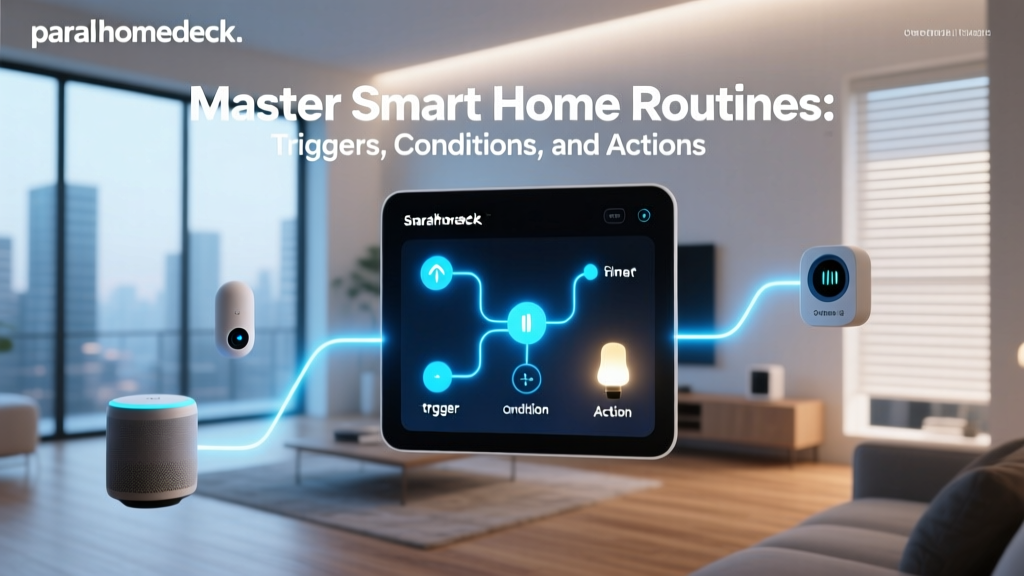
Routines, Scenes, and Automations
These three concepts form the backbone of smart home programming:
- Scenes set multiple devices to specific states simultaneously. A "Movie Night" scene might dim the lights, close the blinds, lower the thermostat, and turn on the television and soundbar — all with a single command.
- Routines are time-based sequences that trigger at specific times or in response to broad events like "Good Morning" or "Good Night." They combine multiple actions in a specific order with optional delays between steps.
- Automations are condition-based rules that trigger when specific criteria are met. They're the most powerful option because they can incorporate sensor data, device states, time conditions, and even geofencing (your phone's location) to make intelligent decisions.
For a deeper dive into creating effective automations that genuinely improve your daily life, check out our article on smart home automation ideas that go beyond the basics.
Benefits of Implementing a Smart Home System
The smart home system meaning extends well beyond technological novelty. When properly implemented, these systems deliver tangible, measurable benefits that impact your comfort, finances, security, and environmental footprint. Let's explore the most significant advantages.
Energy Efficiency and Cost Savings
One of the most compelling reasons homeowners invest in smart home technology is the potential for significant energy savings. Smart thermostats alone can reduce heating and cooling costs by learning your schedule and adjusting temperatures accordingly. According to the U.S. Department of Energy, properly programmed thermostats can save households up to 10% annually on heating and cooling costs.
But the savings extend far beyond climate control. Smart lighting systems ensure lights are never left on in empty rooms. Smart plugs can eliminate phantom power draw from electronics in standby mode. Automated blinds can reduce solar heat gain in summer and capture passive solar warmth in winter. When all these systems work together as part of a coordinated smart home, the cumulative energy savings can be substantial.
Enhanced Security and Safety
A smart home system transforms your home's security from a passive alarm into an active, intelligent defense. Modern smart security systems integrate cameras, motion sensors, door and window contacts, smoke detectors, and water leak sensors into a unified monitoring platform. Key security benefits include:
- Real-time alerts when unusual activity is detected
- Remote video monitoring and two-way communication with visitors
- Automated lighting patterns that simulate occupancy when you're away
- Smart locks that provide audit trails of who entered and when
- Immediate notifications for smoke, carbon monoxide, or water leaks
- Integration with professional monitoring services for emergency response
Our comprehensive guide to smart home security setup walks you through building a layered defense that protects your home and family without unnecessary complexity.
Convenience and Accessibility
Perhaps the most immediately noticeable benefit of a smart home system is the sheer convenience it brings to daily life. Voice commands eliminate the need to physically interact with switches and controls. Routines handle repetitive tasks automatically. Remote access means you can check on your home, adjust settings, or grant access to service providers from anywhere in the world.
For elderly residents and individuals with mobility challenges or disabilities, smart home technology can be genuinely life-changing. Voice-controlled lighting, automated door locks, video doorbells, and sensor-based fall detection systems enable greater independence and peace of mind for both residents and their families.
Increased Property Value
As smart home technology becomes mainstream, homebuyers increasingly expect connected features. A well-designed, professionally installed smart home system can differentiate your property in the real estate market and command a premium price. Key features that appeal to buyers include integrated security systems, whole-home audio, smart lighting, and energy management systems.
Getting Started: Building Your Smart Home System Step by Step
Now that you understand the smart home system meaning and its potential benefits, you might be wondering where to begin. Building a smart home doesn't require a massive upfront investment or a complete home renovation. The most successful smart home implementations follow a phased, intentional approach.
Step 1: Define Your Goals and Priorities
Before purchasing any devices, take time to identify what you want your smart home to accomplish. Are you primarily motivated by energy savings? Security concerns? Convenience? Entertainment? Accessibility needs? Your priorities will determine which devices and platforms make the most sense for your situation.
Write down specific scenarios you'd like to automate. For example: "I want the lights to turn off automatically when everyone leaves the house" or "I want to be alerted if a window is left open while the air conditioning is running." These concrete use cases will guide your technology choices far more effectively than simply buying popular products.
Step 2: Choose Your Ecosystem
The platform you select will shape your entire smart home experience. The major ecosystems each have distinct strengths:
- Amazon Alexa: Broadest device compatibility, extensive skills library, affordable hardware options
- Google Home: Superior voice recognition, excellent search integration, strong multi-room audio
- Apple HomeKit: Strongest privacy protections, seamless integration with Apple devices, polished user experience
- Home Assistant: Open-source, local processing, maximum customization, steeper learning curve
- Samsung SmartThings: Good balance of ease of use and flexibility, strong hub hardware
You're not permanently locked into your initial choice, but switching ecosystems later can be costly and frustrating. Consider which smartphones and devices your household already uses, as this often points toward the most natural ecosystem fit. For a detailed comparison, visit our smart home platforms comparison guide.
Step 3: Start with High-Impact, Low-Complexity Devices
The best entry points into smart home technology are devices that deliver immediate, noticeable benefits with minimal setup complexity:
- Smart speakers and displays — These serve as voice control interfaces and provide instant utility through music, information queries, and timers
- Smart lighting — Bulbs and switches in high-traffic areas create an immediately noticeable improvement in daily comfort
- Smart thermostat — Energy savings begin from day one, and the installation is typically straightforward
- Video doorbell — Security benefits are immediate, and the device serves as an excellent introduction to smart home cameras
Step 4: Expand Thoughtfully and Integrate
Once your foundational devices are running smoothly, begin expanding into additional categories. Add sensors to enable more sophisticated automations. Integrate smart locks, cameras, and additional lighting. Create routines and scenes that coordinate multiple devices. The key is to add devices that enhance and extend what you already have, rather than accumulating gadgets that operate in isolation.
Step 5: Prioritize Network Infrastructure
As your smart home grows, your Wi-Fi network becomes increasingly critical. Dozens of connected devices can overwhelm a basic consumer router. Consider investing in a mesh Wi-Fi system, a dedicated network for IoT devices, or a combination of Wi-Fi and mesh protocols like Zigbee or Z-Wave to distribute the communication load. A robust network is the invisible foundation that makes everything else work reliably.
Frequently Asked Questions About Smart Home Systems
What is the difference between a smart home and a smart home system?
A "smart home" is a general term describing any residence that contains connected, internet-enabled devices. A "smart home system" specifically refers to an integrated setup where multiple devices and categories of technology work together under a unified platform or hub. The key distinction is coordination and integration. A home with a standalone smart speaker and a Wi-Fi-connected camera could be called a smart home, but it becomes a smart home system when those devices — along with lighting, climate, security, and other components — communicate with each other and operate through centralized automations and controls. The system approach delivers exponentially more value than the sum of individual devices because it enables cross-device automations and a cohesive user experience.
Do I need professional installation to set up a smart home system?
Not necessarily. Many modern smart home devices are designed for DIY installation and can be set up by anyone comfortable following app-based instructions. Smart speakers, smart bulbs, smart plugs, and many security cameras are genuinely plug-and-play. However, certain components benefit from or require professional installation, including hardwired smart switches and dimmers (electrical work), whole-home audio systems, motorized window treatments, and complex security installations. Many homeowners take a hybrid approach: handling simple devices themselves while hiring professionals for anything involving electrical wiring, structural modifications, or complex networking. If you choose the DIY route, always prioritize safety — particularly when working with electrical systems — and don't hesitate to consult an electrician for hardwired installations.
How much does a smart home system typically cost?
The cost of a smart home system varies enormously based on the scale and sophistication you're pursuing. A basic starter setup with a smart speaker, a few smart bulbs, a smart plug, and a video doorbell can be assembled for under $200. A mid-range system covering lighting, climate, security, and entertainment across an average-sized home typically ranges from $1,500 to $5,000. High-end, professionally designed and installed whole-home systems with premium components, custom programming, and integrated audio-visual systems can range from $10,000 to well over $50,000. The smart approach is to start small, prove the value in your own life, and expand gradually as your budget and needs evolve. This phased approach also allows you to learn what works best for your household before making larger commitments.
Are smart home systems secure and private?
Security and privacy are legitimate concerns with any connected technology, and smart home systems are no exception. However, the risk level depends heavily on the choices you make. To maximize security: use strong, unique passwords for every device and enable two-factor authentication wherever possible. Keep device firmware updated regularly. Choose reputable brands with transparent privacy policies. Segment your network so IoT devices are isolated from your primary computing devices. For privacy-conscious users, platforms that prioritize local processing (like Home Assistant or Apple HomeKit) minimize the data sent to external servers. According to the Federal Trade Commission, consumers should research device data practices before purchasing and regularly review privacy settings. With proper precautions, a smart home system can be both highly functional and secure.
Can smart home systems work without an internet connection?
The answer depends on how your system is architected. Systems that rely entirely on cloud-based processing will lose most functionality during an internet outage — you may lose voice control, remote access, and certain automations. However, systems built with local processing capabilities continue to function for most core tasks even without internet connectivity. Hub-based systems using Zigbee, Z-Wave, or Thread protocols can typically maintain local automations, sensor-based triggers, and physical switch control during outages. If internet independence is important to you — and for security and reliability, it should be — prioritize devices and platforms that support local processing. A well-designed smart home system should degrade gracefully during connectivity issues rather than becoming completely non-functional.
Final Thoughts on the Smart Home System Meaning
The smart home system meaning ultimately comes down to one idea: creating a living space that actively works for you. It's not about filling your home with gadgets for the sake of novelty. It's about thoughtfully integrating technology to reduce friction in your daily life, protect what matters most, conserve resources, and create an environment that responds intelligently to your needs.
Whether you're starting with a single smart speaker or planning a comprehensive whole-home installation, the principles remain the same. Define your goals, choose compatible technologies, start simple, and expand with intention. The smart home journey is ongoing — technologies evolve, new capabilities emerge, and your own needs change over time. But with a solid understanding of what a smart home system truly means, you're equipped to make decisions that deliver lasting value and genuine improvement to your quality of life.
Ready to take the next step? Explore our complete library of smart home learning resources to deepen your knowledge and discover the tools, devices, and strategies that will transform your house into a truly intelligent home.